NDAs and Security in Outsourced Video Work
TL;DR
- Sharing raw footage with an outside editing team is a real IP risk, not a theoretical one - the risk scales with the sensitivity of what you're shooting.
- Most NDA templates are not written for video outsourcing and miss critical clauses around subcontractors, data destruction, and access scope.
- Proper access controls (individual logins, expiring links, project-scoped folders) reduce your exposure without slowing down the collaboration.
- Vendor security vetting is a ten-minute conversation that most teams skip entirely - and then regret.
- The protocol below covers before, during, and after the editing process so nothing falls through the gaps.
Table of Contents
Your product launch is six weeks out. The demo footage exists in a shared cloud folder - raw screen recordings, unreleased UI flows, a feature that hasn't been announced. Three editors you've never met in person are inside that folder right now.
This is the standard operating reality for most SaaS marketing teams outsourcing video. And it's fine - until it isn't. The risk isn't about trusting individual editors. It's about the structural gap between what your NDA says and what actually happens when raw footage moves across accounts, devices, and time zones without a clear security framework.
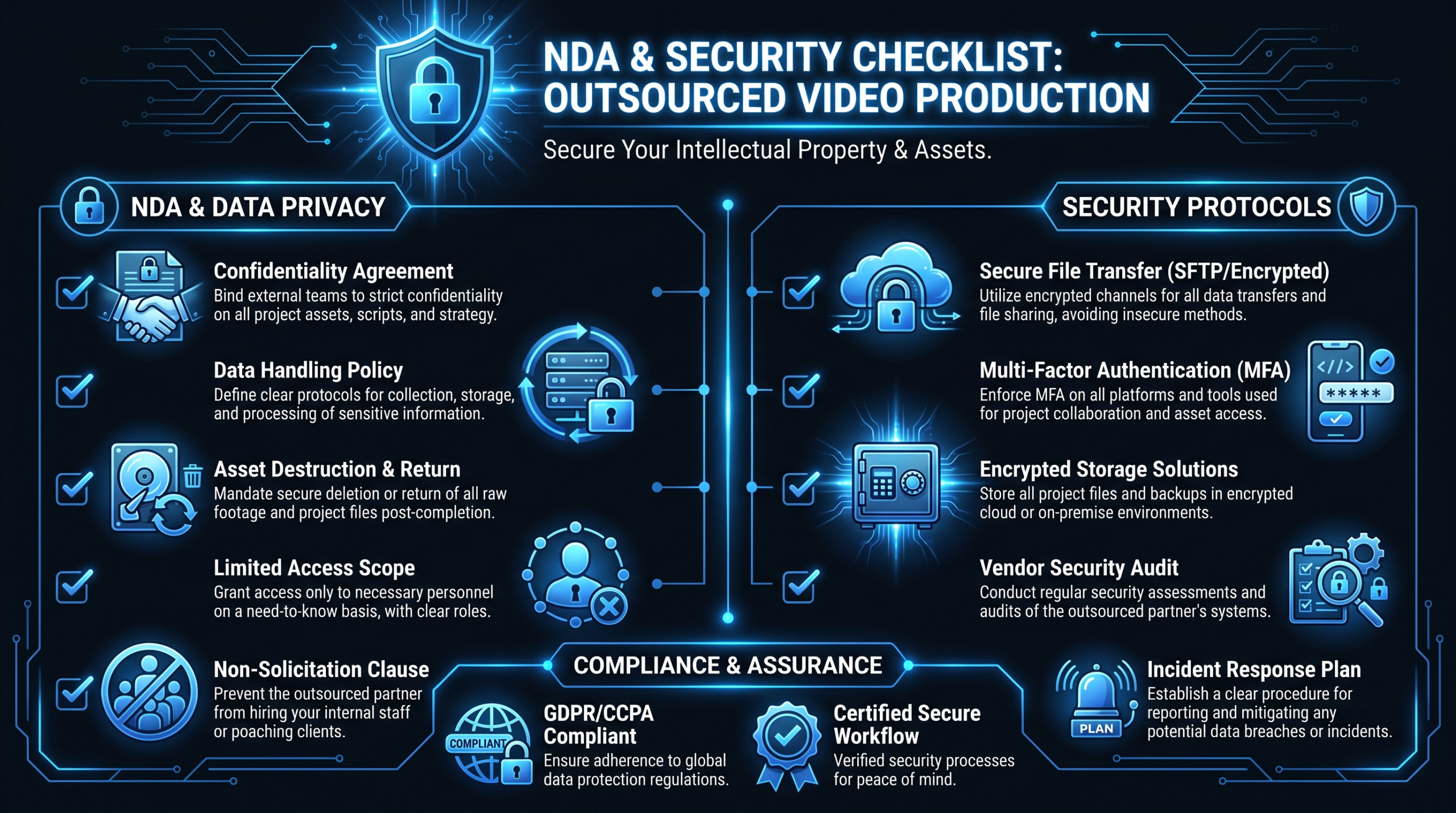
Before you outsource video editing, you need to understand exactly where the exposure sits and how to close it systematically. This guide gives you the complete framework: NDA clauses, access controls, vendor vetting questions, and the step-by-step protocol that covers before, during, and after the editing process.
The Real Security Risk in Outsourced Video Production
The first thing to establish is that the risk is real, not theoretical. It's not about vendors who want to steal your IP. It's about the structural vulnerabilities that exist every time raw footage moves outside your organization.
What You're Actually Handing Over
When you outsource video editing, you typically share some combination of the following:
- Screen recordings of unreleased product features - often the highest-risk asset. If a competitor or press contact sees this footage before your launch date, the damage is immediate.
- Customer testimonial footage - before you've obtained release forms or final approval, this content may create legal exposure related to your data processing agreements or the customer's own confidentiality obligations.
- Internal event recordings - all-hands meetings, investor day prep, executive sessions. These frequently contain strategic roadmap information that should never be in an external folder.
- Sales call recordings - prospect names, deal sizes, competitive positioning discussions, pricing strategy. Many teams don't realize they're sharing these as "supporting context" for testimonial edits.
- Brand identity assets before launch - new logos, rebrand materials, product naming. Leaked pre-launch brand assets have torpedoed surprises before.
Each category has a different risk profile. The common thread: all of it is more sensitive than most teams treat it when spinning up an external editing relationship.
How Security Failures Actually Happen
The failures that reach the "this was a problem" stage rarely involve malicious actors. They look more like this:
- Permanent shared links. A Google Drive folder was shared with a vendor in Q1. The project ended in Q2. The link is still live in Q4 and the folder now contains Q4 launch footage the vendor was never supposed to see.
- NDA templates that don't address subcontractors. Your NDA is with the agency. The agency uses a freelancer for overflow. That freelancer is not bound by your NDA. This happens more often than agencies volunteer.
- No footage destruction requirement. After delivery, raw footage sits in an editor's personal Dropbox indefinitely because nobody asked for deletion and the contract didn't require it.
- Shared account credentials. The vendor uses one login for the entire team. When someone leaves the vendor's team, the account stays active. You have no way to know who currently has access.
- Personal device usage. Remote editors commonly work on personal machines that may not be encrypted, may not have endpoint security, and may sync content to personal iCloud or Google Photos accounts automatically.
None of these require a bad actor. They're all process failures - and all preventable.
What Your NDA Must Actually Cover
The instinct when outsourcing anything is to pull a standard NDA template. For video work, standard templates leave dangerous gaps. Here's what a video-specific NDA needs to address explicitly.
The Non-Negotiable Clauses
1. Exhaustive definition of confidential information. The definition should name specific asset types: raw video files, screen recordings, audio files, project files (Premiere Pro, DaVinci Resolve, After Effects), exported drafts, written creative briefs, and any strategic or brand information shared in the course of the engagement. "Confidential information" without enumeration invites disputes about what was actually covered.
2. Permitted uses - narrow and explicit. The footage and related materials may only be used for the specific deliverable described in the scope of work. Not as portfolio samples. Not as case study examples on the vendor's website. Not in sales pitches. Not as internal training material. If you want to allow any of these later, you can grant permission in writing - but the default should be restriction, not permission.
3. Subcontractor binding. This is the clause most commonly missing from generic templates. If the vendor engages any subcontractors, freelancers, contractors, or third-party platforms in delivering the work, those parties must be bound by equivalent confidentiality obligations. The vendor should warrant this in the agreement, not merely promise to "try."
4. No residual retention. Upon project completion or upon your request, all raw footage, project files, audio assets, and exported drafts must be permanently deleted from the vendor's systems within a specified window (commonly 14-30 days). Written confirmation of deletion should be required.
5. Data residency (where relevant). If you operate in healthcare, financial services, or handle EU customer data, the NDA should specify that materials may not be stored on servers outside designated jurisdictions. This matters when offshore editing teams use cloud infrastructure in different regions.
6. Breach notification timeline. The vendor must notify you within a defined window - commonly 48 to 72 hours - if any confidential materials are accessed, shared, or exposed without authorization. This isn't a nice-to-have for regulated companies; it's baseline due diligence.
7. Audit rights. You should have the right to request confirmation of data handling practices during the engagement. This doesn't mean you'll audit constantly, but the contractual right to ask matters if something feels wrong.
Clauses Specific to Unreleased Product Footage
Standard NDA language doesn't address the unique dynamics of pre-launch product footage. For these assets, add:
- Embargo language with a specific date. Footage containing unreleased features may not be shared publicly, shown to third parties, or used in any form before a defined date - stated explicitly in the agreement, not implied.
- Display restrictions during editing. The editor may not screen-share, stream, or demo footage containing unreleased features during video calls with anyone other than the named project contacts on your side.
- Device scope restrictions. Work on embargoed footage must be performed on encrypted, company-managed devices or devices meeting specified encryption and endpoint security standards. Personal machines with automatic photo/video sync to consumer cloud services are explicitly excluded.
- Staged access. Footage revealing unreleased features may only be shared after the editor has signed a specific acknowledgment of the embargo, separate from the general NDA.
To see what vendors like VEC include as standard in their engagement terms, review the how it works page - security practices and IP handling should be visible before you sign anything.
How to Share Raw Footage Without Exposing Everything
The NDA is the legal backstop. Access controls are the operational reality. Here's how to structure both file transfer and folder architecture to minimize exposure without grinding your workflow to a halt.
Choosing the Right File Transfer and Storage Method
File Sharing Methods: Security Comparison
| Method | Security Level | Access Control | Best For | Main Risk |
|---|---|---|---|---|
| Google Drive - "Anyone with link" | Low | None | Internal teams only | Link forwarding, permanent access |
| Google Drive - individual login | Medium | Per-user permissions | Standard vendor sharing | Requires vendor Google account; no expiration by default |
| Dropbox - shared folder | Medium | Per-user, can set read-only | Ongoing vendor relationships | No built-in expiration; mobile sync issues |
| WeTransfer Pro | Medium | Email-gated delivery | One-time footage delivery | No post-download access revocation |
| Frame.io | High | Granular per-user, watermarking, expiring links | Active review cycles and revision tracking | Cost; requires vendor onboarding |
| Wistia (for review, not delivery) | High | Password-protected, domain-restricted | Review-link sharing, not raw file delivery | Not designed for large raw file transfer |
| ShareFile / OneDrive with IRM | High | Rights management, expiration, audit logs | Regulated industries, enterprise requirements | Setup complexity; vendor must use compatible tools |
The principle: match the security level of the method to the sensitivity of the footage. Screen recordings of an already-released feature can go through standard Drive. Unreleased feature demos should use Frame.io or a controlled folder with individual logins, expiration dates, and download logging - or consider using Wistia's password-protected review links for the approval workflow rather than sharing the raw file directly.
Folder Architecture That Limits Blast Radius
Even with the right platform, folder structure determines how much damage a single compromised link or account can do. The standard mistake: giving vendors access to your top-level client folder, so they can see everything across all projects. The fix is compartmentalization:
- Project-scoped access, not client-level access. The vendor gets a folder for "Q3 2026 Product Launch - Editing" not access to your full drive. When the project ends, you revoke that folder - not a company-level relationship.
- Role-appropriate permissions. Senior editors may need full download access to raw footage. Junior editors on social clips may only need access to approved selects. Use platform permission levels to enforce this.
- Expiring links on all external shares. Set a 30 to 60 day expiration on any shared link. When a project runs longer, renew deliberately rather than leaving permanent access open indefinitely.
- Separate folders for sensitive assets. Keep unreleased feature footage in a distinct folder from general project assets. Only share the sensitive folder when the editor is actively working on that deliverable - not as background material during the whole engagement.
- Download logging. Platforms like Frame.io and ShareFile provide download audit trails. This is your evidence layer if something goes wrong.
The Vendor Security Vetting Checklist
Most teams skip vendor security vetting entirely - they review portfolios, check pricing, and send footage. A ten-minute conversation about security practices before signing can save significant pain later. Here are the questions that actually matter, and what the answers tell you.
Vendor Security Vetting Scorecard
| Question to Ask | Green Flag Response | Red Flag Response |
|---|---|---|
| Does every team member working on our project use individual logins to access files? | Yes - unique credentials per person, access logged per user | "We use a shared team account" or vague answer |
| Where is client footage stored during the project, and who can access it? | Named cloud platform, named role-based access controls | "We just use our Dropbox" with no further detail |
| Do you have a written data destruction policy? Can I see it? | Yes, policy exists, willing to share or reference it in contract | No, or "we delete when you ask us to" with no documentation |
| If you use subcontractors or freelancers, are they bound by NDA with you? | Yes, all contractors sign confidentiality agreements | Vague answer, resistance to the question, or "we handle everything in-house" that turns out not to be true |
| Are your editors working on company-managed devices or personal machines? | Company-issued or policy-managed devices with encryption requirements | Personal machines without device management |
| Do you have cyber liability insurance? | Yes, willing to provide certificate of insurance | No, or "we've never been asked that" |
| How do you handle footage once a project is complete? | Defined deletion window, written confirmation provided to client | "We keep it on file in case you need revisions" indefinitely |
A vendor that hesitates, gets defensive, or can't answer these questions clearly hasn't thought through their security posture - which means you'll be the one managing the risk on their behalf. Vendors who answer confidently and offer to put answers in writing are the ones worth trusting with sensitive footage. For a broader view of what's typically included in a professional engagement, see what video editing services include across different vendor types.
Security Posture by Vendor Type
Not all vendor structures carry equal risk. Here's how the most common arrangements compare from a confidentiality and security standpoint - and where each typically falls short.
Outsourced Video Security: Vendor Type Comparison
| Vendor Type | NDA Willingness | Device Security | Data Destruction | Subcontractor Risk | Overall Risk Level |
|---|---|---|---|---|---|
| Solo Freelancer | Variable - many willing, some resistant | Usually personal machine, minimal policy | Rarely formalized; relies on individual practice | Low (just them) | Medium |
| Freelancer Marketplace (Fiverr/Upwork) | Platform TOS only - your NDA is outside the platform | Personal machine, no audit capability | No policy; platform doesn't require it | Medium (sellers often subcontract) | Medium-High |
| Offshore Agency | Usually willing, but enforcement is harder across jurisdictions | Mixed - company machines common at larger agencies, personal machines at smaller ones | Sometimes formalized, worth verifying | High (distributed teams, multiple subcontractors common) | Medium-High |
| Domestic Agency (US/UK/AU) | Usually willing, legal jurisdiction helps enforcement | Mixed - larger agencies have device policies, smaller ones vary | More common to have a written policy | Medium - often uses some freelancers | Medium |
| Dedicated Team (e.g., Video Editing Company) | Yes - standard practice, often included in engagement terms | Policy-managed devices or documented security requirements for all team members | Yes - systematic, with written confirmation | Low - your team is assigned and consistent | Low |
The dedicated team model consistently outperforms other structures on security because accountability is clearer. You know exactly who has access, the relationship is long-term (meaning security practices are established rather than improvised per-project), and the vendor has a stronger incentive to maintain your trust. Agencies like Increditors, which operates a dedicated editor pod model, similarly embed security into the account structure rather than treating it as a per-project add-on.
That said, the table above describes structural tendencies - individual vendors within each category vary. A well-run freelancer can have better practices than a careless domestic agency. The vetting checklist in the previous section exists precisely for this reason.
Your Internal Video Security Protocol
Your NDA is the legal backstop. Vendor vetting tells you who to trust. But neither replaces a clear internal protocol - a set of practices your team follows every time you spin up an external video engagement. Here's a protocol that covers the full lifecycle.
Before Production Starts
- Confirm NDA is signed before sharing anything. No brief. No brand assets. No footage. The NDA is signed first, full stop.
- Create a project-specific folder with the correct permission levels. Do not share your general client folder or a folder used for prior projects. Start fresh for each engagement.
- Use individual login credentials, not shared passwords. Every person on the vendor's team who needs access gets their own named login. This creates an audit trail and makes access revocation clean.
- Document who has access to what. Keep a simple internal log: vendor name, names of team members with access, what folders they can see, permission level (view, download, edit), and expiration date.
- Flag sensitive assets explicitly. Brief the vendor verbally and in writing about which assets contain unreleased content and what the embargo conditions are. Don't assume they'll infer sensitivity from context.
During the Editing Process
- Share footage in batches, not as a library dump. The editor working on your product demo doesn't need access to your customer testimonial archive. Share the specific assets needed for the current deliverable, not everything that might be useful someday.
- Use access-controlled review platforms for approval cycles. Platforms like Frame.io support watermarked, expiring review links. This is meaningfully more secure than "unlisted YouTube link" or emailed file attachments for approval rounds. Read about Frame.io's security features if you haven't evaluated it as part of your workflow.
- Log sharing events. Every time you share a folder or send a file link to a vendor, note it in your access log: date, what was shared, recipient, expiration. This takes 30 seconds and saves significant time if you ever need to investigate an issue.
- Check access levels at the 30-day mark on longer projects. Permissions that were set up in month one may no longer reflect the current project scope by month two. A quick audit keeps things tidy without requiring constant monitoring.
- Don't include internal communications in raw footage delivery. Teams often batch-export screen recordings that include Slack notifications, calendar popups, or email previews in the background. Review your footage before sharing it with external teams.
After Final Delivery
- Revoke all shared folder access within 48 hours of final delivery acceptance. Don't wait until the invoice is paid or the relationship feels "officially closed." Revoke access as soon as the deliverable is approved.
- Request written confirmation of footage deletion. A simple email from the vendor confirming that all raw files, project files, and exports have been deleted from their systems. File this email. It's your paper trail.
- Archive your access log. Keep a record of who had access to what, for how long, as part of your project documentation. If an issue surfaces six months later, you'll want this.
- Run a debrief question into your standard project close-out. "Did anything about the file sharing or access process feel insecure or unclear?" Capture the answer. Update your protocol if something needs improving.
What To Do When Something Goes Wrong
Even with the right protocol in place, incidents happen. A vendor team member leaves and their access wasn't revoked. A shared link gets forwarded. Footage appears somewhere it shouldn't. Your response in the first 24 hours matters more than the protocol you had in place before the incident.
Immediate Containment (First Two Hours)
- Revoke all access to affected folders and files immediately - don't wait to investigate first.
- Rotate any shared passwords or API keys associated with the compromised account.
- Disable any active shared links to the affected footage.
- If you use a platform with audit logs (Frame.io, ShareFile), pull the access history immediately before any state changes.
Assessment and Notification (First 24 Hours)
- Determine scope: What was accessed? When? By whom? What was the exit point (forwarded link, downloaded file, screen recording of review session)?
- Notify internal stakeholders immediately: Your legal team and whoever holds security responsibility at your company need to know within hours. Not the end of day. Not when you have the full picture. Now.
- Review your NDA: What obligations does the vendor have to notify you and remediate? What remediation is specified? What damages clauses apply?
- Contact the vendor directly: Give them the opportunity to explain and remediate. Document the conversation.
External Notification and Remediation
- If customer data was in the exposed footage (names, emails, account information visible in screen recordings), consult your legal team about disclosure obligations under GDPR, CCPA, or applicable privacy law before taking action.
- If unreleased product information was exposed to a competitor, consult your IP counsel about preservation of evidence and potential remedies.
- Document everything: the timeline, the parties involved, the exact scope of exposure, all remediation steps taken, and the outcomes. This documentation is valuable for legal proceedings, insurance claims, and internal post-mortems.
- Update your protocol. Not as a blame exercise - as a systems fix. What structural gap allowed this to happen and how does the protocol close it?
The difference between teams that recover quickly from vendor security incidents and those that don't is almost always documentation. The teams that documented their sharing events, access logs, and vendor NDA obligations spend hours on remediation. The teams that didn't spend months.
Frequently Asked Questions
Do I need a separate NDA specifically for video outsourcing, or can I use my standard vendor NDA?
Your standard vendor NDA can work as a foundation, but it almost certainly needs video-specific additions. The critical gaps are: explicit coverage of raw footage and project files as confidential assets, subcontractor binding clauses, data destruction requirements with defined timelines, and - for unreleased product footage - embargo language with specific dates. Have your legal team review the standard template against these checkboxes before using it with a video vendor.
How do I handle footage security when working with offshore editing teams?
Offshore teams present the same structural risks as any external vendor, with the added complexity of cross-jurisdictional NDA enforcement. The practical answer is to double down on access controls rather than relying on legal remediation. Use platforms with individual login requirements and audit trails. Apply expiring links. Compartmentalize sensitive footage. Require written confirmation of data destruction. If you're in a regulated industry, verify that your offshore vendor's cloud storage meets your data residency requirements - many do not by default.
What file sharing platform should I use for sending raw footage to an outside editor?
For routine footage (nothing unreleased or sensitive), Google Drive with individual login requirements and a folder-level expiration date is reasonable. For unreleased product footage or anything with competitive sensitivity, Frame.io is the industry standard: it supports granular access control, watermarked review links, download logging, and expiring access tokens. Avoid sharing raw footage via email attachments or "anyone with link" Drive shares for anything you'd be uncomfortable seeing on a competitor's marketing slide.
Can I require a video editing vendor to delete footage after the project ends?
Yes, and you should. A data destruction clause in your NDA specifying a deletion window (typically 14 to 30 days post-delivery) plus a written confirmation requirement is enforceable and increasingly standard in professional vendor agreements. Most professional video editing services will comply readily - if a vendor pushes back on a deletion requirement, that's worth noting as a red flag. For a look at how VEC handles project close-out and data management, see the pricing and engagement terms page.
What should I do if I suspect a freelancer or vendor has retained footage from a past project?
First, review what your NDA or service agreement says about retention - if there's a deletion clause, the vendor is in breach. Contact them in writing, reference the specific clause, and request written confirmation of deletion within a defined window (five to ten business days is reasonable). If they're unresponsive or evasive, escalate to legal counsel. For future engagements, require deletion confirmation as part of your standard project close-out process - building it into the workflow removes the friction of having to ask for it after the fact.
Need a Video Team That Takes Security Seriously?
VEC's dedicated editing teams operate under signed confidentiality agreements, individual access credentials, and systematic data destruction protocols as standard - not as an upgrade. If you're producing 8+ videos per month and want to know how a team that knows your brand and your security requirements runs, let's talk.
Book a Free Strategy Call See How It Works See Pricing