Student Onboarding Videos That Cut Churn
TL;DR
- Most edtech platforms lose a significant share of new students before they complete a single lesson — and onboarding video sequences are the most reliable lever to stop it.
- The most effective sequences combine a platform tour, a personalized welcome, a "getting started" flow, and a first-lesson hook — each doing a distinct job.
- Cohort-based, self-paced, and enterprise L&D platforms each need different onboarding video architecture; a generic tour hurts more than it helps.
- Measurable outcomes — completion of lesson one, day-3 return rate, feature activation — should drive every production decision.
Table of Contents
- Why Edtech Platforms Lose Students Before Lesson One
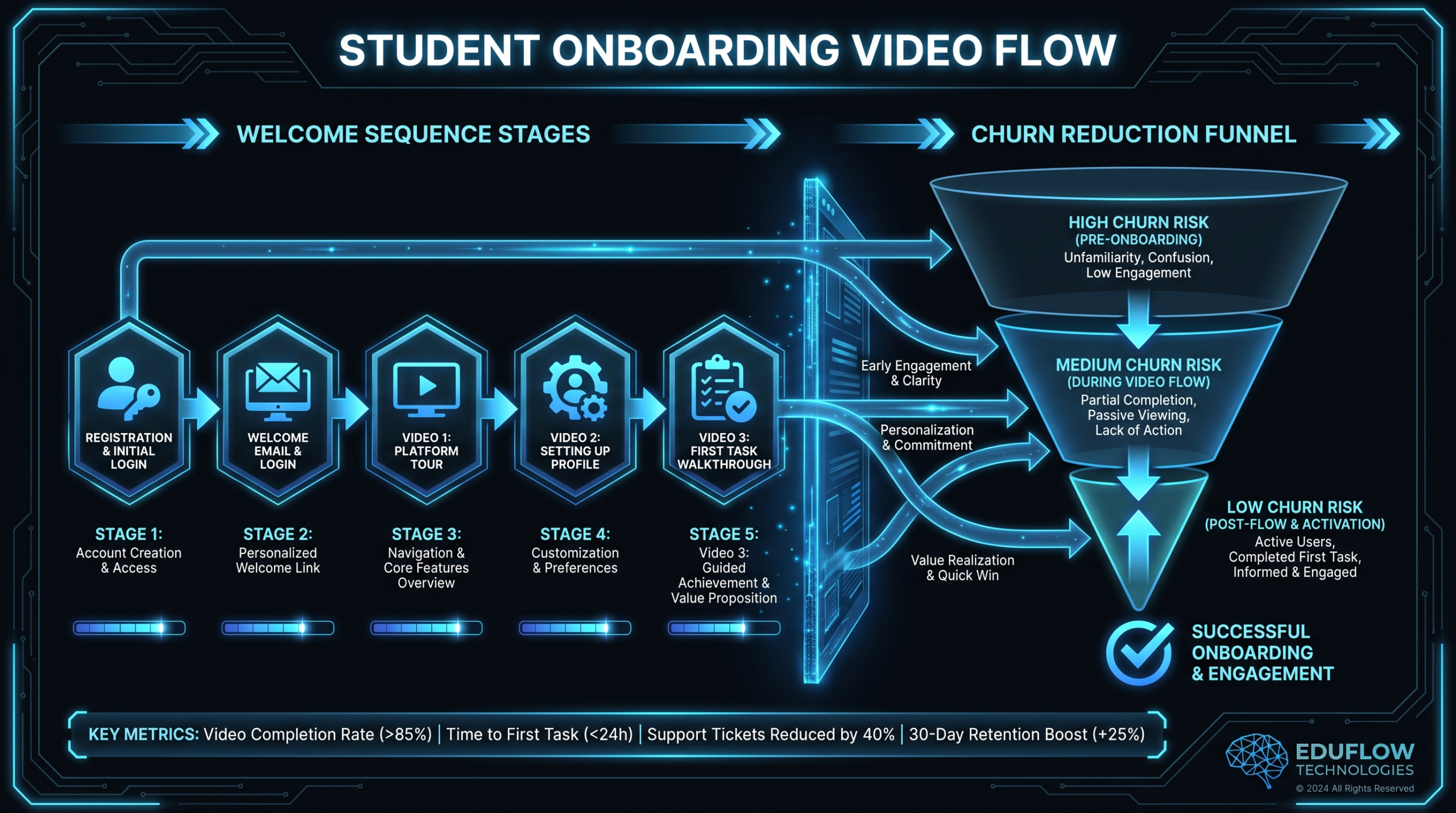
- The Four-Video Onboarding Sequence
- Platform Tour Videos: What to Show (and Skip)
- Welcome Sequence Frameworks by Platform Type
- Getting-Started Flow: Designing the First 15 Minutes
- First-Lesson Hook Videos That Earn the Commitment
- Onboarding Video Strategy by Platform Type
- Measuring Onboarding Video Impact on Churn
- Production Considerations for Edtech Teams
- FAQ
Edtech platforms pour budget into acquisition — ads, content, free trials, demo webinars — and then watch a large share of new students disappear before completing their first real lesson. The problem is rarely the curriculum. It is the gap between sign-up and the moment a student genuinely understands what they are doing and why it matters to them.
Onboarding videos close that gap faster than any other medium. A well-designed sequence answers the three questions every new student has the moment they land in your platform: What is this place? Where do I start? Will this actually work for me? Text walkthroughs and tooltips help, but video creates a human connection that written UI copy cannot replicate at scale.
This guide is for edtech product and content teams — whether you run a cohort-based program, a self-paced library, or an enterprise learning portal. It covers the specific video types that reduce churn, what each one needs to accomplish, and how to adapt the framework to your platform model.
Why Edtech Platforms Lose Students Before Lesson One
Early churn in edtech is not primarily a content quality problem. Students who leave in the first week or two typically do so because they experience one or more of the following:
- Navigation friction. They can not find where to start, or the platform interface feels overwhelming relative to what they expected from the marketing landing page.
- Value ambiguity. They signed up based on a promise ("learn X in Y weeks"), but within the first session they can not see a clear path from where they are to that outcome.
- Motivation failure. Learning is effortful. Without an early win — a completed module, a skill demonstrated, a result visible — the effort does not feel worth returning for.
- Social isolation. On cohort-based platforms, students who do not connect to a peer group or instructor in the first 48 hours are far more likely to disengage than those who do.
- Wrong-fit discovery. The student realizes the course is not what they needed — but they make this decision on incomplete information because they never got a clear picture of what they were buying into.
Video addresses all five of these failure modes more efficiently than any other content type. A 90-second platform tour eliminates navigation friction. A two-minute personalized welcome from the instructor builds immediate trust and sets expectations. A "getting started" screencast shows the exact three actions a student needs to take in their first session. A punchy first-lesson hook creates the early win that earns their return tomorrow.
None of this requires cinematic production. What it requires is strategic clarity about which video does which job — and precise execution of each one.
The Four-Video Onboarding Sequence
The most effective edtech onboarding sequences are not a single video. They are a coordinated set of four distinct video types, delivered at specific moments in the student's first experience. Each one has a single job. Understanding that separation is the most important thing you can take from this guide.
The Four Onboarding Video Types
| Video Type | Length | When Delivered | Primary Job |
|---|---|---|---|
| Platform Tour | 60–90 seconds | Immediately after sign-up, before first login | Eliminate navigation friction; show where everything lives |
| Welcome Sequence | 2–4 minutes per video, 2–3 videos | Email sequence, days 0–3 | Build trust, set expectations, introduce instructor/community |
| Getting-Started Flow | 3–5 minutes total (split into 2–3 short clips) | In-platform, dashboard or first login screen | Guide through the first three actions; create immediate momentum |
| First-Lesson Hook | 3–6 minutes | Opening of Lesson 1 (not a preview — the actual lesson) | Deliver an early win; earn the commitment to return |
Most platforms produce one of these — usually a generic "welcome to the platform" video that blurs together all four functions and accomplishes none of them cleanly. The result is a video that is too long, too confusing, and does not move the student to any specific action.
The separation matters because each video targets a different emotional state. The student who has just signed up and not yet logged in is anxious about navigation. The student in their email on day two is wondering if they made the right purchase decision. The student staring at their dashboard for the first time needs their hand held through exactly three actions. The student who opened Lesson 1 needs to feel a sense of progress in the next four minutes or they will not come back. One video cannot do all of that.
Platform Tour Videos: What to Show (and Skip)
A platform tour is a 60-to-90-second screen recording with narration — not a cinematic production, not a talking-head video, not a slide deck. Its only job is to make a new student feel confident that they can navigate the interface without getting lost.
What to Include
- Where to start. Show the exact click path: dashboard → course → first module → first lesson. Do not assume students will figure this out. Show them the cursor moving through it.
- Where to find their cohort or community. On cohort-based platforms, this is critical — show the discussion forum, Slack channel, or community space within the first 30 seconds.
- Three to four key features only. Progress tracker, bookmarks, downloads, Q&A — pick the three or four that a student will actually use in week one. Do not give a full feature tour; it overwhelms and creates decision paralysis.
- How to get help. Show where the support link lives. This is a trust signal, not a suggestion that your UX is confusing.
What to Skip
- The full settings menu. Students do not need to know about notification preferences and payment settings in their first 90 seconds.
- Promotional language. The student has already bought. Do not re-sell them on how great the course is — they need to know how to use the platform.
- Complex features that are not relevant in week one. Certificates, integrations, advanced filters — leave these for a "power user" video sent in week three or four.
- Talking-head intros on the platform tour. Save the human connection for the welcome sequence. The platform tour should be screen-focused and fast.
One practical note: record the platform tour after your latest UI update, not before. An onboarding video that shows a button in the wrong location creates more anxiety than no video at all.
Welcome Sequence Frameworks by Platform Type
The welcome sequence is a two-to-three-video email series delivered over the first 72 hours. Unlike the platform tour (which is utilitarian), the welcome sequence is emotional — it exists to make the student feel seen, informed, and confident they made the right decision.
Cohort-Based Platforms
On cohort-based platforms — where students move through content together with instructor-led live sessions — the welcome sequence needs to do three things: introduce the instructor, introduce the cohort (or the community model), and set the weekly cadence expectation.
- Video 1 — Day 0, 2 minutes: Instructor face-to-camera welcome. Specific acknowledgment of what the student is trying to achieve (address the outcome stated in your marketing, not generic "welcome to the course" language). End with one action: complete your profile and introduce yourself in the community.
- Video 2 — Day 1, 3 minutes: How the cohort works. Show what a week looks like — when live sessions happen, how to submit assignments, where to ask questions. Frame the rhythm as the thing that makes cohort-based learning work better than self-study.
- Video 3 — Day 2–3, 2 minutes: A "meet the first person you should talk to" format — introduce a community manager, a TA, or a fellow learner. This breaks social isolation before it sets in.
Self-Paced Courses
Self-paced platforms have a different early-churn problem: without external accountability (no live sessions, no cohort pressure), students must generate their own motivation. The welcome sequence needs to supply a structure the student can borrow until they build their own habit.
- Video 1 — Day 0, 2 minutes: Instructor welcome with a specific commitment ask — "Set aside 20 minutes every Tuesday and Thursday morning." Give them the study schedule; do not make them invent it. Students who self-pace without a plan rarely return after the first week.
- Video 2 — Day 2, 3–4 minutes: A "how to use this course to actually finish it" video. Cover how to navigate the modules, how to use bookmarks to pick up where they left off, and what to do when they get stuck. Frame completion as normal and achievable — many students assume they are anomalies when they fall behind.
- Video 3 — Day 5, 90 seconds: A check-in video that acknowledges they may not have started yet. Keep it non-judgmental: "A lot of people sign up and need a few days to find their rhythm. That's fine. Here's the one lesson I'd recommend you try today." Give them a door back in.
Enterprise L&D Portals
Enterprise learning platforms present a distinct challenge: the "student" is an employee who often did not choose to be there. Intrinsic motivation may be low, and the platform tour must account for a learner who is skeptical of mandatory training.
- Video 1 — Day 0, 2 minutes: Manager or L&D leader framing video — not a platform tour, but an explicit answer to "why does this training matter for your role and your team." The video should come from someone with authority and context, not from the platform vendor. If you cannot get a manager-led video, frame it from the employee's perspective: what skill does this give them, and how does it translate to their day-to-day work?
- Video 2 — First login, 90 seconds: Platform orientation focused on compliance-relevant features — how to track completion, how to generate certificates, how to pick up where they left off. Enterprise learners often care about completion status for performance reviews.
- Video 3 — Day 3, 2 minutes: A short "quick win" video that gives the learner an immediate skill or insight they can apply this week. If they can use something from the training before they finish it, the training becomes relevant rather than a checkbox.
Getting-Started Flow: Designing the First 15 Minutes
The getting-started flow is an in-platform video sequence that guides a new student through their first session — typically embedded on the dashboard or triggered on first login. Its job is to create momentum by defining exactly what "starting" looks like.
The Three-Action Method
The most effective getting-started flows give students exactly three actions and nothing more. Research on product onboarding broadly — including work published by Wistia's video marketing team on video-led onboarding — consistently points to a pattern where more than four early actions correlate with higher drop-off. Edtech platforms see the same dynamic.
The three actions in an effective getting-started flow:
- Complete your profile (or set your learning goal). This is not just an admin task — it creates psychological ownership. A student who has typed their name and goal into your platform has already committed a small piece of themselves to it.
- Navigate to Lesson 1 and press play. The getting-started video should literally end with a screen recording of the cursor clicking the first lesson. Remove every click between "I want to start" and "the first lesson is playing."
- Join the community (or schedule their first session). For cohort-based platforms: join the community. For self-paced: set a learning reminder. For enterprise L&D: download the course schedule. One social or structural anchor, created in the first session.
Progress Anchoring in Video
A powerful technique for getting-started flows is progress anchoring: showing the student at the beginning of the video where they will be at the end of their first session — and then delivering on that promise.
For example: "In the next 15 minutes, you will complete your profile, watch the first lesson, and understand the three core principles that underpin everything else in this program." Then the video walks them through exactly that. Students who can see that they are making progress relative to a defined endpoint are significantly more likely to return the next day.
This is the same principle that makes product demo videos effective for SaaS video production — the viewer needs to see a before-and-after, not just a feature tour. Edtech onboarding works the same way.
First-Lesson Hook Videos That Earn the Commitment
The first-lesson hook is the highest-leverage video in your entire onboarding sequence. It is the actual opening of Lesson 1 — not a teaser, not a trailer, not a welcome message. It is the first real learning experience, designed to deliver an early win within the first four to six minutes.
An early win does not mean a certificate or a congratulations screen. It means the student learns one concrete, specific thing that they did not know before — something that changes how they see a problem they already care about. The moment a student thinks "I can already use this," they are committed. Without that moment in Lesson 1, you are relying on willpower to bring them back, and willpower is a limited resource.
What Makes a Strong First-Lesson Hook
- Open with the transformation, not the introduction. "By the end of this lesson, you will understand why X happens and what to do about it" beats "Welcome to Lesson 1. In this lesson, we will cover…" The student's brain needs a reason to engage before it will accept information.
- Teach something complete in the first six minutes. You do not need to cover everything in Lesson 1. Cover one thing, completely, with enough depth that the student can act on it immediately. Completeness creates satisfaction; partial lessons create anxiety.
- Show the skill working in a real context. If you are teaching a software skill, show the screen. If you are teaching a business concept, use a real case (hedged: "companies in this space commonly find that..."). Abstraction in Lesson 1 is the fastest route to "I'll get back to this."
- End with a specific next step, not just "see you in Lesson 2." Give them something to do before the next session — a short exercise, a question to answer in the community, a concept to look for in their own work. This creates a thread that pulls them back.
Length and Format by Platform Type
The right length and format for your first-lesson hook depends on what you are teaching and how. A cohort-based skills program can afford a 15-minute Lesson 1 if the instructor is compelling and the content is dense. A self-paced micro-course should probably cap Lesson 1 at eight minutes, with an early interactive prompt at the four-minute mark. An enterprise compliance module needs its key point delivered within the first three minutes because the learner has not chosen to be there.
Onboarding Video Strategy by Platform Type
Onboarding Video Framework by Platform Type
| Platform Type | Platform Tour | Welcome Sequence Priority | Getting-Started Focus | First-Lesson Hook Priority |
|---|---|---|---|---|
| Cohort-Based | 60–90 sec; include community space prominently | Community connection + weekly rhythm | Profile + community join + Lesson 1 start | High — cohort members who fall behind in week 1 rarely catch up |
| Self-Paced | 60–90 sec; emphasize resume-from-anywhere feature | Study schedule creation + early check-in on day 5 | Goal-setting + Lesson 1 start + reminder scheduling | Critical — no external accountability means Lesson 1 must carry all motivation |
| Enterprise L&D | 90 sec; focus on completion tracking and certificates | Manager framing video first; platform tour second | Completion tracking + first module + peer enrollment | Moderate — completion-driven learners need relevance signals, not just engagement |
Common Onboarding Video Mistakes by Platform Type
| Mistake | Platform Type Most Affected | What to Do Instead |
|---|---|---|
| One generic "welcome" video doing every job | All | Separate into four distinct video types with distinct delivery moments |
| Platform tour longer than 2 minutes | Self-paced, enterprise | Cap at 90 seconds; feature tours belong in a week-3 "power user" video |
| No instructor face in first 24 hours | Cohort-based, self-paced | Day-0 welcome video must be talking-head from instructor, not platform UI |
| First lesson opens with administrative content | All | Lead with the early win; move housekeeping to the end or a separate module |
| No re-engagement video for students who do not log in by day 5 | Self-paced | Build a day-5 email with a short "come back in" video — non-judgmental, direct |
| Enterprise platform tour makes no mention of "why this training" | Enterprise L&D | Lead with a manager-framing video before platform mechanics |
Measuring Onboarding Video Impact on Churn
Onboarding video effectiveness is measurable — but the metrics that matter are behavioral, not engagement-based. Video completion rates are a lagging vanity metric. What you are trying to move is:
- Day-3 return rate: What percentage of new students log back in within three days of sign-up? This is the single most predictive early metric for long-term retention on most platforms. Students who return within three days develop significantly stronger completion rates than those who do not.
- Lesson 1 completion rate: Not "lesson 1 start rate" — completion. A student who starts Lesson 1 but exits at the 60% mark has the same outcome as one who never started: they have no early win.
- Feature activation rate: Did the student complete their profile? Join the community? Set a learning reminder? Feature activation events are proxies for commitment. Each one you can move is a churn-reduction lever.
- Week 2 active learner rate: Of students who completed Lesson 1, how many are still active in week 2? This measures whether the first-lesson hook delivered on its promise — not just in the moment, but in the return behavior it generates.
To isolate the effect of onboarding videos, run a simple cohort test: students who receive the full four-video sequence versus students who receive the standard text-based onboarding. Measure day-3 return rate and Lesson 1 completion rate across both cohorts. Most platforms that have run this test report material differences within the first 30 days. For broader context on activation metrics and their relationship to retention, HubSpot's customer onboarding resource hub covers related SaaS frameworks in depth.
For edtech teams thinking about production scale — particularly those managing multiple courses or platform verticals — our guide on video production for edtech companies covers the full production pipeline, from scripting to post-production workflows.
Production Considerations for Edtech Teams
The four video types in this guide have very different production requirements. Understanding those differences lets you allocate budget and resources intelligently rather than over-producing the wrong videos and under-investing in the high-leverage ones.
What Needs High Production Quality
- The instructor welcome video (Welcome Sequence, Video 1). This is the human face of your platform. It does not need to be cinematic, but it needs to feel warm, clear, and professional. Poor audio on this video is more damaging than a low-budget platform tour. Invest in a decent microphone and a clean background.
- The first-lesson hook. Whatever the production standard of your full course is, the first lesson should meet or slightly exceed it. This is the sample that converts trial into commitment.
What Can Be Produced Simply and Quickly
- Platform tour. A clean screen recording with a calm, clear narration is all this needs. Tools like Loom, Camtasia, or ScreenFlow are purpose-built for this. The tour needs to be accurate and current; it does not need to be beautiful.
- Getting-started flow videos. These are in-product, utilitarian, and watched once. Screen recording with clear step-by-step narration is the right format. Spending production budget here is rarely the right call.
Maintenance and Update Cadence
Onboarding videos decay faster than course content because the platform interface changes. Build a quarterly review into your production calendar — specifically for the platform tour and getting-started flow. If you redesign your dashboard or move a key feature, the onboarding videos must be updated within two weeks of the launch, not after churn data reveals the problem.
For teams managing ongoing video production across multiple courses and platform updates, outsourcing the post-production workflow to a dedicated team can reduce the time from "we changed the UI" to "the new onboarding video is live" from weeks to days. See our guide on outsourcing video editing for how edtech teams typically structure this.
At VEC, we work with edtech platforms that need a consistent production pipeline for onboarding and course content — not one-off videos, but a managed flow where new modules and updated platform tours move from script to final cut without bottlenecking your internal team. Our Growth and Core plans are the most common fit for teams producing four to twelve videos per month across course content and platform onboarding.
For broader context on what professional video production for the edtech vertical looks like — including scripting, talking-head vs. screencast ratios, and delivery format choices — the VEC edtech production guide covers the full picture.
The underlying principle across all of this is simple: your onboarding video sequence is not a marketing asset. It is a retention infrastructure. A student who feels oriented, welcomed, and successful in their first session is a student who comes back. A student who feels lost, overwhelmed, or uncertain will quietly disappear — and no amount of re-engagement email can reliably reverse that pattern once it is set. Build the videos that prevent the problem from starting in the first place.
Frequently Asked Questions
How long should edtech onboarding videos be?
Each video type has a different optimal length. Platform tours work best at 60 to 90 seconds — enough to orient without overwhelming. Welcome sequence videos run two to four minutes each. Getting-started flow videos should total no more than three to five minutes across two or three short clips. The first-lesson hook can be longer — four to fifteen minutes depending on subject matter — because at that point the student has opted into learning, not just orientation. The common failure is treating all four as one long video; that does not work.
Does onboarding video quality really affect churn, or is it the course content?
Both matter, but they affect different stages. Course content quality drives completion and referral. Onboarding video quality drives whether a student ever gets deep enough into the course to experience the content. Students who churn in the first week typically do not have enough exposure to the course content to evaluate it — they leave because of navigation friction, lack of perceived progress, or social isolation, all of which onboarding video directly addresses. A great course with a poor onboarding sequence will still show high early-churn rates.
What should the instructor say in the day-0 welcome video?
Four things: acknowledge specifically what the student is trying to achieve (mirror the language from your marketing), tell them what the first week will look like in concrete terms, give them one action to complete today, and make them feel that they are in the right place. Avoid generic "I am so excited you are here" language — it reads as promotional rather than personal. The most effective welcome videos are specific, brief, and end with a clear single call to action.
Should we use animated or live-action video for platform tours?
For platform tours, live screen recording with narration consistently outperforms animation because it shows the actual interface students will encounter. Animation is appropriate for concept explanations and first-lesson hooks where a visual metaphor helps, but for "here is how to navigate our platform," authenticity and accuracy matter more than visual polish. Record from the actual platform, use the actual UI, and update the video whenever the interface changes materially.
How do we handle onboarding video for enterprise clients with their own branding requirements?
Enterprise L&D deployments commonly request white-labeled or co-branded onboarding videos. The most practical approach is to produce a modular sequence where the platform mechanics portion is platform-branded and the contextual framing portion is recorded by the enterprise client's own L&D or manager team. This keeps your production workload manageable while giving enterprise clients the cultural context their employees respond to. For the manager-framing video specifically, clients typically produce these internally using the script framework you provide — the authenticity of an internal voice matters more than production quality for that particular video type. Wistia's research on video for SaaS and product onboarding covers how enterprise B2B companies approach similar challenges.
Building an Edtech Video Pipeline That Actually Scales?
Most edtech teams hit the same wall: the course content is ready, but onboarding videos are outdated, platform tours are six months stale, and new modules take weeks to edit. VEC gives edtech platforms a dedicated post-production team that keeps pace with your release cadence — platform tours, lesson edits, and welcome sequence videos without the internal bottleneck.
Book a Free Strategy Call See Pricing Plans