Course Videos at Scale: The Edtech Playbook
TL;DR
Producing 10 course modules is a content challenge. Producing 50+ is a systems challenge. This playbook covers the full workflow—scripting for learning retention, recording by production tier, chunking strategy, editing standards, and quality iteration—so your edtech video program scales without losing instructional integrity. Includes a worked framework for a 50+ module certification course.
Table of Contents
- Why Scale Changes Everything in Edtech Video
- Scripting for Learning Retention, Not Just Completions
- Recording Setups by Production Tier
- The Chunking Strategy for 50+ Modules
- Editing Standards That Hold at Volume
- Quality Iteration Without Bottlenecks
- The Full Framework: A Worked Example
- In-House vs. Outsource: The Decision Matrix
- FAQ
Why Scale Changes Everything in Edtech Video
Scaling course video production is a fundamentally different problem from scaling marketing video. The audience relationship is different—learners expect depth, not just engagement. The content lifecycle is longer—a product demo from 18 months ago can be retired; a course module on core concepts may carry for three years. And a single confusing module can break completion rates for thousands of learners across every cohort that ever touches it.
At 10 modules, you can iterate on each video individually. At 50+ modules, you need systems: scripting frameworks that produce learner-ready drafts without constant revision cycles, recording standards that don't depend on any one person's memory, and quality gates that catch problems before post-production rather than after.
Most edtech teams hit their capacity ceiling around 20 modules. The teams that successfully scale past that point share three characteristics: they've templated their scripting process (not just the format, but the cognitive structure), they've tiered their production standards by content type, and they've separated their "scale engine"—mid-tier content that powers most of the course—from the hero modules that anchor the learning experience.
This playbook covers each layer of that system, with a worked example at the end that shows how the pieces fit together for a 52-module certification course.
Scripting for Learning Retention, Not Just Completions
Completion rates measure whether learners watched. Retention measures whether they learned. Scripts optimized for completion—short, engaging, low friction—aren't the same as scripts optimized for retention, which requires deliberate structure for encoding, recall, and application.
The distinction starts at the scripting stage, and getting it right there prevents expensive re-records later.
The Cognitive Load Framework for Course Scripts
Before writing a single line of script, every module needs a three-question brief answered by the instructional designer or subject matter expert:
- What is the single thing learners should be able to do differently after this module? Not "understand X"—a specific behavior or decision.
- What prior knowledge are you building on? Which module or concept does this one depend on?
- What will learners need to recall or apply in the next module? What handoff content matters?
These questions create a "context layer" for each script—the information your video editor, narrator, and instructional designer all need to align before a word is written. At scale, this brief becomes part of the module's production record so that when a module needs to be updated 18 months later, the team can evaluate the change in context rather than in isolation.
A Script Structure That Works at Volume
The most scalable script format for course video follows a consistent four-block structure that editors and reviewers can verify without watching the entire module:
- Context block (15–30 seconds): What this module covers and why it matters in the broader course arc. Sets up working memory, not just attention.
- Core content (3–8 minutes): The primary instruction, organized into 2–3 sub-topics, each with at least one concrete example. Examples are the highest-leverage element for retention—every abstract concept should have one.
- Consolidation block (30–60 seconds): Recap of key points, framed as "the three things you now know" or a direct answer to the module's objective question. This is the part most teams skip under time pressure, and its absence correlates with poor recall at end-of-course assessments.
- Bridge (15–30 seconds): What's coming in the next module and how this one connects to it. Activates forward encoding.
This structure has two production advantages: blocks are independently reviewable before recording begins, and editors know exactly what each segment should contain, making it straightforward to flag a missing consolidation block without watching the whole module twice.
The Script Review Gate
At scale, a common failure mode is approving scripts based on length rather than structure. A two-minute script review checklist—posted at the top of every script template—catches the structural issues that lead to expensive re-records:
- Is the context block present and specific to this module (not the whole course)?
- Does each sub-topic have at least one concrete example?
- Is the consolidation block present and accurate to the core content?
- Does the bridge accurately describe the next module?
- Are all claims either verifiable or explicitly framed as estimates or ranges?
Wistia's research on video engagement and learning content consistently shows that viewer drop-off accelerates when the first 60 seconds fail to establish clear relevance—which is why the context block matters even for learners who've already enrolled.
Recording Setups by Production Tier
Not every module needs the same production investment. Treating all 60 modules as equally important is both expensive and counterproductive—it dilutes the production resources that should be concentrated on signature content.
A three-tier production model gives edtech teams a structured way to allocate recording resources based on content type and learning criticality, not just topic importance.
Course Video Production Tiers: Setup and Investment
| Tier | Content Type | Recording Setup | Relative Investment |
|---|---|---|---|
| Tier 3 — Screen-only | Process walkthroughs, software demos, reference content, checklists | Screen recording + voiceover; no camera required | Low — minimal equipment beyond recording software (Loom, Camtasia, or similar) |
| Tier 2 — Talking head + screen | Explanatory modules, conceptual frameworks, mid-course instruction | Mirrorless or DSLR camera, neutral backdrop, ring light or softbox, condenser mic | Moderate — entry-level professional kit runs a few hundred to a couple thousand dollars; batch recording amortizes the cost |
| Tier 1 — Studio | Course intro/outro, signature modules, section anchors, flagship certification content | Multi-point lighting, quality lens (50mm or 85mm), audio interface + XLR mic, teleprompter, professional backdrop | Higher — full studio kit or day-rate studio rental; reserved for 5–10% of modules |
The allocation question most edtech teams get wrong: what percentage of modules sit in each tier? As a general starting framework, courses with 50+ modules typically distribute roughly 60–70% as Tier 3 (reference, process walkthroughs), 20–30% as Tier 2 (conceptual, explanatory), and 5–10% as Tier 1 (signature and anchor modules). Adjust based on your content type and learner expectations—platform-hosted professional certification courses tend to weight Tier 1 and Tier 2 more heavily than internal training libraries.
Batch Recording at Each Tier
The efficiency multiplier for Tier 2 and Tier 3 content is batch recording: set up the recording environment once and record 5–10 modules in a single session. This requires scripts to be finalized before the session begins—no exceptions—and a consistent slate format so editors can identify module boundaries in raw footage without watching everything in sequence.
A practical batch-recording protocol: the presenter announces "Module [X], take one" before each recording, camera position is marked with tape on the floor for consistency across sessions, and a green flag in the script marks the "clean restart point" if a flub occurs mid-module. These conventions take minutes to establish and eliminate hours of editing confusion across a large course project.
The Chunking Strategy for 50+ Modules
Chunking is the structural discipline that separates scalable course video production from ad-hoc content creation. A module is the unit of instruction; a chunk is the unit of production planning. Getting this distinction right determines whether your 50+ module project ships on schedule or stalls at module 30 when the team runs out of runway.
For courses of 50+ modules, chunking strategy operates at three levels simultaneously.
Level 1 — Within-Module Chunking
Keep individual modules under 10 minutes. Evidence from online learning platforms and instructional design research consistently finds that shorter modules support better knowledge retention, and for production teams, shorter modules mean more reviewable units per sprint without sacrificing completeness. Modules that routinely run long almost always have a scripting problem—the context was set too broadly—rather than a content problem. Tightening the script is cheaper than trimming in post.
Level 2 — Section-Level Chunking
Group modules into sections of 4–8 modules each, organized around a shared theme or skill cluster. The first and last module of each section should be the most polished (context-setting and synthesis, respectively), which guides your production tier allocation: Tier 1 resources go to section anchors; Tier 3 is appropriate for the reference and process modules in the middle.
This also creates a natural quality checkpoint: complete and review an entire section before moving to the next. Problems found at the section level (an objective that wasn't delivered, a missing consolidation) are cheaper to fix before you've committed production resources to all 50+ modules.
Level 3 — Production-Sprint Chunking
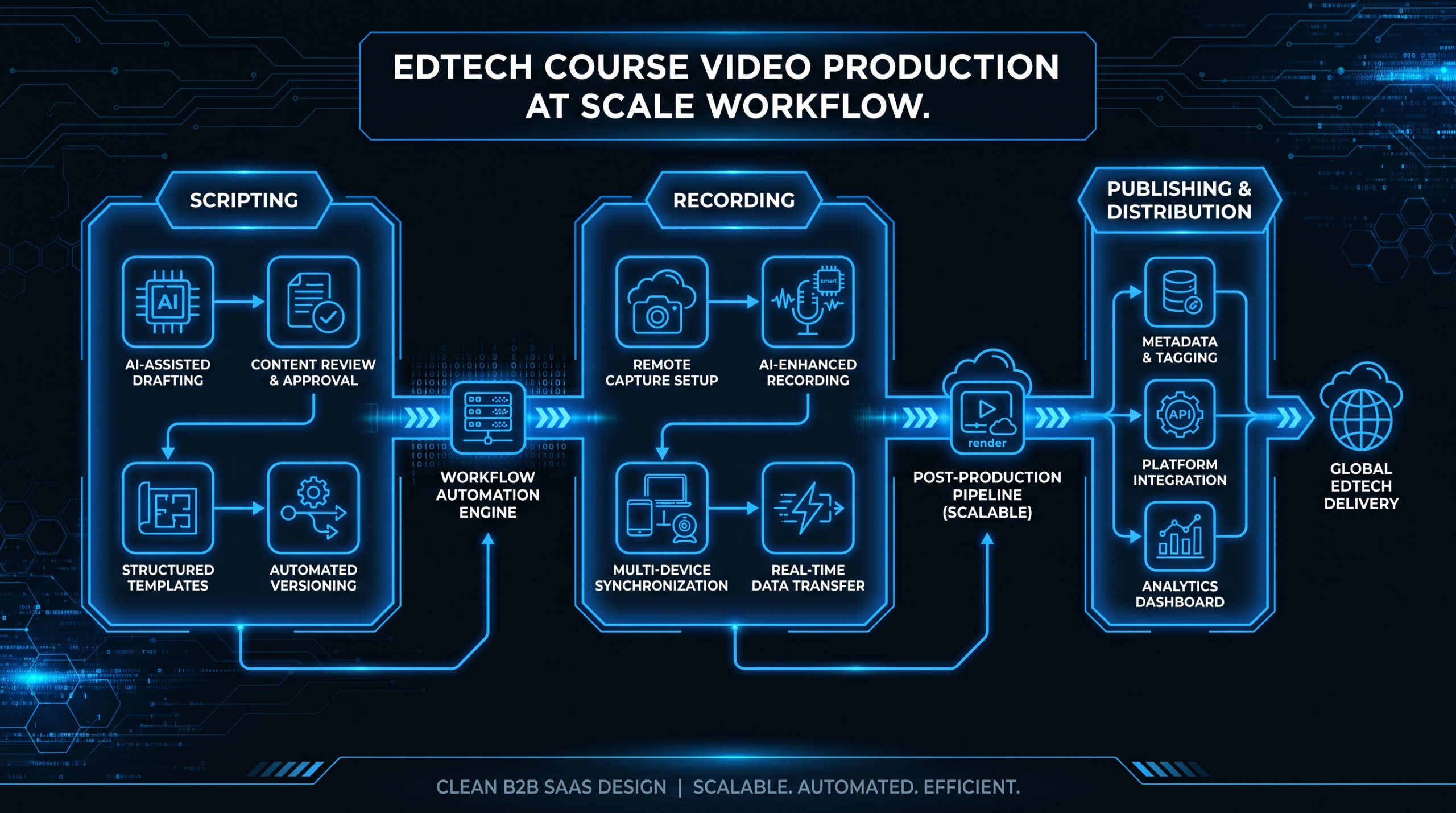
Rather than producing all modules in sequence or in parallel, structure production in section-sized sprints: script → record → edit → QA for one complete section before beginning the next. Two concrete advantages emerge from this approach:
- Early learner feedback becomes possible. You can test Section 1 with a beta cohort before committing production resources to Sections 2–4. If the instructional structure is wrong, you find out when fixing it costs a section, not the whole course.
- Team context stays manageable. Editors and reviewers who are immersed in the Section 2 material will catch instructional gaps that would be invisible to someone working across all 52 modules simultaneously.
Sprint planning should account for the "funnel delay" at each stage: scripting one section in advance of recording, recording one section in advance of editing. At mature production cadence, teams typically have three sections in different stages simultaneously—one in scripting, one in recording, one in post-production.
Editing Standards That Hold at Volume
Editing standards for course video differ from marketing video in a specific way: the goal isn't cinematic quality—it's clarity, pacing, and learner focus. Editing decisions that seem like aesthetic choices (cut frequency, ambient audio levels, lower-third timing) are actually instructional decisions at scale, because they determine whether learners can stay focused or get distracted by inconsistencies across 50 modules.
The Minimum Edit Spec for Course Video
Every module should exit post-production meeting these standards before QA review begins:
- Clean audio: No room noise, consistent levels across all modules in the same section (aim for -14 LUFS for most streaming platforms, -16 LUFS for Zoom/Teams delivery).
- Jump cuts cleared: Flubs, long pauses, and false starts removed cleanly, with natural breath room retained so cuts don't feel abrupt.
- Captions or lower thirds: Accessibility standard for most enterprise and consumer platforms; required for compliance in many markets.
- Consistent intro/outro: Identical duration and format across all modules in the course—learners calibrate expectations, and inconsistency signals unprofessionalism even when the content is excellent.
- Screen content legible: Any UI recording zoomed to the active area, recorded at 1080p minimum, with cursor visibility confirmed.
Template-Based Editing at Scale
The fastest path to consistency across 50+ modules is editing templates: a locked-down timeline structure that every editor on the team uses as the starting point for each module. The template includes the opening slate (title card with module number and section identifier), audio normalization settings, lower-third graphic in the correct font and brand color, and the outro sequence with chapter navigation prompts.
When every editor works from the same template, quality review shifts from a subjective judgment call to a check against a known spec. This distinction matters enormously at volume: subjective review requires expertise; spec-based review can be delegated.
For a detailed breakdown of what professional post-production includes at different investment levels, see our guide to video editing services and what's included.
Quality Iteration Without Bottlenecks
At 10 modules, one person can QA everything. At 50+, single-person QA becomes a bottleneck by definition unless the review process is redesigned to match the production volume. The teams that maintain quality at scale do two things differently from teams that don't.
The Two-Pass Review Model
Separate technical review from instructional review. They require different expertise and different time commitments—mixing them in one pass means the subject matter expert is checking audio levels, and the technical reviewer is assessing whether the consolidation block is complete. Neither is doing their best work.
Pass 1 — Technical review (can be done by any trained team member using a checklist):
- Audio levels consistent with other modules in the section?
- No visible flubs or jump-cut artifacts?
- Lower thirds appear and disappear on time?
- Intro and outro match spec?
- Export file at correct resolution and bitrate?
Pass 2 — Instructional review (requires subject matter expertise):
- Does the module deliver on the stated learning objective?
- Is the consolidation block present and accurate?
- Does the bridge accurately set up the next module?
- Are all claims verifiable or appropriately hedged?
Separating these passes means technical issues are caught without consuming SME time, and instructional issues are flagged before the course goes live rather than surfacing in learner feedback after the fourth cohort has already gone through a broken module.
The Iteration Protocol
Define iteration limits before production begins. Teams that don't commonly report spending disproportionate time on early modules—where there's enthusiasm and no limit on revision cycles—and rushing later modules under deadline pressure. A simple protocol keeps production balanced:
- Technical revision: Unlimited rounds until the spec is met (these should be fast and mechanical).
- Instructional revision: 2 rounds maximum. If unresolved after round 2, escalate to a script revision—which may require a re-record but is the right fix rather than patching in post.
- Cosmetic revision: Deferred to a batch cosmetic review at the end of each section, not addressed module by module.
This protocol prevents the "perfect first module, rough final forty" pattern that affects many large course projects and surprises teams that didn't anticipate iteration debt accumulating across a multi-month production timeline.
The Full Framework: A Worked Example
To make this concrete, here's how the above systems fit together for a 52-module professional certification course.
Course: SaaS Customer Success Certification — 52 modules across 4 sections.
Section 1: CS Foundations (12 modules) · Section 2: Onboarding & Adoption (14 modules) · Section 3: Retention & Expansion (14 modules) · Section 4: Team Leadership & Strategy (12 modules)
Production tier allocation:
- Tier 1 (5 modules): Course intro, each section intro, course outro
- Tier 2 (20 modules): Conceptual frameworks and strategy modules — the second and penultimate module of each section, plus all leadership and strategy content
- Tier 3 (27 modules): Process walkthroughs, software demos, data interpretation modules, checklist-based reference content
Sprint schedule:
- Sprint 1: Script + record + edit all 12 Section 1 modules. Deploy Section 1 to a beta cohort of 20–30 learners before Sprint 2 begins. Gather completion data and open-text feedback.
- Sprint 2: Incorporate Section 1 structural lessons into Section 2 scripting. Complete Section 2 production in parallel with Section 1 review wrap-up.
- Sprints 3 and 4: One section per sprint, with a sprint-opening review of beta feedback from the previous section.
Role allocation:
- Instructional designer: Owns scripting, script review gate, and Pass 2 instructional review for their assigned section only (not all 52 modules).
- Video producer: Owns recording standards, editing templates, technical review checklist, and Pass 1 technical QA across all modules.
- Section leads / SMEs: Own Pass 2 instructional review for their section only—a 12–14 module commitment per lead, not a 52-module commitment per person.
The section lead model is the key insight in this framework: distributing instructional review across four section leads means no single person holds a 52-module review backlog. It's the structural difference between a scalable production program and a bottleneck that delays every section waiting for one overloaded reviewer.
For more on how edtech-specific video production workflows differ from general B2B video, see our dedicated edtech video production resource.
In-House vs. Outsource: The Decision Matrix
Most edtech teams produce their first courses entirely in-house. As the library grows, the question becomes which parts of the production workflow to keep internal versus delegate—not as a cost-cutting measure, but as a capacity and consistency decision.
Course Video Production: In-House vs. Outsource Decision Matrix
| Production Function | Keep In-House | Consider Outsourcing When |
|---|---|---|
| Scripting & instructional design | Always — this is the core IP of the course | Never outsource the instructional framework; only the writing assistance |
| Screen recording | Usually — SME-led, fast, low-overhead | Content is generic or technical-but-non-proprietary; volume exceeds internal time |
| Talking-head recording | While volume fits internal studio schedule | Tier 2 volume exceeds internal studio capacity (book external studio time or on-site production days) |
| Editing & post-production | When total volume is under ~15 modules/month | Volume exceeds team capacity, consistency degrades, or turnaround time becomes a launch blocker |
| QA — Pass 1 (technical) | Can be delegated internally to a non-specialist with a checklist | Pass 1 can be outsourced to an editing partner with clear spec documentation |
| QA — Pass 2 (instructional) | Always — requires subject matter expertise | Never outsource instructional accuracy review |
| Platform distribution | Depends on team structure and platform complexity | Often a candidate for automation (Zapier-style upload pipelines) once production volume justifies it |
For edtech teams scaling from 20 to 50+ modules, editing and post-production is typically the first function to move outside, because it's the highest-volume task with the clearest output spec. When you've built editing templates and a documented minimum spec, an external editing team can work from those standards consistently—which is exactly how a well-run outsourcing engagement should function.
VEC works with edtech platforms and course producers who've hit this transition point: teams that have scripting and recording locked down but need post-production capacity that scales with their publish cadence. Our plans start at $5K/month and are designed for teams producing at volume. See our pricing page for specific plan details, and our guide on how to outsource video editing for the evaluation framework.
The broader context for edtech post-production outsourcing is well-documented in the TechSmith resource library, which covers recording workflows, editing standards, and platform-specific considerations for course video at scale.
For a related perspective on producing SaaS-focused video content at scale, see our SaaS video production guide.
Frequently Asked Questions
How long should each course module video be?
For most course formats, 5–10 minutes per module is the practical target. Shorter modules (3–6 minutes) work well for reference content and process walkthroughs; deeper conceptual modules can run to 10–12 minutes without significant drop-off if the structure is tight. Modules consistently over 12 minutes almost always benefit from being split—it's a scripting issue, not a content issue. What matters more than exact length is that each module has a single clear objective and delivers it within the context block, core content, and consolidation structure.
How many modules can a small production team realistically complete per month?
A two-person team (one content lead, one video producer) working at full capacity on course production typically completes 8–15 modules per month, depending on module complexity and how much of the scripting work is done before production begins. Tier 3 screen-recording modules can move significantly faster—experienced teams report completing 5–8 in a single recording day. The bottleneck is almost never recording; it's scripting approval and Pass 2 instructional review. Teams that parallelize scripting and recording consistently outperform those that work sequentially.
What's the minimum equipment setup for professional-looking course video?
For Tier 2 talking-head content, the minimum kit that produces professional results for most platforms: a mirrorless camera (Sony ZV-E10 or Canon M50 are commonly used entry points), a 50mm equivalent lens, a single softbox or large ring light positioned off-axis, and a condenser microphone on a desktop arm. Total investment is typically in the range of a few hundred to just over a thousand dollars. The microphone matters more than the camera for learner perception of quality—poor audio signals low production value immediately; most learners won't notice a mid-tier camera if the audio is clean.
How do I maintain consistent quality when multiple instructors are recording content?
Consistency across multiple instructors requires three things: a shared recording spec sheet (camera distance, lighting setup, clothing guidelines, background standard) distributed before any recording begins; a single audio standard (same mic model or same target level spec) to prevent loudness inconsistency between modules; and a consolidated Pass 1 technical review that checks all modules against the same baseline before any go to instructional review. Many teams also record a short test clip with each new instructor before the full session to catch setup issues before 3 hours of footage are committed.
When should I re-record a module vs. refresh it in post-production?
Re-record when the core instruction is wrong, the learning objective has changed, or the presenter's delivery undermines the content. Post-production refresh is appropriate when facts, pricing, or product UI have changed but the instructional structure is still sound—you can update screen recordings, add a lower-third correction note, or re-record only the affected segment and splice it in. The decision should be driven by the gap between current content and current accuracy, not by how long the module is. A 6-minute module with one outdated software screen is a post-production fix; a 6-minute module with an outdated conceptual framework is a re-record.
Ready to Scale Your Course Video Production?
VEC provides dedicated video editing teams for edtech platforms and course producers. If you're hitting the capacity ceiling on post-production, we can embed into your existing workflow and give you the output volume to ship your full course library on schedule.
Book a Free Strategy Call See Pricing & Plans