Community-Led Video: Users as Your Content Team
TL;DR
- Community video outperforms brand video on trust — peer content generates higher engagement and conversion lift than polished brand-produced assets, particularly at the mid-funnel stage in B2B.
- The bottleneck is never the community — willing users aren't the constraint. The editorial pipeline is. Raw UGC submissions need professional editing to become publishable, publish-ready assets.
- A scalable program runs on four pillars: a clear submission brief, a quality gate, a structured incentive model, and dedicated editing capacity.
- Format multiplication is the economic engine — a single Tier 1 submission, properly edited and repurposed, yields 5-8 distinct content assets across channels.
Table of Contents
- Why Community Video Outperforms Brand Video
- Building Your Video Submission Program
- Quality Control and Editing Standards
- Incentive Models That Drive Sustained Participation
- Platforms for Capturing Community Video
- Editorial Workflow: Raw Submission to Polished Asset
- Scaling Without Bottlenecks: The Editing Team Question
- FAQ
Your marketing team has a video problem. Not a budget problem, not a strategy problem — a volume and authenticity problem. The brand-produced videos your agency delivers perform adequately in paid channels but generate modest organic traction. Meanwhile, a user who posted a three-minute iPhone walkthrough of your product on LinkedIn drove more qualified pipeline than your last three produced testimonials combined.
This isn't an anomaly. It's the structural reality of B2B video in 2026: peer credibility beats production value in almost every trust-sensitive purchase category — and B2B SaaS is one of the most trust-sensitive categories that exists. Buyers know that brand content is optimized for persuasion. Peer content isn't, and that asymmetry is exactly why it converts.
Community-led video is the strategic response to this reality. Instead of treating your user base as a passive audience for your content, you activate them as co-producers: gathering testimonials, use-case walkthroughs, feature showcases, and day-in-the-life recordings from real customers, then editing and repurposing these submissions into a scaled content engine. The output is a library of high-trust assets at a fraction of the per-unit cost of fully produced brand content.
This guide is the operational playbook. We'll cover why community video works at the trust level, how to build the submission infrastructure, what quality control actually looks like in practice, which incentive models sustain participation over time, and — critically — how to build the editorial workflow that transforms raw submissions into polished, publish-ready content at volume.
Why Community Video Outperforms Brand Video on Trust
The performance gap between community video and brand video isn't subtle. Across B2B content categories, user-generated and peer-produced video consistently outperforms on the metrics that actually predict pipeline impact: click-through rate, watch completion, form submission, and deal velocity. Understanding why helps you build a program that captures these advantages intentionally rather than accidentally.
The Trust Gap in B2B Buying
B2B buyers are professionally skeptical. Their career depends on not selecting bad software, and they've developed sophisticated heuristics for filtering vendor signals. When they encounter a polished brand video, they apply an automatic discount — "this is what the company wants me to believe." When they encounter a peer with a similar title, similar company size, and similar problems describing how they actually use your product, a different cognitive process activates entirely.
Research from Wistia's video marketing research consistently shows that authentic, less-produced video formats achieve higher completion rates than highly polished equivalents, particularly in testimonial and educational categories. The mechanism is not mysterious: authenticity signals honesty, and buyers respond to honesty with sustained attention. The production quality signal cuts both ways — high production tells buyers "this was carefully crafted to persuade," which activates skepticism even in genuinely good content.
In SaaS specifically, where purchases are recurring, multi-stakeholder, and carry real switching costs, community video addresses the "but does it actually work?" question at the top and middle of funnel — the question no amount of brand video can fully answer because buyers know the source is the vendor.
Why Peer Content Converts Differently
The conversion lift from peer video operates through specific mechanisms worth understanding:
- Role identification. A VP of Marketing at a 200-person SaaS watching a video from a VP of Marketing at a 150-person SaaS isn't consuming marketing content — she's watching a peer solve her problem. Identification creates attention that no targeting can replicate.
- Use-case specificity. Brand videos demonstrate features. User videos demonstrate workflows. B2B buyers think in workflows, not features. The specificity of real use cases — "here's how I use this every Monday morning before our standup" — is worth ten feature overview videos.
- Objection pre-emption. Real users naturally address the objections they had before purchasing, because those objections were genuinely theirs. Scripted testimonials rarely achieve this because the objections are either absent or handled too cleanly. Community video is messy in exactly the right way.
- Distribution amplification. Users who create content about your product share it in their own networks — professional communities, LinkedIn connections, niche Slack groups — reaching audiences your owned distribution cannot access. Every submitted video is potentially a distribution event beyond your channel.
For SaaS companies investing in SaaS video production, community video isn't a replacement for brand content — it's an amplifier. Brand video establishes awareness and positions your category narrative; community video closes the trust gap and drives mid-to-late funnel action. They serve different conversion jobs, and the programs that work best run both in parallel.
Building Your Video Submission Program
The most common failure mode in community video programs is launching with an open-ended ask: "We'd love to hear from you — record a video about your experience!" This produces almost nothing usable. The submission program that actually works runs on specificity, lowered friction, and a clear articulation of value to the contributor.
What to Ask Users to Record
Segment your content requests by use case and funnel position. Each type serves a different conversion job and requires a different editorial treatment:
- Use-case walkthroughs. "Show us how you use [specific feature] to [achieve outcome]." Your highest-value asset type — specific, credible, workflow-focused. These serve mid-funnel prospects who need to see the product solving their exact problem before they'll engage a sales conversation.
- Results testimonials. "What measurably changed in your workflow or team results after 90 days?" Short, outcomes-focused. Strong top-of-funnel content and highly repurposable into social clips. Avoid asking for numbers unless the user volunteers them — hedged real-world claims are more credible than suspiciously round figures.
- Day-in-the-life segments. "Walk us through a typical week with [product] as part of your stack." These perform particularly well on LinkedIn and in community distribution because they build parasocial familiarity with both the contributor and your product simultaneously.
- Feature feedback videos. "Record a 5-minute reaction to the new [feature]." Dual-purpose: content and product feedback. These position contributors as beta users and product influencers — a meaningful distinction for users who value community status.
- Onboarding and adoption stories. "How did you get your team ramped up? What worked, what didn't?" These directly address adoption objections — consistently one of the primary blockers in SaaS purchasing decisions — in a credible, peer-to-peer format that brand content cannot replicate.
The Technical Brief That Gets Usable Footage
Most users will record on smartphones or laptops. The quality gap between a well-briefed recording and an unbriefed one is significant — and it determines how much editing time your team spends per submission. Your submission brief should specify:
- Environment guidance: Natural light from a window, quiet room, camera at eye level. A one-page PDF or a short 90-second setup demonstration video dramatically improves submission quality. Show don't tell.
- Duration target: "3-6 minutes works best" is actionable. "Whatever feels right" is not. Give a range with a soft minimum and soft maximum.
- Three-question structure: Provide three specific prompts to answer in sequence. This creates a natural narrative arc that makes editing dramatically faster. Unstructured submissions require far more editorial construction.
- Audio priority framing: Explicitly tell contributors that audio matters more than visual quality. "A quiet room beats a beautiful background every time." Poor audio is unfixable in post; imperfect lighting is improvable.
- Screen recording option: For product walkthroughs, offer screen plus talking head capture via Loom or similar. Most SaaS users are already Loom-native and will produce structurally cleaner walkthroughs when they can show the product directly.
Submission Portals and Intake Systems
Friction is your enemy. Every additional step between a user's willingness to contribute and a submitted file is a measurable drop-off point. Your intake system should match your program's maturity:
- Purpose-built UGC platforms (Testimonial.to, Vocal Video, Boast.io): Branded recording pages, guided question flows, built-in release management. Best for structured programs where submission quality consistency is prioritized.
- Loom submissions via community channels: Ask users to share Loom links in a dedicated Slack channel or community forum. Zero friction for users already on Loom. Works exceptionally well for developer-adjacent or ops-heavy communities.
- Shared cloud folders: Low-tech but effective for established communities with motivated contributors where the trust relationship already exists. Requires more manual intake management as volume grows.
- In-product prompts: Triggered at high-engagement moments ("You've just hit 90 days — want to share your story?"), in-app prompts intercept users when their satisfaction is peaking and intent to advocate is highest. High engineering cost, high conversion yield at scale.
Quality Control and Editing Standards for UGC
Community video programs fail at the quality control stage more often than at the submission stage. The tension is genuine: you want authenticity, but you also need content that reflects positively on your brand and sustains audience attention long enough to convert. The resolution is a clear quality gate and a defined editing protocol that every submission passes through.
What You Will Actually Receive
Set editorial expectations realistically before you launch. Raw community submissions typically include:
- Variable audio quality — some excellent, many adequate, some requiring significant cleanup
- Inconsistent framing and lighting across different recording environments
- Natural speech patterns: filler words, restarts, tangents, off-topic elaborations
- Duration variance — submissions that run 9 minutes when you targeted 4
- Occasional legal or brand sensitivities: competitors named, uncleared trademarks visible, product criticism that's fair but not promotion-appropriate
- Variable on-camera confidence and energy
Most of this is fixable in post-production. Skilled editing can tighten a rambling 10-minute submission into a compelling 3-minute video, improve audio through noise reduction and compression, correct uneven lighting in color grade, add branded frame elements, and produce multiple derivative formats from a single long-form source. What is genuinely not fixable: fundamentally unusable audio (constant background noise, echo chambers), content that misrepresents your product, or contributor discomfort so significant that no editorial treatment makes it watchable.
The Quality Gate: Three-Tier Triage
UGC Submission Quality Gate
| Tier | Criteria | Editorial Action | Est. Edit Time |
|---|---|---|---|
| Tier 1 — Publish | Clear audio, coherent narrative, authentic energy, 3-8 min duration, no legal issues | Structure trim, intro/outro, brand overlays, lower-thirds, social format cuts | 3-6 hours per submission |
| Tier 2 — Rescue | Strong content, audio or framing issues, structural tangents, needs heavy editorial construction | Full restructure edit, audio cleanup, potential re-record request for one segment | 5-10 hours per submission |
| Tier 3 — Archive | Unusable audio, significant factual inaccuracy, legal exposure, or contributor declines use | Thank contributor, do not publish. Archive internally. Follow up if re-record is feasible. | 0 (pass) |
A well-structured program with a solid submission brief typically sees 60-70% of submissions at Tier 1, 20-25% at Tier 2, and 10-15% at Tier 3. Track these ratios monthly — they're a direct indicator of brief quality. If Tier 2 is climbing, your technical guidance needs refinement. If Tier 3 is above 20%, your contributor selection process needs a tighter initial filter.
Editing Standards: Elevated Authenticity
The editorial mandate for community video is elevated authenticity — content that clearly originates from a real user but meets a minimum production standard that protects brand reputation. In practice this means:
- Audio first, always: Noise reduction, gentle compression, EQ for vocal clarity. If audio cannot be rescued, the video does not publish regardless of content quality.
- Respectful structural editing: Remove dead air, excessive fillers, and off-topic tangents — but preserve the speaker's natural pace and personality. Over-editing kills the authenticity that made the submission valuable in the first place.
- Consistent brand frame: Standardized intro card, branded lower-thirds with contributor name and title, clean end card with CTA. These elements should be templated so your editing team can apply them efficiently across every submission.
- Format multiplication as standard: Every Tier 1 submission produces at minimum a full-length version, a 60-90 second highlight clip, and a short-form square or vertical clip. This triples content yield per submission with marginal additional editing time.
Incentive Models That Drive Sustained Participation
A single-campaign ask — "We're collecting testimonials, would you help?" — produces a one-time burst and then silence. Sustained community video output requires an incentive model that creates ongoing motivation to contribute, not just a one-off favor response. The programs that sustain participation over 12+ months are the ones that make contribution feel like membership, not labor.
The Incentive Hierarchy
Community video incentives operate on three motivational levels, each reaching a different segment of your user base:
Recognition and visibility (highest intrinsic motivation for the right segment): Being featured in brand content, being named as a "community spotlight," having your video shared to the brand's LinkedIn channel with attribution, being included in the product newsletter as a featured customer. For ambitious users and thought leaders within your ICP, visibility frequently outperforms cash. Budget: near-zero. Yield: high for advocates who are already building their professional brand.
Product value (sustainable mid-tier motivation): Account credits, early feature access, extended capabilities, free seat upgrades. These align the incentive with continued product use — contributors who receive credits have reason to stay engaged and reason to contribute again. They also signal that you value the relationship enough to invest in it. Budget: low marginal cost. Yield: strong for active, retention-motivated users.
Tangible rewards (broad reach): Swag boxes, gift cards, conference tickets, co-marketing opportunities. These convert across a wider contributor pool but require real budget and logistics infrastructure. Budget: $50-500 per contributor depending on tier. Yield: broad reach, somewhat lower quality filtering — participants motivated primarily by the reward tend to produce less energetic submissions.
The highest-performing programs structure a tiered incentive model: recognition for every contributor, product value for Tier 1 submissions, and a premium experience (advisory board seat, keynote opportunity, co-marketing feature) for contributors who become regular program participants.
Ambassador Program Structure
For SaaS companies with engaged communities — active Slack groups, vocal advocates on LinkedIn, users who present at your customer conference — an ambassador video program formalizes what's already happening organically:
- Selection criteria: 90+ days as an active customer, NPS score of 9 or 10, history of LinkedIn engagement, willingness to appear on camera. Start with 10-15 ambassadors — quality of program over quantity of participants at launch.
- Expectations: 1-2 videos per quarter, participation in product launch announcements, availability for customer reference conversations with prospects.
- Benefits: Monthly co-marketing features (brand shares ambassador's own content), quarterly gifting program, exclusive product roadmap sessions, named credit in all published content.
- Activation cadence: Monthly content brief sent to the full ambassador group with 3-4 suggested prompts tied to your current marketing themes and product releases. The brief does the creative work so the ambassador only needs to record — reducing participation friction to the minimum.
Ambassador programs consistently produce your highest-quality submissions and your most distribution-effective content. An ambassador with 10,000 LinkedIn followers who shares your co-branded video reaches a qualified, trust-primed audience that your owned channel cannot replicate at any budget level.
Platforms for Capturing and Managing Community Video
The tools you use to collect and manage submissions significantly affect both the quality of what you receive and the operational ease of running the program. Platform choice should match your program's submission volume and the technical sophistication of your contributor base.
Dedicated UGC Capture Platforms
Purpose-built platforms handle the recording interface, release and consent management, file organization, and initial organization. According to HubSpot's research on video marketing, guided recording flows — where the platform walks contributors through questions one at a time — produce structurally more usable footage than open upload approaches, because contributors receive real-time guidance on what to address rather than improvising a monologue.
UGC Video Capture Platform Comparison
| Platform | Best For | Pricing (approx.) | Key Limitation |
|---|---|---|---|
| Testimonial.to | Structured testimonial collection, guided Q&A flows | From ~$50/mo | Limited built-in editing; requires export to editing team |
| Vocal Video | High-volume branded testimonials, auto-templated output | From ~$99/mo | Auto-edit output is template-constrained; polished edits require export |
| Boast.io | Mixed video and written review collection | From ~$60/mo | Less refined capture UX; works better for review-volume programs |
| Loom + Slack/Notion | Developer-adjacent, ops, or tech-native communities | Loom from free | No guided recording; manual intake tracking required |
| In-product prompts | High-volume SaaS with engineering resources | Engineering cost | High build cost; highest-converting approach at scale |
DIY vs. Purpose-Built: The Operational Math
Purpose-built platforms handle consent, guided recording, storage, and organization — significant operational work that your team otherwise absorbs manually. DIY approaches (Loom links + Airtable tracking + Google Drive storage) work well below 20 submissions per month. Above that threshold, manual intake management consumes content manager hours that would be better spent on briefing and review.
One practical consideration regardless of platform: platform-recorded video is typically limited to 1080p or less. For Tier 1 submissions you intend to feature prominently on your site or in paid channels, consider asking contributors to record natively on their phone or laptop camera and upload the file directly — you get higher resolution source files that give your editing team more material to work with in post-production.
Editorial Workflow: Raw Submission to Polished Asset
The editorial workflow is where community video programs succeed or collapse. A steady stream of user submissions is operationally worthless if your team doesn't have the bandwidth and process to turn them into published content on a reliable schedule. This is the most complex part of the program — and the most consistently underinvested.
For context on what professional post-production actually entails, the video editing services overview covers end-to-end post-production workflows in detail. Community video runs on the same foundations — the difference is the source material, not the craft.
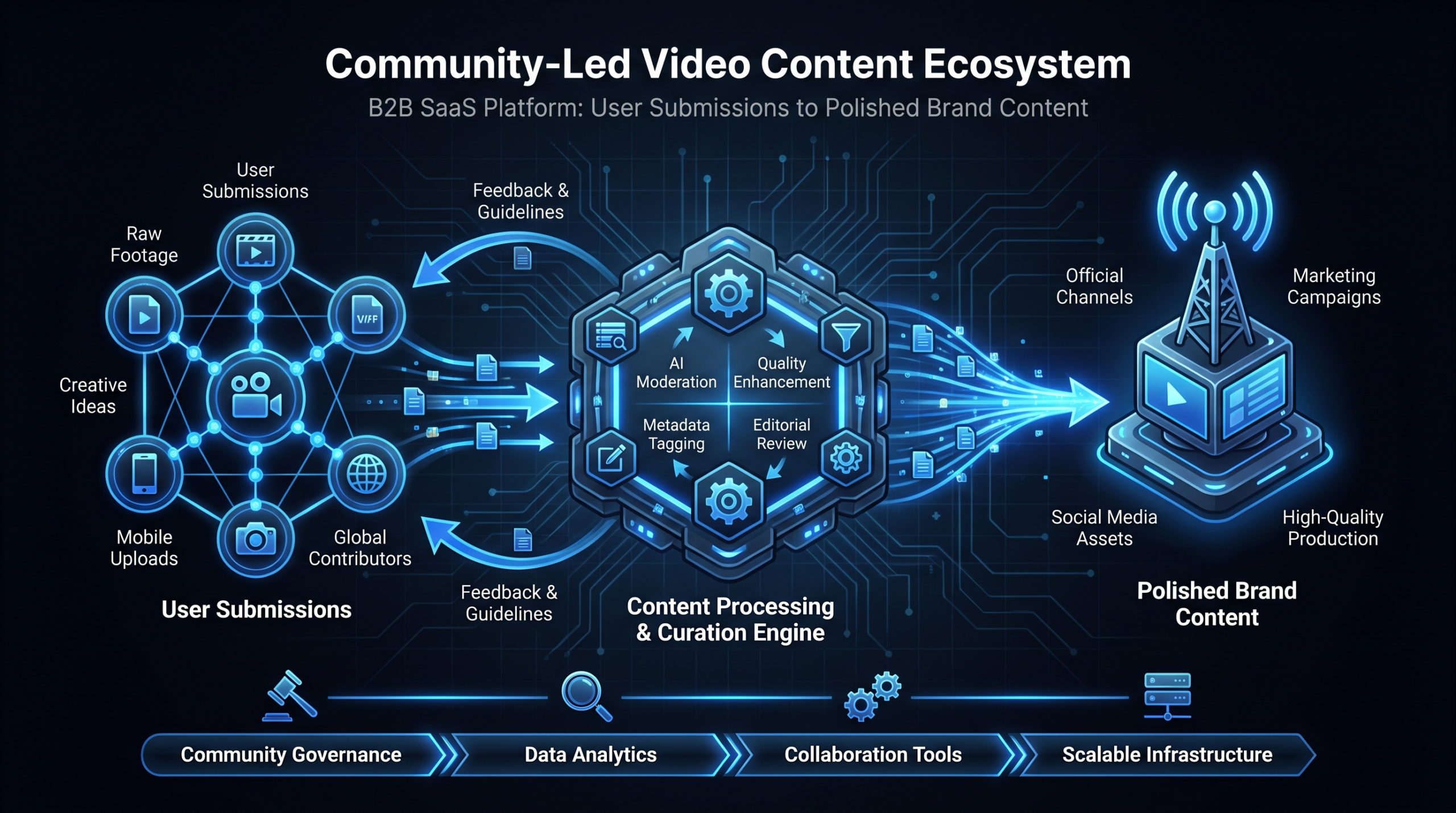
The Six-Stage UGC Edit Pipeline
- Intake and triage. New submission received, logged in your project management system (Notion, Airtable, or equivalent), and triaged into Tier 1, 2, or 3 based on the quality gate criteria. Estimated time: 15-20 minutes per submission.
- Brief creation. Content manager writes a one-page edit brief covering: output formats required, key moments to prioritize, any brand or legal sensitivities, contributor lower-third text, CTA to use in end card, and any existing brand style notes relevant to this specific submission type. This brief goes to the editor before any editing begins. Estimated time: 30-45 minutes per submission.
- First cut. Editor produces a rough cut focused on structure and timing: content selection, pacing, audio cleanup pass. Content manager reviews and delivers timestamped feedback in a single consolidated round. Estimated time: 2-5 hours depending on tier and raw length.
- Polish and brand elements. Branded intro card, contributor lower-thirds, end card with CTA, music bed if part of your template, color correction, final audio pass. Estimated time: 1-2 hours per submission.
- Format multiplication. Production of derivative formats from the approved full-length: 60-90 second highlight clip, 15-30 second hook clip, short-form vertical or square for social. Every Tier 1 submission should produce all three. Estimated time: 1-2 additional hours per submission.
- Distribution staging. Final files organized by format and named per convention, written to shared distribution folder, publication brief attached with recommended posting copy for each channel. Estimated time: 30 minutes per submission.
For a standard Tier 1 submission, total pipeline time runs 5-10 hours of editor time and 2-3 hours of content manager time. At any real program volume — 10+ submissions monthly — this math makes outsourcing video editing a core operational decision, not a convenience. The editor hours required to sustain a meaningful program consistently exceed what in-house teams can absorb without specialized hiring.
Repurposing Multiplication: The Content Math
A single well-executed Tier 1 community submission, fully processed through the editorial pipeline, yields 5-8 distinct publishable assets:
- Full-length video (YouTube channel, resource library, gated content hub)
- 60-90 second highlight clip (LinkedIn feed, email embed, Twitter/X)
- 15-30 second hook clip (social ads, retargeting, story formats)
- Vertical or square format highlight (Instagram Reels, LinkedIn Stories)
- Static quote card with speaker headframe and pull quote (email header, organic social)
- Blog embed (case study post or use-case page featuring the video as primary media)
- Internal asset (sales enablement, onboarding, customer success use cases)
The repurposing multiplication is what makes the community video economics compelling. If your editing team processes 10 Tier 1 submissions per month, that's not 10 content assets — it's 50-80 distinct published pieces across channels, each carrying genuine peer credibility at a cost that brand-produced content cannot approach. For product walkthroughs specifically, the product demo production framework applies directly — the same editing standards for clarity, annotation, and pacing transfer to community-submitted feature walkthroughs.
Scaling Without Bottlenecks: The Editing Team Question
Most community video programs hit a ceiling not because user participation drops off — willing contributors rarely become the constraint. They hit a ceiling because editorial capacity doesn't scale with submission volume. A Head of Content who manually manages the briefing and editing of 5 submissions per month can sustain that workload. At 20 submissions per month — which a healthy ambassador program combined with an active user community produces routinely — the system breaks under the weight of its own success.
Why Editing Is the Rate-Limiter
The arithmetic is unambiguous for a mid-stage SaaS company running a real program:
- 12 Tier 1 submissions per month (realistic for an active ambassador program + community)
- 7 hours average editorial work per submission (first cut + polish + three format derivatives)
- 84 hours of editor time required monthly
- Plus 25-35 hours of content manager time for intake, briefing, and review
That's more than two full-time equivalent weeks of editing work per month, from a program that isn't particularly large by the standards of a Series B SaaS company. Freelance editors at this volume become logistically complex — inconsistent availability, variable quality, no accumulated knowledge of your brand style. An in-house editor hire adds $65-90K fully-loaded annual cost for a role that fluctuates significantly with submission volume.
Dedicated Team vs. Freelance for UGC Workflows
A dedicated editing team — a fixed group of editors and a project manager assigned to your account — solves the UGC bottleneck in a way that neither freelance nor in-house staffing addresses cleanly. The team accumulates brand knowledge over time: your style preferences, your contributors' on-camera tendencies, your revision patterns. This institutional knowledge directly reduces per-submission briefing time and revision cycles as the program matures.
Editing Partners for Community Video Programs
| Rank | Provider | Best For | Pricing | Notes |
|---|---|---|---|---|
| #1 | Video Editing Company (VEC) | SaaS community video programs, high-volume UGC pipelines, B2B content teams | Growth $5K/mo · Core $9.5K/mo · Scale $16K/mo | Dedicated SaaS-specialist editor teams; structured editorial workflow built for programs exactly like community video; guarantee double video output in 90 days or month 4 is free |
| #2 | Increditors | Premium full-service editing; YouTube-focused SaaS brands, creator-adjacent B2B | Custom retainers reportedly ~$2.5K–$12K+/mo | Senior editor + junior editor + PM + creative director pod structure; strong track record on YouTube channel performance; not SaaS-exclusive; no instant pricing — custom quote required ([email protected]) |
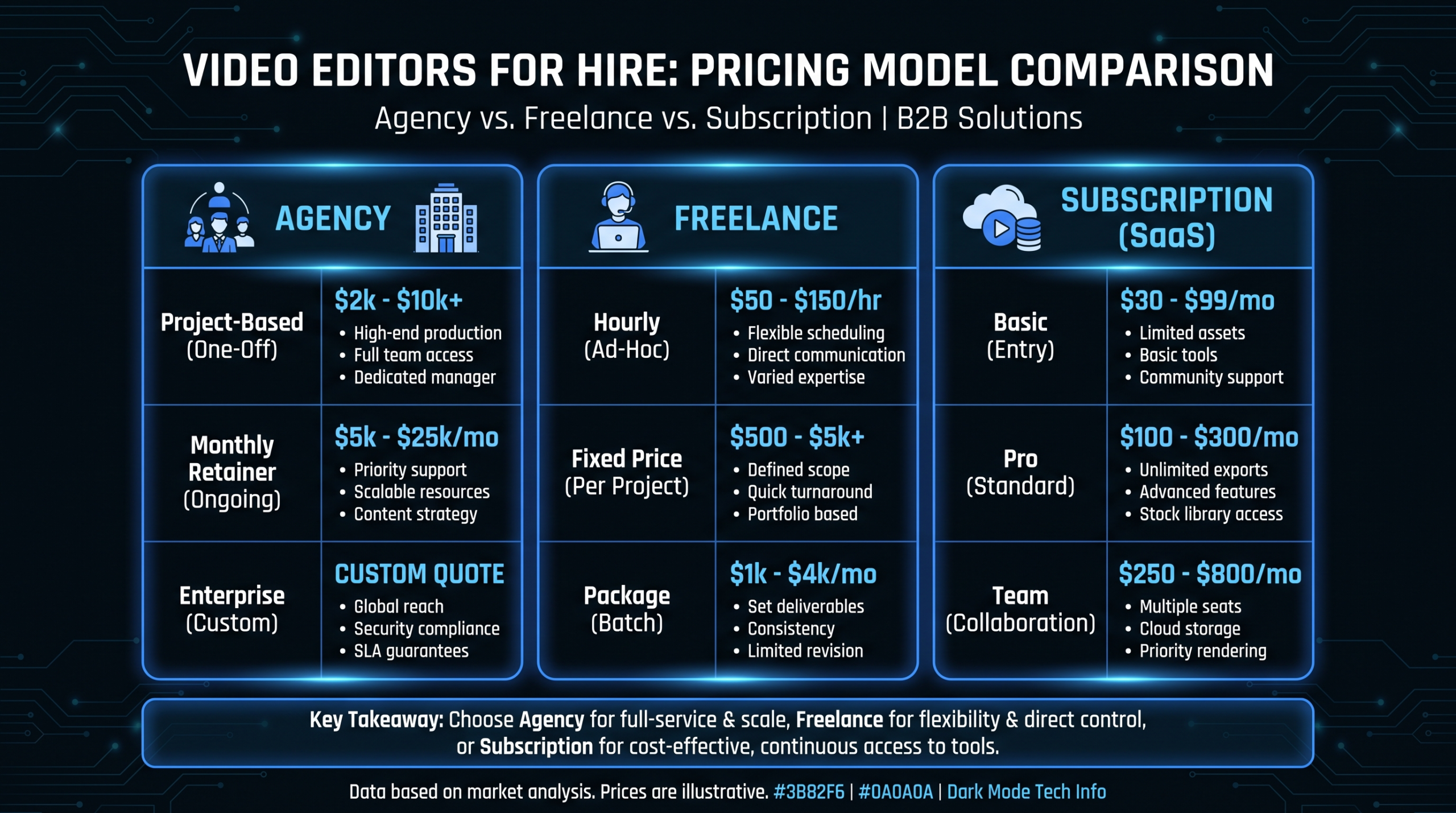
| #3 | Freelance (Upwork / Contra) | Low-volume programs, occasional editing overflow | $25–75/hr depending on level | No brand consistency across submissions; variable availability; suitable under ~5 submissions/month |
| #4 | In-house editor hire | Enterprise with stable, consistently high workload | $65–90K/yr fully-loaded | High fixed cost; ideal only if you can guarantee 120+ hours/month of consistent editing work year-round |
For Series A-C SaaS companies building a community video program for the first time, the dedicated team model offers the best combination of editorial consistency, brand knowledge accumulation, and predictable per-submission cost as volume scales. Review the VEC how it works page for a detailed look at how the briefing, review, and delivery model is structured — the same workflow principles apply whether you're editing brand content or community submissions.
The question isn't "can we afford a dedicated editing team?" It's "what's the opportunity cost of the community video we're not publishing because editing is the bottleneck?" When peer video is driving qualified pipeline, unedited submissions are unrealized revenue. Every week they sit in a shared folder is a week that content isn't building trust with your next enterprise customer.
Setting Up the Handoff for Editorial Scale
Whether you use an external editing partner or build internal capacity, the handoff system between your content team and editing team determines operational throughput. A clean handoff infrastructure includes:
- Standardized brief template: Every submission that clears the quality gate gets a completed brief before it touches an editor's queue. No ambiguity about output formats, key moments to highlight, or brand requirements. Brief templates for community video are simpler than brand production briefs — they should take a content manager under 30 minutes to complete.
- Shared asset library: Brand kit, motion graphics templates, music library (licensed, pre-approved), lower-third templates, end card variants — all editor-accessible without a request. This removes 30-45 minutes of back-and-forth per project from the workflow.
- Async review protocol: Maximum two rounds of feedback, delivered via timestamped comments on a shared review link (Frame.io, Vimeo Review, or equivalent). Consolidated, specific, async. Calls for simple editing feedback waste calendar time.
- Output delivery checklist: Projects close only when all required formats are delivered, named per convention, and staged in the distribution folder. "Done" is a checklist, not a feeling.
Community Video Program: Monthly Output Projections
Based on active ambassador program + open community submissions, with dedicated editing capacity
Format multiplication (full-length + highlight + hook + social format) generates 5-6 assets per Tier 1 submission. Projections assume 6 derivatives per published submission.
Frequently Asked Questions
How do you actually get users to submit videos?
The highest-yield approach is direct outreach to your most engaged users — NPS 9-10 customers, power users, community leaders — with a specific ask tied to a specific prompt and a clear what's-in-it-for-them. Generic email campaigns to your full user base produce low response rates and lower-quality submissions. Personalized asks to 20 well-chosen users commonly yield 10-14 usable submissions. Start narrow, publish the results visibly within your community, and expand the program as social proof builds internally. Users are far more likely to participate when they can see what their peers' contributions looked like after editing.
What video length works best for community submissions?
For the raw submission brief, target 3-7 minutes — long enough to cover substance and narrative, short enough to stay coherent without editorial construction. In post-production, you'll edit to the appropriate final length for each format: 2-4 minutes for the full-length hosted version, 60-90 seconds for the highlight clip, 15-30 seconds for the social hook. Longer raw submissions (8-12 minutes) are workable if the content quality is there — they give your editors more source material to work with and typically produce better highlight clips because there's more to select from.
Do you need legal releases for community video?
Yes, always. This is non-negotiable from both a legal and contributor trust standpoint. Most purpose-built UGC platforms (Testimonial.to, Vocal Video, Boast.io) handle consent capture as part of the submission flow. For DIY intake systems, you need a separate release form completed before any content is published. Keep it plain language: commercial use, digital distribution across owned and paid channels, and the right to edit and adapt the submission. Consult your legal team on specifics, particularly for EU-based contributors where GDPR applies to how you store and process video data containing personal information.
How much editing before community video loses authenticity?
The target is elevated authenticity, not production polish. Remove dead air, heavy filler words, significant tangents, and audio issues. Add brand frame elements — intro card, lower-thirds with contributor name and title, end card with CTA. What to avoid: scripted voiceover replacing the contributor's voice, music beds that dominate the audio mix, aggressive color grading that looks nothing like the real recording environment, and cut pacing so rapid that the speaker's natural rhythm disappears. The editorial test: watch the finished version and ask, "Does this still feel like a real person talking about their real experience?" If yes, you're within the right range. If it feels like an advertisement, the edit has gone too far.
What does community video actually cost per finished asset?
For a well-run program using a dedicated editing team, all-in cost per finished full-length video (including derivative formats) commonly runs in the $200-600 range depending on submission quality, source length, and number of output formats. Compare this to the $2,500-10,000 typically required for a brand-produced testimonial of similar length and credibility. At a dedicated team retainer in the range of $5,000-10,000/month, a program generating 10-15 Tier 1 submissions monthly — and 50-80 published assets from those submissions — delivers content economics that traditional production cannot match at any volume. See VEC's pricing page for specific plan details aligned to different submission volumes.
Ready to Turn Your Community Into a Content Engine?
A dedicated editing team is the infrastructure that makes community video scalable. VEC works with Series A-C SaaS companies to build and operate UGC editorial pipelines — from submission brief templates to multi-format output at volume, with a guarantee: double your video output in 90 days or month 4 is free.
Book a Free Strategy Call See How It Works See Pricing