B2B SaaS Demo Videos: The 2026 Playbook
TL;DR — What This Playbook Covers
- Why most SaaS demo videos fail — and the strategic errors behind low conversion rates
- The 4 demo video formats that actually move B2B buyers in 2026 (and when to use each)
- A production framework covering script, screen recording, voiceover, motion graphics, and final edit
- Distribution strategy — where to place demo videos in your funnel for maximum pipeline impact
- Budget benchmarks for in-house, freelance, and agency production paths
- A QA checklist you can use before any demo video goes live
Table of Contents
Most B2B SaaS demo videos are product tours that nobody finishes. They open with a logo animation, cut to a talking head explaining what the product "does," and spend four minutes clicking through the UI while ambient music plays in the background. By minute two, your prospective VP of Marketing is back on LinkedIn.
The problem isn't the format — demo videos work. The problem is strategic misunderstanding of what a B2B buyer actually needs from a demo video in 2026. This playbook corrects that, giving you a system for producing demo videos that progress pipeline, not just rack up views.
Why Most B2B SaaS Demo Videos Fail
Before fixing the production, fix the strategy. The root causes of poor-performing demo videos are almost always upstream of the edit.
Error 1: Leading with Features, Not Outcomes
A demo video that opens with "here's our dashboard" is answering a question the buyer hasn't asked yet. Before they want to see the product, they need confirmation that you understand their problem. B2B buyers — particularly at Series A–C SaaS companies where buying committees have formed — evaluate vendors on fit first, capability second. Your demo video's first 30 seconds must be about them, not your UI.
Error 2: One Video for Every Stage of the Funnel
A buyer who just found you on Google has different needs from a buyer in an active evaluation comparing three shortlisted vendors. Sending both the same two-minute overview video is a strategic mistake. The overview confuses the late-stage buyer who already understands the category; the deep-dive overwhelms the early-stage buyer who's still assessing whether they have the problem you solve. Effective demo video programs use different video types at each funnel stage — covered in the next section.
Error 3: Treating the Demo Video as a Recording of a Sales Call
Live sales demos have a rhythm built around conversation, questions, and pivoting in real-time. That rhythm does not translate to a scripted video. When you record a sales rep walking through the product, you get a one-sided conversation with dead air, filler language ("so, um, let me click over to..."), and no ability to edit based on viewer feedback data. Demo videos are marketing assets — they need to be produced, not recorded.
Error 4: Ignoring the Audio-First Reality of B2B Video
Research from video analytics platforms consistently shows that viewers tolerate bad visuals far longer than bad audio. A crisp professional voiceover on average screen recordings outperforms polished visuals with mediocre audio. Many SaaS teams spend their entire demo video budget on motion graphics and UI animations, then record the narration on a laptop microphone. The priority is backwards.
Error 5: No CTA Architecture
A demo video without a clear, contextually appropriate call to action is a completed sales conversation with no ask. The CTA must match the funnel stage: an overview video should drive to a live demo booking; a use-case video should drive to a relevant case study or free trial. Generic "Sign up free" CTAs in every video represent a missed segmentation opportunity.
The 4 Demo Video Formats That Convert in 2026
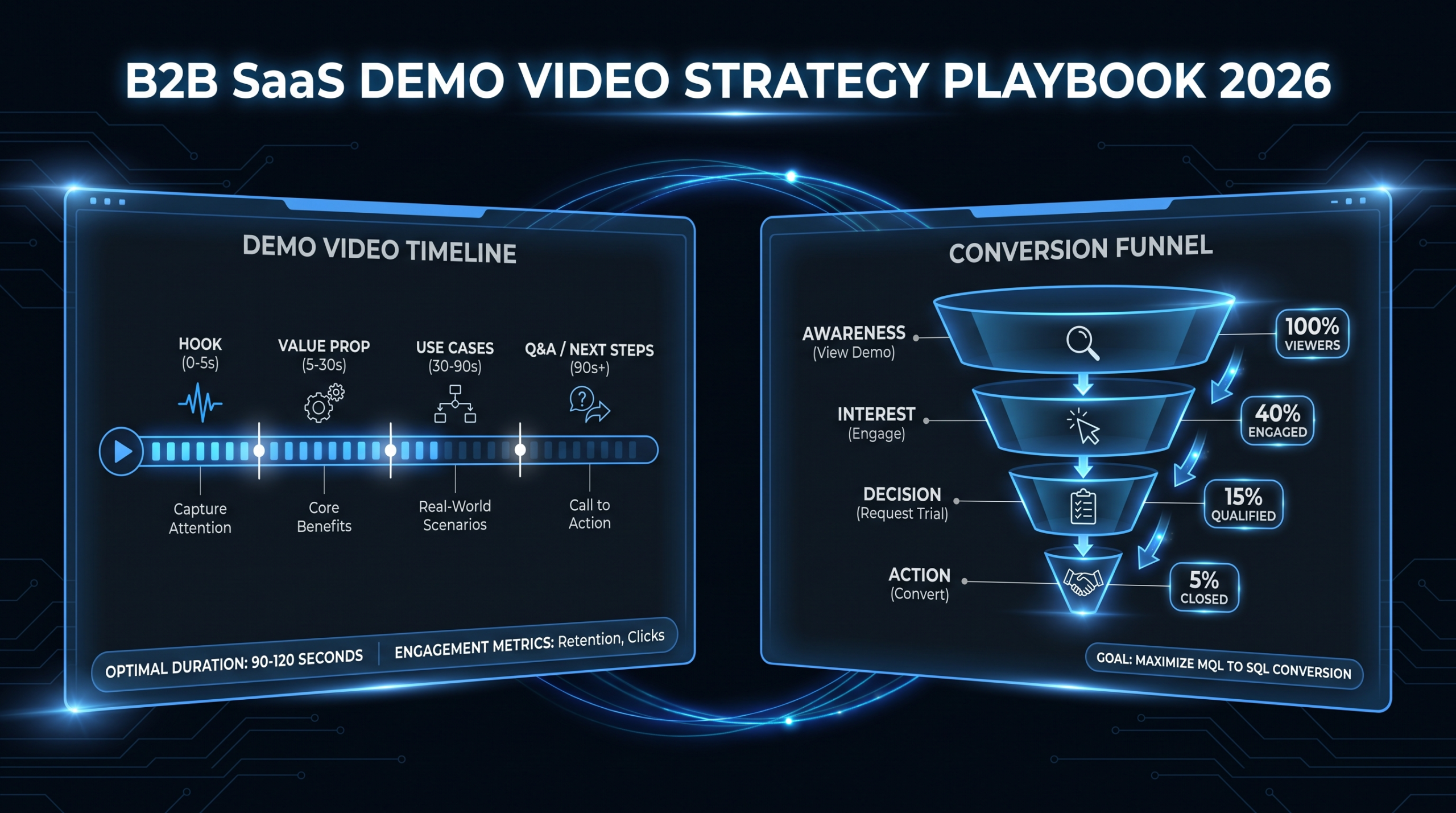
Each format serves a distinct buyer need. Matching the format to the funnel stage is the single highest-leverage decision in your demo video strategy.
Demo Video Format Comparison
| Format | Length | Funnel Stage | Primary Goal | Hosted Where |
|---|---|---|---|---|
| Overview / Hero Demo | 60–90 sec | Top of funnel | Qualify interest, generate demo requests | Homepage, G2/Capterra profile, LinkedIn ads |
| Use-Case Demo | 2–4 min | Middle of funnel | Show value for a specific persona/workflow | Landing pages, email sequences, help center |
| Feature Deep-Dive | 3–6 min | Late-stage evaluation | Resolve objections, demonstrate technical depth | Sales enablement decks, proposal follow-up emails |
| Interactive / Guided Tour | Self-paced | Post-trial activation | Drive activation, reduce support load | In-app, onboarding email sequence |
Format 1: The Overview / Hero Demo
This is your 60–90 second homepage video. It does one job: convert a skeptical visitor into a demo request or trial signup. It should not try to explain every feature. It should make a bold, specific claim about the outcome your product delivers — ideally with a number ("reduce churn analysis time from 4 hours to 20 minutes") — show enough of the UI to prove the claim is real, and close with a direct CTA.
The common failure mode is trying to show everything. The discipline is showing one thing compellingly. Think of it as a movie trailer: it sells the experience, not the plot.
Format 2: The Use-Case Demo
This is where most SaaS demo video programs stall — not enough of these exist. Use-case demos follow a specific persona through a specific workflow and show exactly how your product changes their experience. For a platform serving both RevOps and Sales Enablement teams, you should have at least two separate use-case videos: one for each persona, with different language, different parts of the product highlighted, and different CTAs.
These videos live in email nurture sequences, on landing pages tied to specific pain-point ad campaigns, and in the help center where they reduce support tickets. You can see real-world examples of how SaaS companies structure these in our SaaS demo video examples breakdown — it's worth reviewing those before scripting your own.
Format 3: The Feature Deep-Dive
Late-stage B2B buyers have specific objections. They've narrowed their shortlist to two or three vendors and are looking for differentiation at the feature level. A three-to-six minute deep-dive on your most defensible capability — integrations, reporting, compliance controls, workflow automation — addresses those objections better than a sales call that has to be scheduled, attended, and recapped.
These videos are shared by sales reps after discovery calls, attached to proposals, and included in mutual action plans. They're produced for a small but high-intent audience, which means the investment ROI per view is higher than any other demo video format.
Format 4: The Interactive / Guided Tour
Tools like Arcade, Navattic, and Storylane have made interactive product tours a standard part of the SaaS onboarding stack. These aren't video in the traditional sense — they're step-by-step walkthroughs of the actual product UI. But they follow the same production principles: clear outcome framing, concise copy, and a logical progression through the aha moment.
The key distinction: interactive tours reduce support load and improve activation metrics. They're not designed to sell — they're designed to ensure that buyers who choose your product actually use it.
The 2026 Production Framework
Every effective B2B SaaS demo video goes through five production stages. Skipping or compressing any stage creates a predictable failure mode.
Production Stage Overview
| Stage | Deliverable | Typical Duration | Common Skip Error |
|---|---|---|---|
| 1. Strategy Brief | Buyer persona, funnel stage, single message, CTA | 1–2 days | Skipping → produces a feature tour nobody needs |
| 2. Script | Timed VO script, on-screen annotation notes | 2–3 days | Skipping → sales rep improvises, filler language ruins the edit |
| 3. Screen Recording | Clean UI captures, annotated mouse paths | 1 day | Recording live UI → typos, notifications, cursor drift in final video |
| 4. Voiceover + Audio | Studio-quality VO, music bed, SFX | 1–2 days | Laptop microphone VO → audio kills the entire production |
| 5. Post-Production | Edit, motion graphics, captions, color | 3–5 days | Rushed edit → pacing issues, no visual hierarchy |
Stage 1: The Strategy Brief
The brief answers four questions before a single word of script is written:
- Who is watching this video? Name the persona, their job title, their primary pain point.
- Where in the funnel does this video live? This determines length and depth.
- What is the single outcome this video must communicate? One claim, not five.
- What action should the viewer take immediately after? This is the CTA that gets written into the video itself.
A brief that takes two hours to write saves you three rounds of revisions downstream. Every version-three revision you've ever done on a demo video can be traced back to a brief that didn't answer one of these four questions clearly.
Stage 2: The Script
More on script structure in the dedicated section below — but the key production principle here is that the script drives everything else. The screen recording is planned against it. The motion graphics annotations are mapped to specific timestamps. The voiceover is recorded to it verbatim.
Any production team that starts screen recording before the script is final will redo that recording. Build the script review step into your project plan with a 48-hour turnaround on stakeholder feedback. Do not start recording until the script has a signed-off version.
Stage 3: Screen Recording Best Practices
Never record a live product session for a professional demo video. Instead:
- Seed the environment with demo data that tells a coherent story. A CRM demo with contacts named "John Smith" and "Test User" signals low production quality. Use realistic fictional data: companies, names, and deal values that match your target buyer's world.
- Disable all notifications at the OS level before recording. One Slack notification mid-recording can require a full re-record.
- Use a clean browser profile with no extensions, bookmarks bar hidden, and the UI at 100% zoom. Browser clutter in the background of a product demo is an instant credibility killer.
- Record at 2x the target resolution (record at 4K, export at 1080p). This gives the editor zoom headroom to highlight specific UI elements without pixelation.
- Record the mouse path separately from the click action. Slow, deliberate mouse movements that pause before clicking read as intentional; rapid cursor movement reads as someone in a hurry to get the recording over with.
Script Structure That Moves Buyers
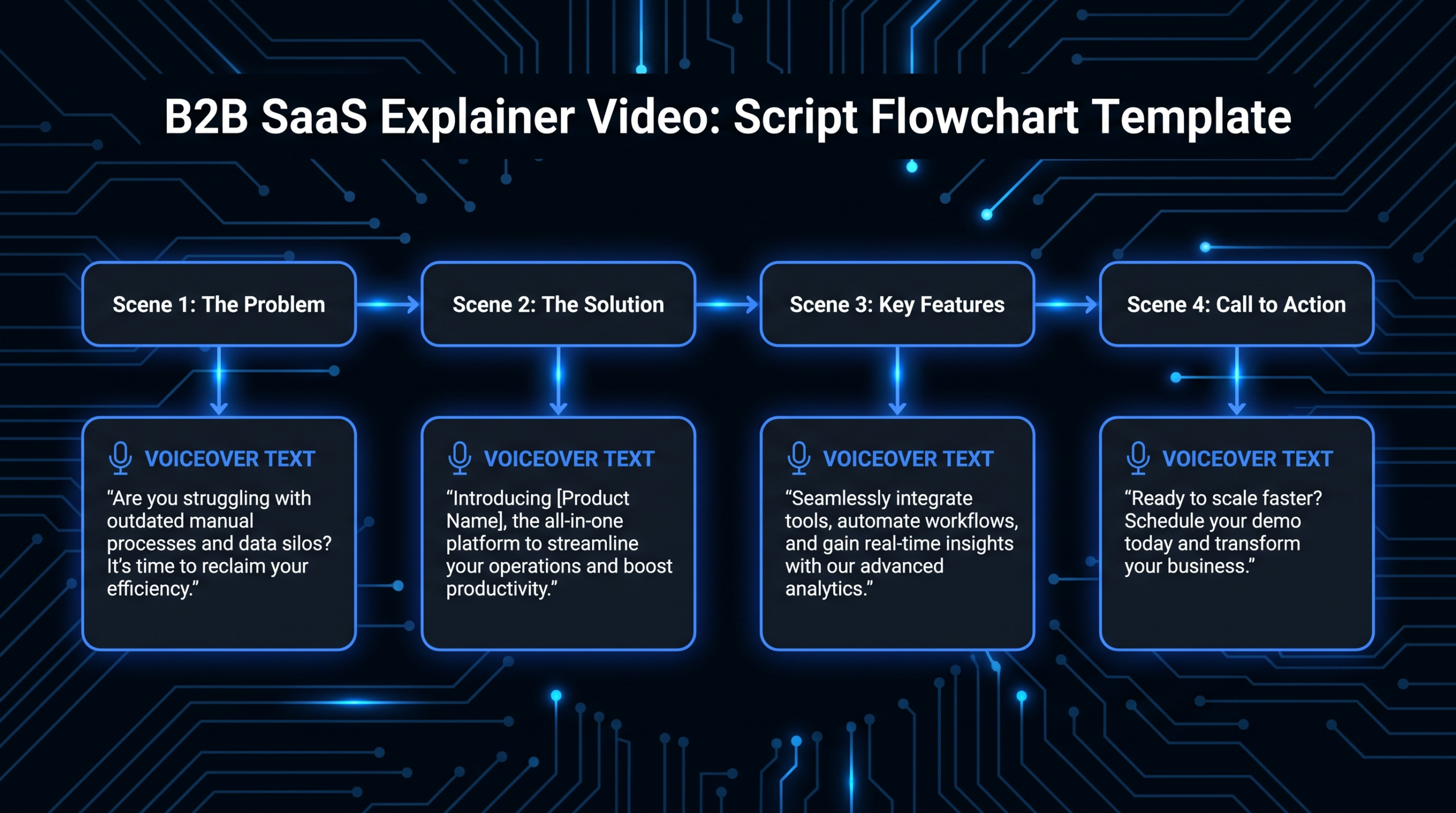
The script structure for a B2B SaaS demo video follows a problem-solution-proof-CTA arc. The proportions shift by video length, but the arc is constant.
The 60-Second Overview Script Structure
For the homepage hero demo:
- 0:00–0:10 — Problem statement. One sentence, first person for the buyer: "Your team spends 6 hours a week pulling data from three different platforms to build a report your VP will see for 90 seconds."
- 0:10–0:45 — Solution demonstration. Show the specific product action that solves the stated problem. No feature tour. One workflow, start to finish.
- 0:45–0:55 — Outcome claim. Quantified if possible, hedged if not: "Teams commonly cut that reporting time to under 30 minutes."
- 0:55–1:00 — CTA. Direct and specific: "See it work with your data — book a 30-minute call."
The 2–4 Minute Use-Case Script Structure
For persona-specific and use-case landing page videos:
- Opening (15%): Persona identification and pain acknowledgment. The buyer should recognize themselves in the first 20 seconds.
- Context (10%): What the old workflow looks like — optional, but effective for audiences who relate to before/after framing.
- Core demo (60%): Walk through the complete workflow. Each step gets a brief annotation on-screen ("Step 1: Import your pipeline data") to orient the viewer who's watching on mute.
- Outcome summary (10%): Call back to the opening pain, confirm the outcome, add supporting social proof if available ("Used by teams at [category] companies").
- CTA (5%): Stage-appropriate. For a middle-funnel video, the CTA might be "See our case studies" or "Start your 14-day trial."
Voiceover Writing Rules
Demo video scripts are written to be spoken, not read. Apply these rules before sending the script to voiceover:
- Read every sentence aloud. If you pause to breathe in the middle, it's too long — break it into two sentences.
- Remove all adjectives that don't add information: "powerful," "robust," "seamless," "intuitive." These words are filler that signals marketing speak to B2B buyers.
- Write in second person ("your team," "you can") not third ("users can," "the platform allows").
- Time the script. One page of double-spaced copy reads at approximately 90 seconds. A 60-second video needs roughly 130–150 words of narration.
Post-Production: Where Demo Videos Are Won or Lost
The edit is where a competent screen recording becomes a compelling sales asset — or where it falls apart. Most SaaS marketing teams underestimate post-production scope until they're on revision three of a video that still doesn't feel right.
Pacing and the 3-Second Rule
Every shot in a demo video should change something — either what's on screen, what's highlighted, or what's being said. If three seconds pass with no change, the viewer's attention drifts. For UI-heavy demos where you're holding on a single screen while narration plays, use motion graphics annotations (cursor pulses, highlights, zoom-ins) to create visual movement within the shot.
Motion Graphics for UI Clarity
The most common motion graphics in B2B SaaS demo videos:
- Cursor spotlight: A softened circle that follows the cursor, helping viewers track what's being clicked
- Region zoom: A slow zoom-in to a specific UI element as it's mentioned in the narration
- Callout labels: Text labels with arrows pointing to specific fields or buttons ("Pipeline stage" / "Last activity date")
- Transition wipes: Clean cuts or slides between UI states that signal time has passed in the workflow
- Lower-third titles: Step numbers or persona labels that appear at the start of each major workflow section
Agencies with dedicated SaaS demo experience — like VEC's product demo video production service — have libraries of these motion graphics elements already built, which cuts post-production time significantly versus building from scratch on every project.
Captions Are Not Optional
LinkedIn data from Wistia's annual State of Video report consistently shows that a significant proportion of video views happen with audio off, particularly in the first few seconds of feed-based discovery. Captions should be burned into demo videos that will be distributed on social platforms. For website-hosted demos, an SRT file uploaded alongside the video achieves the same result while remaining searchable.
Caption style for B2B demo videos: sentence-cased, no more than two lines at a time, timed to the voiceover (not word-for-word with no breathing room). All-caps captions in social-style videos may work for consumer content but feel misaligned with the enterprise buyer persona.
Color Grading for Screen Recordings
Raw screen recordings often look flat and slightly washed out, especially against talking-head footage or animated segments. A basic color grade pass — adjusting white balance, contrast, and saturation — brings screen recordings in line with the rest of the video. This is especially important when you're cutting between screen recordings of your UI and professionally shot footage of a presenter or customer.
Distribution Strategy for Demo Videos
A demo video library with no distribution strategy is a content investment with no conversion path. Where and how you place demo videos is as important as how you produce them.
Homepage Placement
The hero demo should be above the fold, autoplay-muted, with a thumbnail that frames the outcome (not the logo). Autoplay-muted videos on homepages typically see higher engagement than click-to-play videos for visitors who are already in research mode. Include a visible play button for visitors who want audio from the start.
Avoid placing the demo video inside a modal that requires a form submission to access. Gating homepage demos costs you the buyers who would self-qualify and request a live call after watching — your highest-intent traffic converting themselves into pipeline.
G2, Capterra, and Review Site Profiles
Review platforms allow video uploads in two locations: the product profile page and review responses. Profile page videos get watched by buyers in active evaluation — this is one of the highest-intent contexts you have. A 90-second overview demo on your G2 profile reaches buyers who have already opted into a comparison process.
Email Sequences
Use-case demo videos belong in email nurture sequences segmented by persona. A VP of Marketing and a Sales Director evaluating your platform have different workflows and different objections — they should receive different demo videos with different narration, even if the underlying product being demonstrated is the same.
Video in email (thumbnail with a play button linking to a hosted page) outperforms plain text links for click-through in B2B email sequences. The word "video" in subject lines may lift open rates depending on your audience — test it rather than assuming.
Sales Enablement Integration
Feature deep-dive videos belong in your CRM as sales-stage resources. When a deal enters "Technical Evaluation," reps should have a library of specific feature videos they can attach to proposal emails. Building a simple matrix — deal stage vs. video asset — reduces the time reps spend searching for the right resource and ensures buyers receive consistent, high-quality demos regardless of which rep handles the deal.
Our guide to product demo video production covers the hand-off from marketing to sales enablement in detail, including how to version demo videos for different ICP segments.
LinkedIn Distribution
Short-form demo clips (30–60 seconds) pulled from longer use-case videos perform well on LinkedIn for brand awareness among your ICP. The editing approach for LinkedIn clips differs from the full demo video: tighter pacing, text-on-screen for the muted-viewer experience, and a hook in the first three seconds that speaks directly to a pain the persona recognizes.
Budget Benchmarks by Production Path
There are three production paths for B2B SaaS demo videos. Each has a different cost structure, quality ceiling, and time-to-delivery. The right path depends on your video volume and how central demo videos are to your pipeline strategy.
Demo Video Production Paths — Cost Comparison
| Path | Per Video Cost (est.) | Time to Delivery | Quality Ceiling | Best For |
|---|---|---|---|---|
| In-house team | $3,000–8,000 loaded cost | 2–4 weeks | High (with right tools and skills) | Companies with 3+ demo videos/month and a dedicated video producer |
| Freelance editor + VO | $800–3,000 | 1–2 weeks | Medium (coordination overhead) | 1–2 demo videos/quarter, budget-constrained teams |
| Dedicated video agency | $2,500–8,000 | 7–14 days | High (senior editors, SaaS experience) | Series A–C companies with ongoing demo programs |
In-House Production: The Real Cost
The appeal of in-house production is control and cost. The actual cost per video — when you factor in fully-loaded headcount (salary, benefits, equipment, software licenses for Premiere Pro, After Effects, a stock music platform, and storage) — commonly runs $3,000–8,000 per video at Series A headcount levels. This isn't a reason to avoid in-house production, but it reframes the comparison with agency pricing.
In-house production makes financial sense when you're producing three or more demo videos per month and have a dedicated producer or video marketing manager. Below that volume, the fixed cost of headcount isn't efficiently utilized.
The Freelance Path
Freelance production typically involves a script writer, a voiceover artist, and a video editor — three separate contractors to coordinate. The total cost is lower than an agency on a per-video basis, but the coordination overhead (briefing each person, managing timelines, reconciling different revision processes) adds hidden time cost to your team. For one-off demo videos, freelance is cost-effective. For an ongoing program, the coordination cost compounds.
Our full breakdown of video editing cost per minute — which covers freelance, agency, and subscription pricing across video types — is worth reviewing if you're comparing options. And our pricing page outlines how VEC structures demo video production for SaaS teams at different growth stages.
The Agency Path (VEC's Model)
A dedicated video editing agency with SaaS demo experience brings three things a freelance arrangement doesn't: a team that already knows the format, motion graphics libraries that accelerate post-production, and a project manager who coordinates the process so your team doesn't have to.
At Video Editing Company, demo video programs for B2B SaaS clients typically involve a senior editor assigned to your account who learns your product, your persona language, and your brand voice over time. The first demo video takes the longest; subsequent videos from the same team take roughly 40% less time because the learning curve is already paid. Our Growth plan at $5K/month, Core at $9.5K/month, and Scale at $16K/month are structured to support ongoing demo video programs at different output volumes — see our how it works page for specifics on the workflow.
Pre-Launch QA Checklist
Before any B2B SaaS demo video goes live, run it through this checklist. Each item corresponds to a failure mode we've documented across hundreds of demo video productions.
Demo Video QA Checklist
| Check | Pass Criteria | Common Failure |
|---|---|---|
| First 5 seconds | Viewer knows who the video is for and what problem it addresses | Opens with logo animation + product name |
| Audio quality | No room echo, no background noise, consistent levels throughout | Laptop microphone recording, level drops between takes |
| UI demo data | All visible data is realistic fictional (not "Test User" or placeholder text) | Demo environment not seeded before recording |
| Captions | Captions present and synced to narration; no spelling errors | Auto-generated captions not reviewed, technical terms misspelled |
| CTA clarity | CTA appears on screen with specific action; link/URL is active | Verbal CTA only, no on-screen reinforcement |
| Watch-on-mute test | A viewer with audio off can follow the core demo workflow | All context is in the voiceover with no on-screen text |
| Mobile playback | UI elements are legible at mobile screen size; text annotations not cropped | Designed and tested at desktop resolution only |
| Pacing check | No shot holds for more than 3 seconds without visual change | Static UI screens held for 8–10 seconds while narration plays |
| Length vs. format | Video length matches the declared format (overview ≤90s, use-case ≤4min) | Use-case demos balloon to 7–8 minutes during script revisions |
Run this checklist internally before sharing with external stakeholders. Catching a muted-view failure or a CTA link error during internal review avoids a re-approval cycle that can delay launch by a week.
Testing and Iteration After Launch
The production checklist gets the video live. What improves it over time is engagement data:
- Drop-off rate by timestamp: Where do viewers stop watching? A cliff at 0:45 in a two-minute video signals a pacing problem or a section that doesn't deliver on what preceded it.
- Completion rate by funnel stage: Late-stage buyers (in active evaluation) should complete feature deep-dives at higher rates than top-of-funnel visitors complete overview videos. If the completion rates are reversed, your video placements may be misaligned.
- CTA click rate: Industry benchmarks vary widely, but any CTA click rate below 2% on a homepage demo warrants testing a new CTA copy or a new CTA destination.
- Replay rate: Sections with high replay rates are sections where viewers are trying to absorb something they found valuable or didn't catch the first time. That information tells you where the highest-value content lives — and where to add more annotation or explanatory text.
Frequently Asked Questions
How long should a B2B SaaS demo video be?
Length depends on the funnel stage. Homepage overview videos should be 60–90 seconds — long enough to demonstrate one workflow, short enough to hold attention. Use-case demos for specific personas work well at 2–4 minutes. Feature deep-dives for late-stage evaluation can run 3–6 minutes when the audience is already invested. The rule: cut everything that doesn't serve the single stated goal of that specific video.
Should we use a real person or screen recording for our demo video?
For most B2B SaaS companies, screen recording with professional voiceover outperforms talking-head demos in terms of information density and production efficiency. A real presenter adds warmth but also adds complexity — camera setup, lighting, reshooting for script changes. The best approach for overview and use-case demos is clean screen recordings with studio-quality voiceover. Feature deep-dives can layer in a presenter when technical credibility matters.
What's the difference between a product tour and a demo video?
A product tour shows features; a demo video demonstrates outcomes. A product tour might click through five sections of your dashboard and explain what each one does. A demo video follows a specific persona through a workflow and shows how the product changes their result. Buyers at B2B SaaS companies have limited attention and high skepticism — lead with the outcome they want, not the features you built.
How many demo videos does a Series B SaaS company actually need?
A comprehensive demo video library for a Series B company typically includes: one homepage overview video, two to four use-case videos (one per major persona or use case), two to three feature deep-dives for your most technically differentiated capabilities, and one post-trial activation video for onboarding. That's roughly 6–9 videos in the core library, with quarterly updates as the product evolves and new use cases emerge from customer conversations.
How do we keep demo videos up to date as the product changes?
Build your demo videos with modularity in mind. Record UI segments in logical blocks (login → main dashboard → specific workflow → reporting) rather than one continuous recording. When the dashboard changes, you can re-record that segment and swap it into multiple videos without re-recording everything. Maintain a simple changelog document that tracks which videos contain which UI versions — this makes triage straightforward when a major product update requires video updates.
Ready to Build a Demo Video Program That Moves Pipeline?
VEC works with Series A–C SaaS marketing teams to produce demo videos that work at every stage of the funnel — from homepage hero demos to sales enablement deep-dives. Dedicated senior editors. 90-day output guarantee. No per-video negotiation.
Book a Free Strategy Call See How It Works