Product Demo Video Best Practices: 2026
TL;DR — 5 Best Practices That Actually Move the Needle
- Lead with the pain, not the product. Open with the problem your buyer has, then reveal your solution. Feature-first demos lose viewers in the first 15 seconds.
- Match length to placement. Homepage heroes: 60–90 seconds. Sales decks and landing pages: 2–4 minutes. Full walkthroughs for late-stage deals only.
- Use the 4-part structure: Hook → Problem → Solution → Proof. Every high-converting demo follows this sequence.
- Audio quality beats visual quality. Viewers tolerate imperfect visuals but not bad audio. A $100 USB mic outperforms a $5K camera setup with built-in microphone.
- Edit for skimmers. Text overlays, chapter markers, and on-screen annotations let buyers absorb key points without watching every second.
Table of Contents
- What Makes a Product Demo Video Actually Convert
- The 4-Part Demo Structure That Works
- Script and Messaging Best Practices
- Length and Pacing Guidelines
- Production Quality Standards
- Demo Video Types: Which Format for Which Use Case
- Distribution and Placement Best Practices
- Common Mistakes That Kill Demo Video Performance
- FAQ
Most product demo videos fail before the 30-second mark. Not because the product is bad — but because the video treats the demo as a feature tour instead of a buying decision tool.
The difference between a demo that converts and one that gets skipped comes down to execution: structure, length, script, pacing, and how well the edit communicates value without demanding the viewer's full attention. This guide covers all of it — with frameworks you can apply immediately, regardless of whether you're producing your first demo or optimizing a library of existing assets.
For context on what a product demo video is and when to use one, see our complete guide to product demo videos.
What Makes a Product Demo Video Actually Convert
The single most important factor in demo video performance is problem-first framing. Demos that open with the buyer's pain point — not the product's features — consistently hold attention longer and generate more qualified responses.
Here's the underlying logic: your buyer doesn't care about your product. They care about their problem. The moment your video answers "I understand what you're dealing with," you've earned the next 30 seconds. From there, your job is to show — not tell — how your product resolves that problem.
A few factors consistently separate high-performing demo videos from the rest:
- Specificity over completeness. Showing one workflow in detail beats showing ten features at a glance. Buyers need to see themselves using the product, not an overview of every capability.
- Proof woven in, not tacked on. A real customer outcome mentioned in the body of the demo carries more weight than a testimonial card at the end.
- Self-service comprehension. The best demos work with the sound off. On-screen text, annotations, and clear UI states mean your video communicates even when a buyer watches it at their desk without headphones.
- A single, clear next step. Every demo ends with one call to action — not three. "Book a call" or "Start free" — pick one.
These aren't aesthetic choices. They're conversion mechanics. Understanding how product demo video production works end-to-end will help you apply these principles at every stage of the process.
The 4-Part Demo Structure That Works
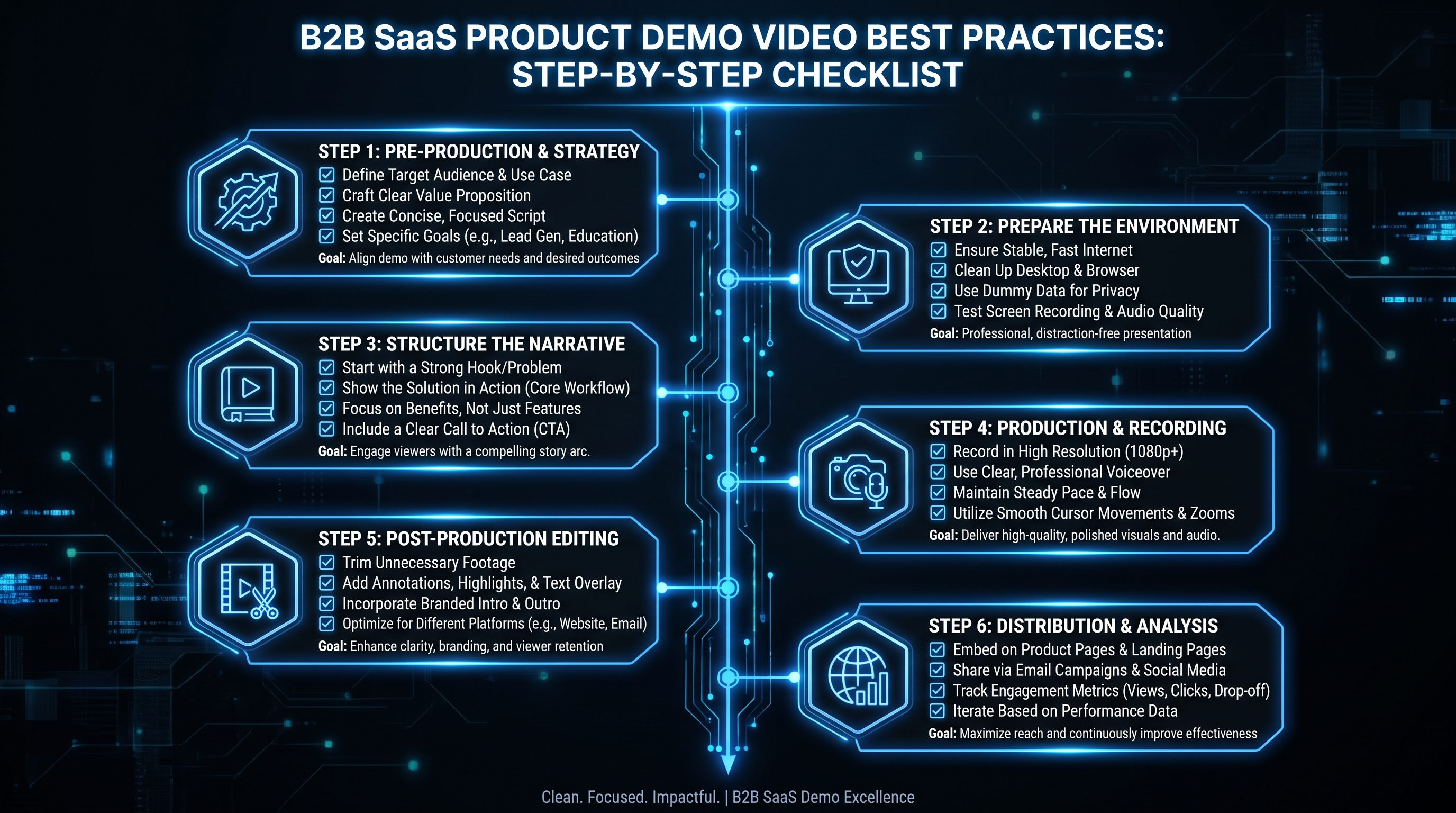
The most reliable demo video structure follows four sequential beats: Hook → Problem → Solution → Proof + CTA. This sequence maps directly to how buyers evaluate software — they need to feel understood before they'll invest attention in a solution.
Part 1: The Hook (0–15 Seconds)
Your first 15 seconds determine whether the rest of the video gets watched. The hook must answer one question: "Is this video relevant to me?" The most effective hooks either state a specific pain ("If your team is losing hours per week to manual reporting…") or show a before-state the viewer immediately recognizes.
Avoid product logos, brand intros, and feature headlines in the first 15 seconds. These don't create relevance — they create friction. Start with the buyer's world, not yours.
Part 2: The Problem Statement (15–45 Seconds)
Name the problem clearly and honestly. Specificity matters more than empathy here. "Your sales team is spending 40% of their week on CRM data entry" is more compelling than "managing CRM data is painful." The more precisely you describe the problem, the more the right buyer self-selects in — and the wrong buyer self-selects out, which is also valuable.
This section should validate the buyer's frustration, not dramatize it. Credibility sells; theatrics don't.
Part 3: The Solution Walkthrough (45 Seconds–3 Minutes)
Show the product solving the exact problem you just described. This is the core of the demo — and the section where most videos go wrong by trying to show everything. Pick one primary workflow and demonstrate it completely. If your product has multiple use cases, create multiple demos rather than cramming them into one video.
Best practices for the walkthrough section:
- Use on-screen callouts to highlight where the buyer's attention should go
- Narrate outcomes, not actions ("now you can see the report in real time" vs. "I clicked the report button")
- Include realistic data — demo environments with placeholder text or fake data undermine credibility
- Show the before and after state explicitly — the transformation is the point
Part 4: Proof + CTA (Final 15–30 Seconds)
Close with one concrete proof point — a real metric, a named customer outcome, or a brief quote. Then land on a single clear CTA. The proof doesn't need to be elaborate; one honest, specific result is worth more than a montage of vague testimonials.
Script and Messaging Best Practices
Lead with the outcome the viewer wants, not the feature you want to show. Every line of your demo script should answer the implicit question "what does this mean for me?" — not "how does this work?"
Write the Script Before Touching the Screen Recorder
The biggest production mistake is starting with a screen recording and adding narration afterward. This reverses the logic. Write your script first — every line of voiceover — then record exactly what you need to illustrate each point. This produces a tighter video with no dead air and no "and here you can see" filler phrases.
A working script format: write the voiceover in the left column and the on-screen action in the right column. For each line of narration, you should know exactly what's happening on screen and why it's there.
Use Customer Language, Not Product Language
Review your support tickets, sales call recordings, and customer reviews before writing a single line. The exact phrases buyers use to describe their problems are the phrases that should appear in your demo script. "I can never tell which accounts are actually worth my time" will resonate with your ICP more than "prioritize your pipeline with AI-powered lead scoring."
Cut Every Word That Doesn't Earn Its Place
Demo scripts have no room for filler. Remove:
- Generic intros ("In today's fast-paced world…")
- Feature names before explaining the benefit
- Adjectives that don't add information ("powerful," "seamless," "robust")
- Transitions that state the obvious ("Now, let's move on to…")
A tight 90-second script serves buyers better than a rambling 5-minute one. Research from Wistia's video engagement studies consistently shows that viewer retention drops sharply when pacing is loose and information density is low.
Write for Silent Viewing
A meaningful share of buyers will watch your demo without audio — in an open-plan office, on a commute, or while muting notifications during a meeting. Your script should work with on-screen text overlays so the core message lands either way. Plan your text annotations as part of the script, not as an afterthought in post-production.
Length and Pacing Guidelines
The right length is determined by placement, not preference. A homepage hero demo should be 60–90 seconds; a sales deck attachment can run 2–4 minutes; a full interactive walkthrough is the only context that justifies anything beyond 5 minutes. Matching length to context is one of the highest-leverage improvements most teams can make.
For a detailed breakdown of optimal runtimes by use case, see our full guide on how long a product demo video should be.
Recommended Demo Video Length by Placement
| Placement Context | Recommended Length | Priority Focus |
|---|---|---|
| Homepage hero | 60–90 seconds | Hook + high-level value, no deep walkthrough |
| Paid ad (social/display) | 15–30 seconds | Single pain point + CTA only |
| Product landing page | 2–3 minutes | Full 4-part structure, one workflow |
| Sales deck / outbound email | 2–4 minutes | ICP-specific problem → solution → proof |
| Post-discovery follow-up | 3–5 minutes | Tailored to prospect's stated pain, specific features |
| Full product walkthrough | 8–15 minutes | Late-stage evaluation, champion enablement |
Pacing: The Overlooked Variable
Length is the visible metric; pacing is the hidden one. A 90-second video with slow pacing will lose viewers faster than a 3-minute video with tight editing. Pacing rules to follow:
- No shot should last longer than 5 seconds without a cut, an annotation appearing, or something changing on screen
- Match narration to action. Voiceover and visuals should be synchronized — if you're describing a feature, show it at exactly that moment
- Use J-cuts and L-cuts to maintain audio continuity during screen transitions — they prevent jarring jumps between scenes
- Build in visual breathing room. A brief pause after a key insight lets the message land before the next point begins
Production Quality Standards
The minimum viable production quality is determined by your distribution channel, not your budget. A demo you're attaching to a cold email can succeed at lower production polish than a demo appearing on your homepage or in paid ads.
Screen Recording Best Practices
For SaaS demos built on screen recordings, the quality ceiling is high and the cost is low — execution is everything:
- Set your screen resolution to 1920×1080 minimum. Recording at lower resolution makes UI elements blurry when played on modern monitors.
- Record in a clean browser/app state. Disable notifications, close unrelated tabs, clear the browser's bookmarks bar and address bar. Any extraneous UI element distracts from the product.
- Use a demo environment with realistic data. Placeholder names like "Company A" and "Test Account" undermine the demonstration. Populate your demo environment with plausible business data that reflects your ICP.
- Record at double the intended speed, then slow it down 50% in post. This produces smoother cursor movements and cleaner interactions without looking artificially slow.
- Zoom in on key interactions. When you click or type something important, zoom in to 125–150% so it's visible on any screen size.
Audio Quality Is Non-Negotiable
Buyers will tolerate compressed video, imperfect lighting, and basic motion graphics. They will not tolerate bad audio. A USB condenser microphone in a quiet room outperforms a professional video setup with built-in microphone audio. Practical standards:
- Record in a room with soft surfaces — carpet, curtains, and upholstered furniture absorb echo
- Position the microphone 4–6 inches from your mouth at a slight angle to reduce plosives
- Record a room-tone clip of 10–15 seconds of silence before the session — your editor can use it to remove background noise
- Normalize audio levels to –14 LUFS for online platforms after editing
Production Quality Requirements by Distribution Channel
| Channel | Minimum Visual Standard | Audio Requirement | Motion Graphics |
|---|---|---|---|
| Paid social ads | 1080p, clean brand colors, subtitles | Optional (most muted) | Essential — carries messaging |
| Homepage hero | 1080p+, polished transitions | Required, studio quality | Callouts + text overlays |
| Sales / outbound email | Clean screen recording, 720p+ | Clear and consistent | Basic callout overlays |
| Product landing page | 1080p, consistent UI framing | Studio or close-mic quality | Annotations + chapter cards |
| Customer onboarding | Clean screen recording, 1080p | Clear narration | Step labels + progress indicators |
Motion Graphics and Text Annotations
Text overlays and callouts are not decorative — they're structural. They let buyers extract key information without watching at full attention. Annotation best practices:
- Limit on-screen text to 8 words or fewer per callout
- Use consistent visual language: same font, same callout style, same color palette throughout
- Animate callouts in and out rather than having them pop — smooth transitions are less jarring and feel more professional
- Add progress chapter markers for videos longer than 2 minutes — buyers in evaluation mode want to skip to the feature relevant to them
Demo Video Types: Which Format for Which Use Case
Not all product demos are the same format. Choosing the wrong type for the context is a common cause of underperformance — a feature spotlight that belongs in a sales email isn't your homepage hero, and a full walkthrough that serves late-stage evaluators won't convert cold traffic.
Demo Video Formats: Use Case, Length, and Production Level
| Demo Type | Best Use Case | Ideal Length | Production Level |
|---|---|---|---|
| Explainer Demo | Homepage, paid ads, awareness campaigns | 60–90 sec | High — polished motion graphics |
| Product Walkthrough | Landing pages, prospect follow-up | 2–4 min | Medium — clean screen recording + narration |
| Feature Spotlight | Feature pages, email campaigns, LinkedIn | 30–90 sec | Medium — focused, single workflow |
| Use-Case Demo | Sales decks, late-stage evaluation | 3–6 min | Medium — tailored to persona/industry |
| Social Proof Demo | Case studies, review sites, retargeting | 90 sec–3 min | High — real customer, real results |
| Interactive Walkthrough | Self-serve evaluation, PLG onboarding | 5–15 min | Medium — clarity over polish |
Explainer Demo
The explainer demo is your highest-funnel format. It doesn't show every feature — it communicates the core value proposition and earns a next step. Think of it as a 90-second argument for why someone should give your product 30 minutes of their time. These benefit most from professional motion graphics and tight scripting, which is why teams with consistent demo production typically work with a dedicated video editing service rather than rebuilding from scratch each time.
Product Walkthrough
The walkthrough is the workhorse of demo video libraries. It shows a complete workflow — from problem state to resolution — in enough detail that a buyer can evaluate whether your product fits their process. Two to four minutes is the practical range: long enough to demonstrate real depth, short enough to hold attention without a live demo call.
Feature Spotlight
Feature spotlights are the most underutilized format in B2B SaaS. A 60-second video focused on a single high-value feature, distributed in a product update email or LinkedIn post, consistently generates disproportionate engagement. The format is low production cost and highly repeatable — a well-structured library of feature spotlights is often more valuable than one polished hero demo.
Use-Case and Social Proof Demo
Use-case demos are sales tools more than marketing assets. They're tailored to a specific industry, company size, or job role, and they work because they speak directly to how a specific buyer would use the product. Social proof demos pair a real customer's story with a product walkthrough — they convert because they combine authority (a real customer) with evidence (the product in action).
For production and editorial support across your full demo library, Video Editing Company's dedicated video editing teams are structured specifically for B2B SaaS content pipelines — so each new demo doesn't start from scratch.
Distribution and Placement Best Practices
Where your demo lives determines how it should be cut. The same underlying product footage should produce different edits for different channels — a single "master demo" repurposed everywhere is one of the most common distribution mistakes.
Homepage Hero
Your homepage demo is your highest-stakes asset. It reaches the widest range of buyers at the least commitment stage. Optimize it for:
- Autoplay capability: must work muted, with subtitles, at autoplay volume
- Above-the-fold impact: the first frame should communicate category and value before the video starts
- Speed: every second of runtime is seconds your visitor isn't reading your headline or clicking your primary CTA — keep it under 90 seconds
Product Pages and Feature Pages
Feature page demos should be specific to that feature — don't embed your homepage demo on every page. A buyer landing on your reporting feature page wants to see your reporting in action, not a general product overview. Feature-specific demos on feature pages consistently improve on-page conversion rates because they match the buyer's intent at the moment of landing.
Sales Enablement
Sales teams need demo video assets they can send in 30 seconds. This means short, persona-specific cuts (by industry or role) that reps can drop into follow-up emails. The production bar for sales enablement demos is lower than for marketing demos — clarity and relevance matter more than polish. A sales rep sending a 90-second screen recording that addresses a specific pain the prospect mentioned on a call will outperform a polished marketing demo that doesn't.
HubSpot's research on video in sales outreach consistently finds that personalized video emails outperform text-only follow-ups in response rates when the video is under 2 minutes and includes the prospect's name or company in the first 5 seconds.
Paid Ads
Paid ad cuts follow their own rules. The hook must land in the first 3 seconds — before the skip option appears. The entire narrative must resolve in 15–30 seconds. Text overlays carry the full message because most ad inventory plays without audio. And every ad variant should test a different hook (different pain statement), keeping the product footage constant, to isolate which buyer problem drives the most qualified clicks.
Common Mistakes That Kill Demo Video Performance
The most damaging demo video mistake is treating the demo as a feature tour. Buyers don't watch demos to learn how software works — they watch to determine if it solves their problem. Every element that doesn't serve that determination is a reason to click away.
Additional mistakes that consistently underperform:
- Starting with a logo or brand intro. The first 5 seconds are the most expensive — you've already paid to get the viewer there. Use them on the buyer's problem, not your logo.
- Showing every feature. A comprehensive demo is an indecisive one. Pick the 1–2 features that solve the core problem and demonstrate those completely. Features the buyer needs to discover on their own are features that should appear in a second demo or during a live call.
- Fake demo data. Placeholder data breaks the suspension of disbelief that makes demos persuasive. Use realistic business data — real-sounding company names, plausible numbers, actual workflow scenarios from your best customers' use cases.
- No clear CTA. A demo that ends without directing the viewer to a next step wastes the attention it just earned. Every demo needs one action: book a call, start a trial, or watch the next video. Not all three.
- Ignoring the mobile viewer. A meaningful share of B2B buyers watch sales videos on mobile. Text overlays at 10pt font, tiny UI elements, and widescreen-only framing all fail on a phone screen. Test every demo on mobile before publishing.
- Treating the demo as a one-time asset. A demo video is a hypothesis about which message resonates with your buyer. Run it, measure engagement drop-off points, and iterate. The highest-performing demo videos are rarely the first cut — they're the third or fourth, refined by viewer behavior data.
- Skipping the editing investment. Raw screen recordings without professional editing communicate "we didn't invest in this." In competitive categories where buyers are evaluating several vendors, production quality signals how much you invest in your customer experience. SaaS video production services built for continuous demo iteration are now accessible at flat-rate pricing that makes ongoing investment practical for growth-stage companies.
The fastest way to improve demo video performance: watch it yourself with the sound off. If you can follow the story, understand the product, and feel the CTA — it works. If you can't, your buyers can't either.
Frequently Asked Questions
What are the most important product demo video best practices for B2B SaaS?
Lead with the buyer's problem before introducing your product, keep homepage demos under 90 seconds, show realistic demo data instead of placeholders, end with a single clear CTA, and ensure the video communicates with the sound off through text overlays. Of these, problem-first framing and tight pacing have the greatest impact on viewer retention and conversion.
How long should a product demo video be?
Length depends on placement. Homepage heroes and paid ads: 60–90 seconds. Landing pages and sales follow-up: 2–4 minutes. Late-stage full walkthroughs: up to 10–15 minutes for buyers in active evaluation. The mistake most teams make is using one length across all contexts — each placement has a different attention budget. See our detailed guide on product demo video length for use-case breakdowns.
What's the best structure for a product demo video script?
The 4-part structure works consistently: Hook (identify the pain in 15 seconds) → Problem Statement (name the problem specifically) → Solution Walkthrough (show the product resolving that exact problem) → Proof + CTA (one concrete result, one next step). Write the voiceover script before recording anything — narration-first production produces tighter, more purposeful videos than recording first and scripting afterward.
How much does it cost to produce a professional product demo video?
Costs vary significantly by format and production level. A screen-recording walkthrough with professional editing typically runs $1,500–$5,000 per video from an agency. A fully motion-graphics-driven explainer demo ranges from $5,000–$20,000+. For teams producing demos continuously, a dedicated video editing subscription starting around $5,000/month can be more cost-effective than per-project pricing — particularly when you're maintaining a library of feature spotlights, use-case cuts, and ad variants alongside your hero demo.
Should I use a voiceover or on-screen text for my demo video?
Use both. Voiceover carries the narrative for buyers watching with audio; on-screen text makes the same message accessible to buyers watching muted. The two should be synchronized — each text overlay should appear at the exact moment the voiceover says the same point, not before or after. For paid social ads where most plays are muted by default, on-screen text is the primary communication channel and the voiceover is secondary.
Need a Demo Video Library That Actually Converts?
Video Editing Company builds dedicated video editing teams for B2B SaaS companies — so your demo library grows continuously without rebuilding from scratch for every launch. Our Growth plan starts at $5K/month with a guarantee: double your video output in 90 days, or month 4 is free.
Book a Free Strategy Call View Pricing Plans