What Is a Product Demo Video? Complete Guide
TL;DR
A product demo video shows your software or product working in real time, walking prospects through key features and workflows so they understand the value before talking to sales. Done right, it shortens the buying cycle, reduces repetitive sales calls, and gives buyers the confidence to move forward — at any hour, without a rep on the call.
Table of Contents
What Is a Product Demo Video?
A product demo video is a short-form video asset that shows your software or physical product operating in real conditions, demonstrating specific features and the outcomes they create for users. Unlike a brand video (which builds awareness) or a testimonial (which builds trust through social proof), a demo video does one thing above all else: it bridges the gap between "I'm interested" and "I understand how this works."
For SaaS companies specifically, a product demo video typically records the actual interface — navigating screens, triggering workflows, showing results — with a voiceover that ties each action to a business outcome. The best ones don't just show features; they show the transformation from before-state (the problem the user has) to after-state (the solution in action).
How It Differs from Related Video Types
Teams often conflate demo videos with adjacent formats. Here's the practical distinction:
- Demo video: Shows the product working. Primary goal is comprehension and qualified interest. Typically 90 seconds to 5 minutes.
- Explainer video: Describes the problem and positions your product as the category solution, usually with animation. Less product-specific, more concept-level. Used earlier in the funnel.
- Tutorial / how-to video: Trains existing users on a specific workflow. Assumes the viewer is already a customer. Much more detailed — often 5–20 minutes.
- Sales call recording: A live walkthrough with a prospect, recorded for async sharing. Not scripted or polished; effective for late-stage deals but not for top-of-funnel use.
- Brand video: Conveys company mission, values, and culture. Rarely shows the product interface. Builds affinity, not comprehension.
A product demo video lives at the intersection of marketing and sales enablement: it's polished enough for public-facing use (website, paid ads) but specific enough to answer the "but how does it actually work?" question that your sales team fields on every call.
Why Demo Videos Drive SaaS Pipeline
The clearest argument for investing in product demo videos is the self-serve research shift in B2B buying. Prospects increasingly arrive at a first sales conversation having already decided they're interested — they've watched videos, read reviews, and formed an opinion before speaking to a human. A video that isn't there to answer their questions doesn't just miss a moment; it loses to a competitor whose video did.
Beyond awareness, demo videos work throughout the funnel:
Top of Funnel: Qualify Interest Passively
A 90-second overview demo on your homepage or a paid social ad pre-qualifies visitors before they request a demo call. Prospects who watch the full video and then book a call are typically further along in their evaluation. Your sales team spends less time on basic product education and more time on discovery and objection handling.
Middle of Funnel: Accelerate Multi-Stakeholder Decisions
B2B SaaS deals commonly involve 4–8 stakeholders, most of whom your sales rep will never speak to directly. A shareable demo video — delivered as a leave-behind after a discovery call — travels through the buying group without your rep. It presents your product consistently, doesn't forget key points under pressure, and is available at 11 PM when the VP of Engineering finally reviews the shortlist.
Bottom of Funnel: Reduce Decision Risk
For high-ACV deals, feature-specific demo videos (showing exactly how a compliance workflow runs, or how the API integrates with their existing stack) address the specific technical objections that stall deals. These aren't marketing videos — they're precision tools for late-stage sales conversations.
Teams that invest in a library of demo video assets — overview, feature-focused, use-case-specific — commonly report that sales reps close deals faster because buyers arrive more informed. See how VEC approaches SaaS video production for B2B software companies to understand what a full video library looks like in practice.
Types of Product Demo Videos
Not all demo videos serve the same purpose. The format you choose should match where the viewer is in their buying journey.
Product Demo Video Types at a Glance
| Type | Best For | Typical Length | Format |
|---|---|---|---|
| Overview demo | Homepage, paid ads, trade shows | 60–120 seconds | Screen recording + voiceover + motion graphics |
| Guided walkthrough | Sales leave-behind, email nurture | 3–6 minutes | Screen recording + narrated use case story |
| Feature spotlight | Late-stage objection handling, product updates | 60–90 seconds | Focused screen capture of one feature |
| Use-case demo | Vertical campaigns, ABM | 2–4 minutes | Screen recording framed around a specific persona's workflow |
| Interactive demo | Freemium acquisition, self-serve evaluation | Async / self-paced | Clickable product sandbox (not strictly video) |
Overview Demo
The flagship asset. This is what lives on your homepage, runs in paid social ads, and plays in trade show booths. It should convey your product's core value proposition in under two minutes without requiring any prior knowledge of your product category. Assume the viewer has a 90-second attention window and optimize ruthlessly: open with the problem, show the product solving it, close with a clear call to action.
Guided Walkthrough
A longer, narrative-driven demo that walks a prospect through the product as if they were a new user. The best guided walkthroughs are structured as a story: a fictional customer with a specific job-to-be-done uses the product to solve their problem, step by step. This format works especially well as a sales leave-behind — the rep shares it after a discovery call with "here's exactly how this would work for your team."
Feature Spotlight
A 60–90 second video focused on a single feature. These are created reactively (a competitor releases something similar, you need to show yours is better) or proactively (a new feature ships and needs to be explained to existing users and prospects). Feature spotlights are the highest-velocity demo content — a team with a strong production workflow can turn one around in 48–72 hours.
Use-Case Demo
Framed around a specific buyer persona or industry vertical. A use-case demo for a project management tool might show "How marketing teams at e-commerce companies use [Product] to manage their content calendar" — completely different from the version made for engineering teams. These are the foundation of account-based marketing campaigns and vertical landing pages.
How to Structure a Demo Video Script
The most common mistake in demo video scripts is leading with features rather than problems. A feature tour says "here's what we have." A great demo script says "here's the situation you're in, here's what it costs you, and here's exactly how our product changes that."
The 6-Part Framework
- Hook (0–10 seconds): Name the specific problem your buyer faces — in their language, not yours. "If your team is still manually formatting video exports for each platform, you're burning 3–4 hours per project that should be automated." Immediately relevant, immediately credible.
- Context bridge (10–20 seconds): Briefly orient the viewer to what they're about to see. "Let me show you how [Product] handles this end-to-end — from raw footage to published, formatted assets — in under 15 minutes." Set the expectation for what the next few minutes will deliver.
- Product in action (the core): Show — don't tell — the product solving the problem introduced in the hook. Navigate deliberately; don't click through every menu. Pick the 3–5 actions that most directly demonstrate value and narrate the "why" behind each one, not just the "what." "Notice that the system automatically detects aspect ratios and renders formats for LinkedIn, Instagram, and YouTube simultaneously — no manual export for each channel."
- Result state (10–15 seconds): Show or state the outcome. "In 12 minutes, we went from raw footage to six platform-ready assets. No manual reformatting. No back-and-forth with the video team." Make the transformation concrete.
- Social proof or trust signal (optional, 10–15 seconds): A brief customer reference or a quantified result (hedged appropriately). "Teams using this workflow commonly report cutting their post-production time by 40–60% in the first month." Keep it truthful and sourced — fabricated statistics are the single fastest way to undermine credibility.
- Call to action (final 5–10 seconds): A single, specific next step. "Book a 20-minute call to see this running with your footage" is better than "visit our website to learn more." The CTA should match the funnel stage — overview demos can ask for a demo call; late-stage feature spotlights can ask for a pilot or trial.
Script Length Guidelines
A voiceover script for a 90-second video runs approximately 225–250 words at a natural speaking pace (150 words/minute). A 3-minute guided walkthrough needs roughly 450–500 words of narration. Write your script first, time it aloud, then cut — never pad. Every sentence should either demonstrate the product or advance the viewer's understanding of why it matters.
The Production Process
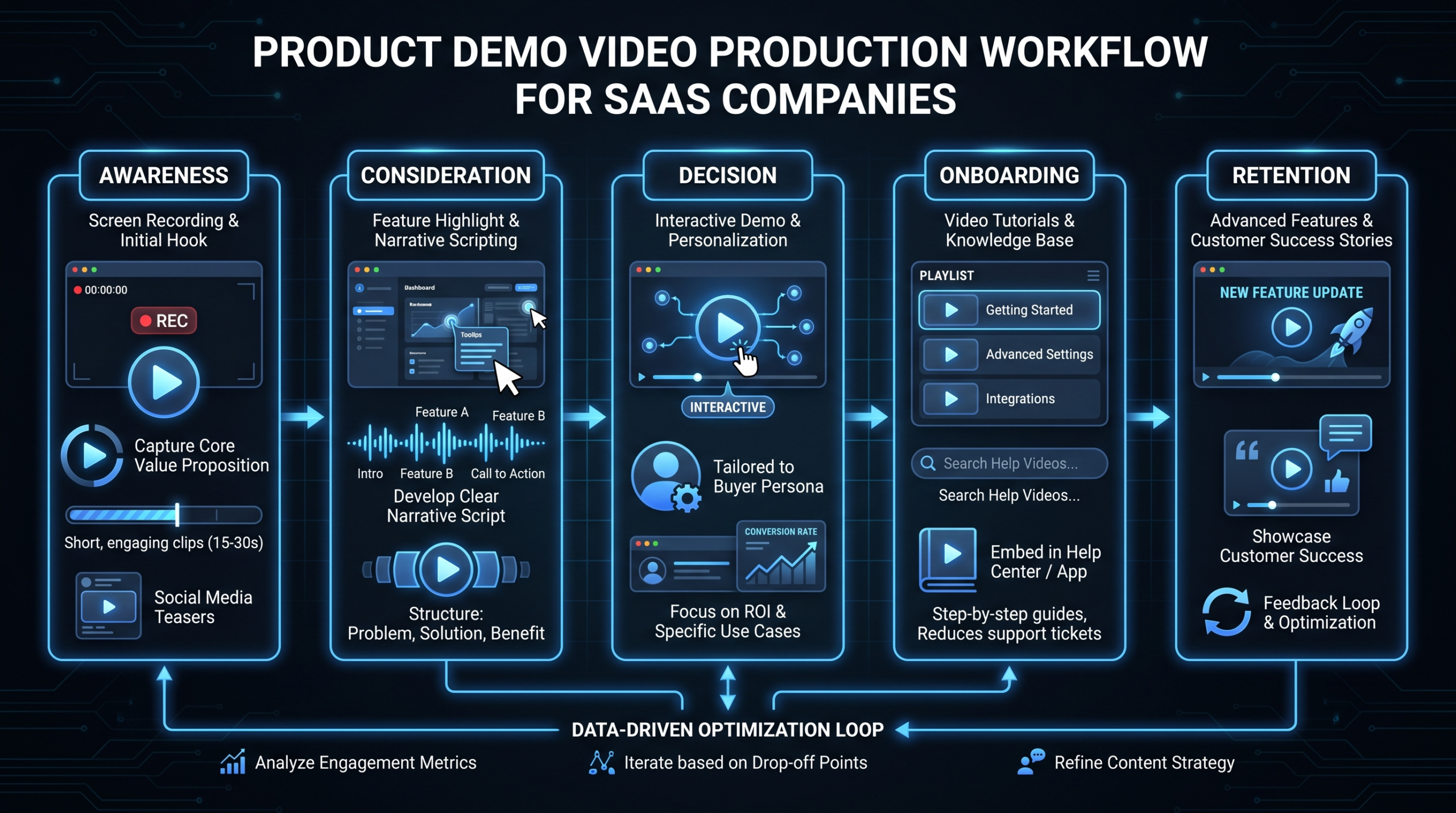
Most SaaS product demo videos are produced in three phases: pre-production (strategy, scripting, screen preparation), production (screen recording, voiceover, asset capture), and post-production (editing, motion graphics, sound design, QC).
Pre-Production
- Define the target viewer and their job-to-be-done. A demo built for a VP of Marketing will look and sound completely different from one built for a DevOps lead.
- Prepare the product environment. Use clean, realistic sample data — never real customer data. The UI should be uncluttered, with only the elements you'll feature in the demo visible. Test the recording flow end-to-end before capture.
- Write and approve the script. Get sign-off from product and sales before recording. A script change after voiceover has been recorded costs significantly more than fixing it before.
Production
- Screen recording: Record at minimum 1920×1080; 2K or higher is preferred for 4K delivery. Slow mouse movements slightly — what feels natural at your desk looks rushed on screen. Record 10–15% more footage than you think you'll need.
- Voiceover: A dedicated recording session in a quiet, treated space produces dramatically better audio than a laptop microphone in an open office. Audio quality is the variable that most affects perceived production quality.
- Supplemental footage: B-roll of team collaboration, results screens, or animated transitions between sections improve engagement and help editors bridge jump cuts in the screen recording.
Post-Production
Post-production for a demo video includes editing the screen recording to pace, syncing voiceover, adding motion graphics (callout boxes, animated arrows pointing to UI elements, lower-thirds), color grading, sound design, and rendering in multiple formats. For a complete breakdown of how professional production teams handle the full workflow, see our guide on product demo video production.
Many SaaS teams underestimate the post-production workload. A well-edited 2-minute demo video typically requires 8–15 hours of editing time to reach publishable quality, depending on complexity, motion graphics volume, and revision rounds. This is why many teams that attempt in-house production end up with technically functional but visually unpolished results that underperform against professionally produced alternatives.
DIY vs. Professional Production: When to Hire Out
The honest answer: not every demo video needs professional production. A quick feature update video recorded by a product manager and sent via Loom to existing customers is the right call — fast, authentic, cost-effective. But a video living on your homepage, running in paid campaigns, and representing your brand to every prospect who evaluates you deserves professional treatment.
DIY vs. Professional Production: Decision Guide
| Factor | DIY / Loom | Professional Production |
|---|---|---|
| Audience | Existing users, internal teams | Prospects, paid campaigns, public-facing pages |
| Shelf life | Days to weeks (changelog, update) | 6–18 months (strategic asset) |
| Motion graphics | None or basic | Callouts, animated transitions, lower-thirds |
| Audio quality | Variable (ambient noise, room echo) | Studio-quality or treated-space recording |
| Revision capacity | Re-record from scratch | Structured revision rounds, modular edits |
| Typical cost range | $0–500 (tools, time) | $3,000–15,000 per video (see VEC pricing) |
| Best for | Speed, internal use, iterative testing | Homepage hero, paid acquisition, sales enablement |
A useful rule of thumb: if the video will be seen by prospects who haven't yet qualified themselves, it should be professionally produced. If it's going to existing customers or internal audiences where the relationship already exists, DIY is often appropriate.
For teams that need consistent video output across multiple demo types — overview, feature spotlights, use-case variants — a dedicated video editing team is often more cost-effective than briefing individual projects. VEC's Growth plan at $5K/month, for example, covers the production capacity needed to maintain and refresh a full demo video library, including social cuts and landing page variants. See the how it works page for a walkthrough of how we structure ongoing demo video programs for SaaS teams.
Distribution and Placement
A great demo video that lives only on a product page and gets discovered by chance is a missed opportunity. The distribution strategy should be planned before production, not after.
High-Impact Placement Locations
- Homepage above the fold: An autoplaying (muted) or click-to-play overview demo on the homepage is typically the highest-leverage placement. Visitors who watch it convert at higher rates than those who don't — though the exact lift varies significantly by product category and audience quality.
- Pricing page: Buyers on the pricing page are evaluating cost vs. value. A demo video on this page that reinforces what they get for the price reduces drop-off. Internal link: see our pricing page for an example of video-supported pricing presentation.
- Sales email sequences: A personalized or use-case-specific demo video in a follow-up email after a discovery call ("here's the workflow we discussed") is one of the highest-converting sales assets in modern B2B sales motions.
- LinkedIn organic and paid: 60–90 second demo clips with captions perform well on LinkedIn for SaaS audiences. The key is to lead with the problem in the first 3 seconds (no logo animation intros) and make the video watchable at zero volume.
- G2 / Capterra profiles: Product review platforms allow video uploads. A demo video on your profile differentiates you from competitors who only have screenshots and gives evaluators a complete picture before they read reviews.
Measuring Demo Video Performance
The metrics that matter depend on placement. For website-embedded demo videos, track watch-through rate at 25%, 50%, 75%, and 100% — a significant drop at any point reveals where the script loses the viewer. For sales-shared videos, track opens and watch time per recipient via tools like Vidyard or Loom. For paid social, cost-per-view and view-to-demo-request conversion rate are the primary metrics. For a research perspective on video engagement benchmarks, Wistia publishes engagement data across thousands of business videos that provides useful directional context.
The most important metric at the macro level is pipeline influence: are deals that included demo video engagement closing faster or at higher rates than deals without it? Most CRMs allow you to tag video-touched opportunities so you can run this comparison after 3–6 months of consistent use.
Common Product Demo Video Mistakes
These are the patterns that consistently produce underperforming demo videos, regardless of production budget:
1. Leading with the Product, Not the Problem
Starting a demo video with your company logo, founding story, or feature list is the fastest path to viewer drop-off. Prospects don't care who you are until they care about what you solve. Open with their problem — stated in terms they recognize — before showing a single screen.
2. Trying to Show Everything
A 6-minute overview demo that covers 40 features is not a demo — it's a user manual on video. Viewers disengage when they can't determine relevance. Identify the 3–5 features that most directly solve the problems your target buyer cares about, and show only those. Everything else gets its own feature spotlight video.
3. Using Live or Messy Product Data
Demo videos recorded against a cluttered interface — notification badges, half-completed projects, test account names — look unprofessional and distract from the features you're showcasing. Build a clean demo environment with realistic but curated sample data before every recording session.
4. Neglecting Audio Quality
Viewers tolerate imperfect visuals more readily than poor audio. A slightly blurry screen recording with clean, clear voiceover will outperform a 4K recording with room echo and background noise. If you're producing demo videos at volume, a basic recording setup — condenser microphone, pop filter, treated room — is the single highest-ROI investment you can make. For teams that outsource audio and editing, see what's included in professional video editing services.
5. Skipping the Call to Action
A demo video with no clear CTA at the end leaves money on the table. Every demo video should close with one specific action — book a call, start a trial, download the use-case guide. Make it easy: on-screen text, a URL in the description, and (on your website) a CTA button directly below the video player.
6. Publishing Once and Never Updating
Product interfaces change. Pricing changes. Competitive context changes. A demo video built on a UI that looked like your product 18 months ago actively undermines trust with prospects who compare the video to the live product and notice the discrepancy. Schedule a quarterly review of every demo asset in your library and flag any that show a materially changed UI for re-recording. For strategic guidance on keeping your video library current, HubSpot's video marketing resource hub covers content lifecycle planning in depth.
Frequently Asked Questions
What is a product demo video exactly?
A product demo video shows your software or product functioning in real time, walking a viewer through key features and the outcomes they create. It sits between a brand explainer (concept-level) and a tutorial (training-level) — its primary job is to answer "how does this actually work?" in a way that builds qualified interest and moves a prospect toward a buying decision.
How long should a product demo video be?
Length depends on where the video lives and who it's for. Homepage overview demos typically perform best at 60–120 seconds — long enough to demonstrate real value, short enough to hold attention before a bounce. Sales leave-behind walkthroughs can run 3–6 minutes for a qualified prospect who has already expressed interest. Feature spotlights should stay under 90 seconds. The key principle: never exceed the length you've earned with value. If the viewer isn't gaining something new every 30 seconds, the video is too long.
What's the difference between a demo video and an explainer video?
An explainer video describes the problem and positions your product as the solution, usually with animation and without showing the actual product interface. A product demo video shows the product working. Explainers are better for top-of-funnel awareness; demo videos are better for middle- and bottom-of-funnel evaluation. Most SaaS companies need both: the explainer to introduce the category, the demo to close the comprehension gap.
How much does a professional product demo video cost?
A single professionally produced SaaS demo video typically runs $2,000–$8,000 at project rates, depending on length, motion graphics complexity, and revision rounds. Teams that need a library of demo assets — overview, use-case variants, feature spotlights — commonly find monthly retainer arrangements more cost-effective than per-project pricing. VEC's plans start at $5K/month and are structured specifically for ongoing demo and SaaS video production at scale. See our pricing page for current figures.
Should I produce demo videos in-house or work with a video production team?
For internal use, feature updates, and rapid-iteration content, in-house tools like Loom work fine. For homepage heroes, paid acquisition campaigns, and sales enablement assets that represent your brand to prospects, professional production is worth the investment — the quality gap is visible and affects conversion. The practical middle ground for most Series A–C SaaS teams is to handle first-draft screen recordings internally and work with a dedicated editing team to turn those recordings into polished, branded assets. See how to outsource video editing for a framework on splitting the work effectively.
Need a Demo Video Library That Actually Converts?
VEC builds and maintains ongoing demo video programs for Series A–C SaaS companies — overview demos, feature spotlights, use-case variants, and social cuts — all from a dedicated team that learns your product and brand.
Book a Free Strategy Call See How It Works