Explaining AI Products on Video: A Framework
TL;DR
- AI products fail on video because founders lead with the model, not the outcome. Start with the problem your buyer already feels.
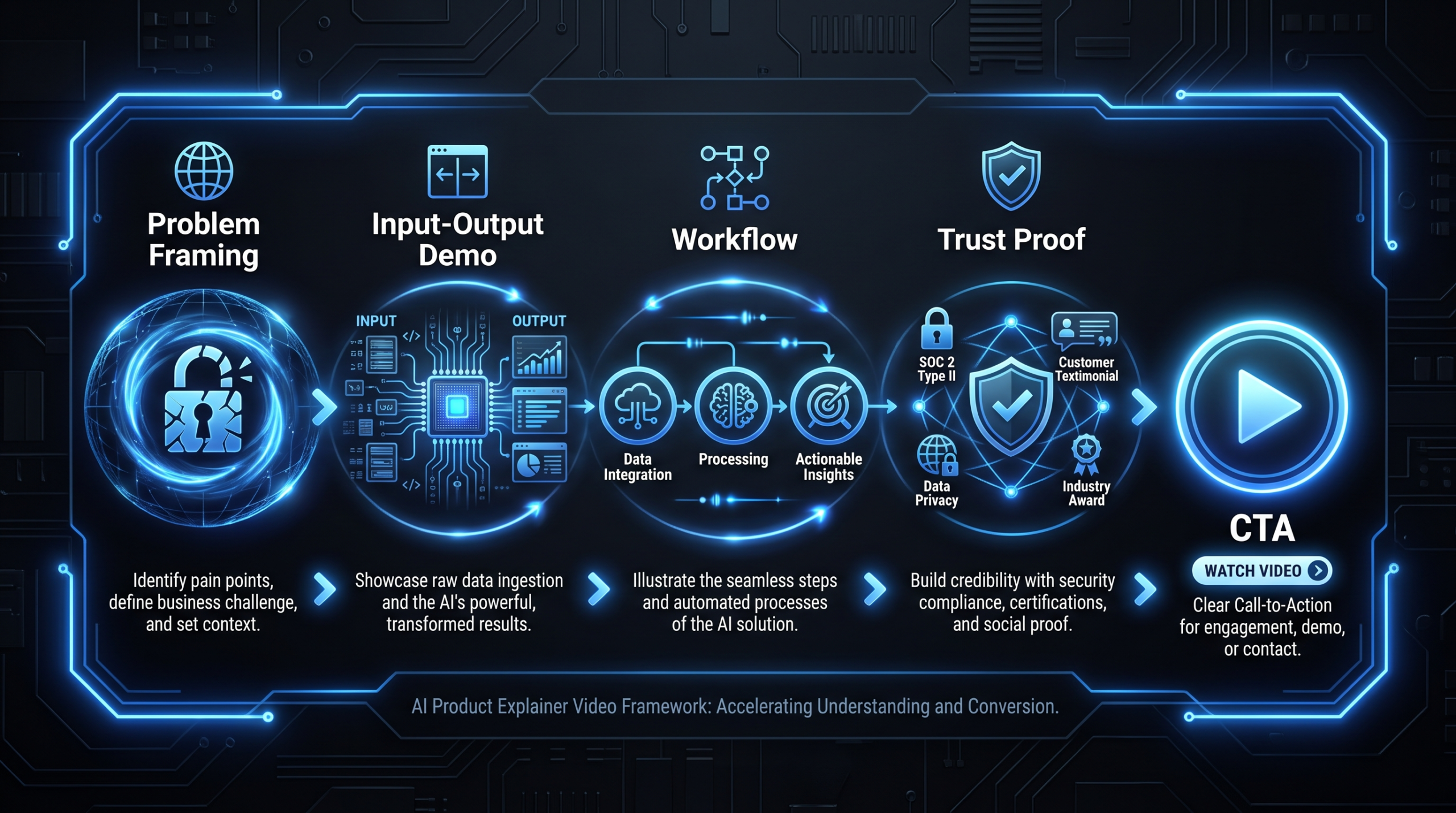
- Use a 5-video sequence: problem framing → input/output demo → workflow walkthrough → trust proof → CTA video.
- Show transformations, not dashboards. Input (messy state) → Output (clean result) is the most persuasive structure available.
- Discipline around claims is non-negotiable: hedge accuracy numbers, cite what you can verify, and never promise outcomes you cannot demonstrate.
- Storyboard before you script. Define the visual evidence first; words fill the gaps.
Table of Contents
- Why AI Products Need a Different Video Playbook
- The 5-Video Framework for AI Product Marketing
- Problem Framing: Lead With Pain, Not Technology
- Input/Output Demos: Show the Transformation
- Workflow Walkthroughs: Make Integration Tangible
- Trust Proof: Evidence Over Claims
- Scripts, Storyboards, and Claim Discipline
- CTA Strategy: What Comes After the Video
- Common AI Video Mistakes and How to Fix Them
- FAQ
Why AI Products Need a Different Video Playbook
Most product explainer video frameworks were built for SaaS products with visible UIs and predictable workflows. Click button, thing happens, repeat. AI products break this model in three fundamental ways — and each break requires a different video strategy to fix.
The invisible engine problem. The core of your AI product — the model, the embeddings, the inference layer — is invisible to the user. You cannot screen-record an LLM. You can only show what it produces. This forces you to design your videos around outputs and transformations rather than features and flows.
The trust deficit problem. Buyers in 2026 have seen enough AI demos to be appropriately skeptical. They have watched products that looked impressive in a demo underperform in production. Your video needs to earn trust before it asks for action — which means evidence-first structure, not claim-first narration.
The abstraction problem. AI products often describe themselves in abstract terms: "intelligent automation," "real-time insights," "AI-powered workflows." These phrases communicate nothing to a busy VP of Marketing evaluating five vendors simultaneously. Your video has to translate abstraction into a concrete before-and-after that the buyer immediately recognizes as their own situation.
The frameworks below are built for AI-native products at Series A through Series C — companies that have built something genuinely useful but are struggling to communicate it on video without either over-claiming or boring the prospect into closing the tab.
The 5-Video Framework for AI Product Marketing
A single explainer video is rarely enough. AI products have multiple audiences (technical evaluators, business buyers, end users) and multiple funnel stages. The framework below maps five video types to buyer intent and production priority — so you build in the right order and deploy each piece where it earns the most.
AI Product Video Framework: Type, Intent, Length, Priority
| Video Type | Primary Intent | Recommended Length | Funnel Stage | Build Priority |
|---|---|---|---|---|
| Problem Framing | Create recognition: "that's my problem" | 60–90 sec | Top of funnel / awareness | Start here |
| Input/Output Demo | Show the transformation, remove skepticism | 90–180 sec | Mid-funnel / consideration | Second |
| Workflow Walkthrough | Answer "how does this fit into what we already do?" | 3–5 min | Mid/bottom of funnel | Third |
| Trust Proof | Social proof + evidence; handle evaluation objections | 60–120 sec | Bottom of funnel / evaluation | Fourth |
| CTA / Next Step | Drive a specific action: trial, demo, call | 15–30 sec | Conversion | Repurpose from above |
Most AI startups produce one generic "what we do" video and expect it to carry all five jobs. It cannot. The problem framing video that works on LinkedIn will bore someone who already understands the problem and needs to see integration depth. Build the sequence; deploy each piece where it belongs.
Problem Framing: Lead With Pain, Not Technology
The most effective first 10 seconds of an AI product video describes something the buyer does every day that wastes their time — without mentioning AI at all. The technology is the solution; the video opens with the problem.
The Structure That Works
- Open on the pain state. Not "our AI automates X" — instead, show the manual process: the spreadsheet with 400 rows, the analyst copying data between tabs, the sales rep re-entering the same information in three systems. Make the viewer feel the friction before you show the escape.
- Name the cost. Time lost, errors introduced, decisions delayed. Use observable language: "teams typically spend hours per week on tasks like this" is relatable and honest, not a fabricated statistic.
- Introduce the product as the answer, not the hero. The buyer is the hero. Your product is the tool that lets them stop doing the painful thing. Keep product branding minimal in the first 30 seconds.
Common Mistakes in Problem Framing Videos
- Leading with the product name. "Acme AI helps teams…" opens with you, not the buyer. Open with the buyer's problem instead.
- Abstract pain statements. "Companies struggle with data management" is too vague to land. "Your ops team re-keys the same transaction data into Salesforce, NetSuite, and your data warehouse every morning" is specific and immediately recognizable.
- Skipping the problem to get to features. A 60-second problem framing video should spend 40 seconds on the problem. Many teams invert this ratio and spend 50 seconds on features before the viewer has cared enough to listen.
The problem framing video earns the right to show the demo. If the buyer does not feel their own situation in the first 15 seconds, the demo video never gets played.
Input/Output Demos: Show the Transformation
The input/output demo is the highest-leverage video format for AI products. It answers the most important buyer question — "does this actually work?" — through direct visual demonstration rather than claim.
The Input → Output Structure
Every effective AI demo video shows two things in sequence: the input state (raw, messy, incomplete) and the output state (clean, structured, useful). The distance between those two states is your value proposition. The video's only job is to make that distance visible and undeniable.
Structure your demo as follows:
- Show the input. Raw data, unstructured text, uploaded document, voice recording, screenshot — whatever the user provides. Make it look authentically messy, not staged with suspiciously clean sample data.
- Show the process briefly. One to two seconds of the system working. Do not linger here — this is the least interesting part of the video. A brief animation or progress indicator is fine; a 30-second loading screen is not.
- Reveal the output. Spend 60–70% of the video here. Show the structured result, the generated document, the classified data, the drafted email — whatever your product produces. Zoom in. Make it readable. Annotate what matters.
- Show what the user does next. The output is only valuable if the user can act on it. Show one quick downstream action: the report exported, the Slack message sent, the task created in their project management tool.
Demo Video Production Notes
- Use real data, not placeholder text. Placeholder text in a demo signals the product is not ready for real inputs.
- If your actual product UI needs polish, consider a screen recording cleaned up with motion graphics overlays — highlight boxes, zoom effects, animated callouts — to direct attention without hiding the real product.
- Audio matters more than most teams realize. Clean voiceover with a confident, measured pace outperforms text-only overlays for retention throughout the demo.
- Keep the demo under 3 minutes. Beyond that, attention drops sharply for consideration-stage viewers who have not yet committed to evaluating your product.
For a deeper look at structuring demos specifically for SaaS, see our guide on product demo video production. The same principles apply to AI products, with the additional constraint that you must manage expectations around what the AI can and cannot do consistently.
Workflow Walkthroughs: Make Integration Tangible
Workflow walkthroughs answer the question that kills AI deals in the evaluation stage: "How does this actually fit into what we already do?" This is the video format that moves evaluators from interested to advancing in the buying process.
What a Workflow Walkthrough Covers
A workflow walkthrough is not a feature tour. It is a narrative of a real use case from trigger to resolution, showing your product in context alongside the tools the buyer already uses every day.
- Start with the trigger. What happens before a user opens your product? A new lead in Salesforce, an uploaded contract, a meeting ending, a support ticket — show the trigger event that initiates the workflow.
- Show the integration points. Your product probably connects to 3–5 tools. Show those connections explicitly. "When the contract uploads to Drive, it automatically appears here" is more convincing than "we integrate with 200+ tools."
- Walk the core workflow at real speed. Do not fast-forward through the important steps. Let the viewer track the actual time — if the workflow takes 45 seconds from trigger to output, show all 45 seconds. Real time builds credibility.
- Name the stakeholders. "This is what the analyst sees. Here is what the manager sees when they log in for approval." Showing multi-stakeholder views helps the buyer mentally map your product onto their org chart.
Length and Format Guidance
Workflow walkthroughs should run 3–5 minutes. Shorter and you cannot cover enough context to be convincing. Longer and you are asking too much of a mid-funnel buyer who is still making a shortlisting decision. For complex products with multiple distinct use cases, produce one walkthrough per use case rather than one omnibus walkthrough that tries to cover everything at once.
Workflow Walkthrough vs. Feature Tour: Key Differences
| Dimension | Workflow Walkthrough | Feature Tour |
|---|---|---|
| Narrative structure | Story: trigger → workflow → outcome | List: here is feature A, here is feature B |
| Focus | The user's task and real-world context | The product's capabilities in isolation |
| Integration coverage | Shows the ecosystem around the product | Usually stays inside the product UI |
| Best funnel stage | Mid-to-bottom — evaluation and shortlisting | Mid-funnel — initial exploration |
| Objection it handles | "How does this fit into what we do?" | "What can this product do?" |
| Ideal length | 3–5 minutes | 90–180 seconds |
Trust Proof: Evidence Over Claims
Trust proof videos are the most underproduced asset in AI startup video libraries. Most teams produce one customer testimonial and call the category done. But for AI products specifically — where buyer skepticism is structurally high after years of overpromised demos — you need a richer evidence portfolio.
Four Evidence Types That Actually Reduce Skepticism
- Customer testimonials with specifics. "We saved time" is not a useful testimonial. "Our team was spending roughly a day a week on this task; now it takes about 20 minutes" is. Script your customer interviews to draw out specifics, and let those specifics drive the video — not the interviewer's questions or the customer's general praise.
- Before/after comparisons with real assets. Show an actual document your customer processed — before and after. Blur any sensitive fields, but keep the structure real. Nothing is more convincing than seeing actual output quality from your product at work.
- Live demo with edge cases. Most AI demos show cherry-picked inputs. A trust proof video that shows a difficult edge case — messy input, ambiguous instruction, partial data — and still produces a useful output is far more credible than a perfect demo with perfect data.
- Accuracy and limitation disclosure. Counterintuitively, being specific about what your AI does not do well builds more trust than a claim of universal accuracy. "Our model handles English-language contracts reliably; multilingual documents are still in beta" tells the buyer you have tested it honestly and you are not hiding failure modes.
Claim Discipline for AI Products
This is the area where AI startups create the most long-term credibility damage through video. A few non-negotiable rules:
- Never state an accuracy percentage you cannot defend. "98% accuracy" without linking to a methodology invites the first enterprise buyer to test you and find 87% on their own data — and then they tell five peers about the gap.
- Hedge time-savings claims appropriately. "Teams commonly report saving several hours per week" is honest and relatable. "Saves 8 hours per week" is a specific claim that requires data you almost certainly do not have at scale across your customer base.
- Be clear about what "AI" means in your product. LLM wrapper, fine-tuned model, custom trained on proprietary data — these distinctions matter to technical evaluators. Vague AI claims without specifics read as marketing puffery to the people running your POC.
- Show real outputs from real use cases, not simulated data. If you cannot show a real customer's output for confidentiality reasons, build a synthetic but realistic example and say so on screen. Disclosure beats fabrication in every buying scenario.
Resources like Wistia's video marketing learning center and the annual Wyzowl State of Video Marketing report offer useful benchmarks on video engagement and trust-building content structures — without the fabrication risk of vaguely cited AI market statistics.
Scripts, Storyboards, and Claim Discipline
For AI product videos, the storyboard comes before the script — not after. This is the opposite of how most marketing teams approach video production, and the inversion matters significantly for output quality.
Why Storyboard First
When you write the script first, you build the video around what you want to say. When you storyboard first, you build it around what you want to show. For AI products — where the visual evidence is everything — the latter produces better videos because it forces you to identify the specific frames that will do the persuasive work before you layer narration on top.
Your storyboard should answer these questions for every scene before you write a single word of narration:
- What is on screen right now, and what is the viewer's eye drawn to?
- What does this scene prove about the product?
- What would a skeptical buyer see in this frame that builds or undermines trust?
Script Structure for AI Product Explainers
Once the storyboard is locked, structure your script using this proven sequence:
- Situation (10–15%). Set the scene — who is the user and what are they trying to accomplish? One sentence in the voiceover is enough. The visual does the rest.
- Complication (15–20%). What is getting in the way? Describe it in the user's language, not the product's. This is where the viewer decides whether this video is relevant to their life.
- Resolution (50–60%). The demo. Show, do not tell. Your voiceover narrates what the viewer is seeing but does not restate it verbatim — add context and implication rather than redundant description.
- Outcome (10–15%). What is the user's situation now? This is the after state — the life after the problem is solved. Keep it concrete and specific rather than abstract and aspirational.
- CTA (5%). One action, stated simply. Not four options competing for the same click.
Claim Review Checklist Before Production
Before going into production on any AI product video, every claim in the script should pass this filter:
- Is this claim based on data we actually have, or plausible-sounding extrapolation?
- If a journalist or enterprise buyer asked us to defend this claim on the record, could we?
- Is this claim hedged appropriately — "commonly" / "typically" / "in our testing" — or stated as universal fact?
- Does any claim require a caveat that we have omitted for brevity? If so, the omission is the problem to fix.
Teams working with VEC run this review as part of the pre-production brief sign-off. It adds roughly a day to the process and eliminates the risk of publishing a video that creates legal or credibility problems six months later. For a full view of how VEC structures the SaaS video production process — from brief to delivery — see our dedicated guide.
CTA Strategy: What Comes After the Video
The CTA in an AI product video is not an afterthought — it is a strategic decision that determines whether the video produces pipeline or produces views with no downstream action.
Match the CTA to the Video Type and Buyer Stage
- Problem framing video → soft CTA. "See how [Product] handles this" with a link to the demo video or a features page. You have not yet earned the trial ask from a viewer who is only just recognizing the problem.
- Input/output demo → medium CTA. "Try it with your own data" (trial) or "See a live demo" (demo request). The buyer has seen the product work — a low-friction next step is now appropriate.
- Workflow walkthrough → qualified CTA. "Talk to a technical expert" or "Get a custom demo for your stack." The buyer who watches a full workflow walkthrough is in evaluation mode — they are ready for a conversation, not another video.
- Trust proof / testimonial → social share CTA. "Share with your team" is an underused CTA for AI products. Enterprise buying is a team sport — the person who watched your testimonial video is often not the final decision-maker, and enabling them to forward it is a high-leverage action.
Video CTA Mechanics That Work
- One CTA per video. Two CTAs split attention and typically produce fewer conversions than one focused ask.
- State the CTA in the voiceover and on screen simultaneously. Relying solely on on-screen text loses viewers whose attention drifted momentarily during the final seconds.
- End cards on hosted videos (Wistia, Vidyard, YouTube) should appear with 10–15 seconds left — not at the very end when most viewers have already navigated away or started clicking elsewhere.
- For email and LinkedIn distribution, embed the video as a GIF or thumbnail-with-play-button linking to a landing page. Do not autoplay with sound in contexts where the buyer is not expecting it.
Common AI Video Mistakes and How to Fix Them
These are the patterns that appear most often in AI product video libraries — and the specific fixes that work.
- Mistake: Showing the model, not the outcome. The model is infrastructure. The viewer cares about what they can do, not what runs underneath. Fix: restructure every demo around the user action and the resulting output, not around model architecture or technical specifications.
- Mistake: Using AI jargon without definitions. "Semantic search," "retrieval-augmented generation," "inference pipeline" — these phrases mean nothing to the VP of Marketing you are trying to sell. Fix: replace jargon with outcomes in every voiceover line, and relegate technical terminology to documentation or a separate technical deep-dive video produced for a different audience.
- Mistake: One video for all audiences. The technical evaluator needs depth; the economic buyer needs ROI framing; the end user needs workflow fit. A single video cannot serve all three effectively. Fix: produce a video per audience segment, even if the underlying demo footage is shared across them.
- Mistake: Demo with perfectly clean data. Staged demos with spotless, well-formatted sample inputs signal to experienced buyers that the product may not handle their messy reality. Fix: use realistic sample data — inconsistently formatted contracts, noisy audio, partially complete forms — and show the AI handling it gracefully.
- Mistake: Ignoring the comparison question. Buyers in evaluation mode are comparing your product to alternatives. A video that does not acknowledge this looks like it is avoiding the question. Fix: include a brief comparison table or "how we are different" segment in the workflow walkthrough to pre-empt the question on your terms.
For a broader view of what makes video programs succeed at scale, see what is included in a professional video editing engagement — the production standards that distinguish enterprise-grade outputs from startup DIY. If you are evaluating build-vs-buy for your video program, the explainer video cost breakdown walks through the full cost picture from first brief to final file.
VEC works with AI-native SaaS companies at Series A through Series C to build video libraries that carry the full 5-video framework — from problem framing through trust proof — with dedicated senior editors who stay on your account and learn your product over time. Plans start at $5K/month. See how it works.
Frequently Asked Questions
How long should an AI product explainer video be?
It depends on the video's job in the funnel. A top-of-funnel problem framing video should be 60–90 seconds — long enough to establish the problem clearly, short enough to hold attention before the viewer has committed to learning more. Mid-funnel input/output demos work best at 90–180 seconds. Workflow walkthroughs for evaluation-stage buyers can run 3–5 minutes because the viewer is already engaged and needs depth to make a shortlisting decision.
Should I show the AI model itself or just the results?
Show the results. The model is infrastructure — what matters to buyers is what the product produces, not what runs underneath. If your model architecture is a genuine differentiator (for example, fine-tuned on domain-specific data with a verifiable accuracy advantage), mention it briefly in narration and link to technical documentation. Spending video time on model diagrams is almost always a mistake for a business-buyer audience.
What is the biggest mistake AI companies make in product videos?
Leading with the technology instead of the buyer's problem. AI product videos that open with "our proprietary model" or "powered by large language models" immediately signal that the company is more excited about its own tech than about the buyer's pain. The most effective AI product videos spend their first 30 seconds entirely on the problem — no product branding, no technology mention — before introducing the solution as the natural answer to what just aired.
How do I handle accuracy and performance claims in video?
Hedge them explicitly and show your work. Instead of "98% accuracy," say "in our internal testing across a representative sample of documents, accuracy consistently ran above 95% — and we publish the methodology." If you do not have that data, do not make the claim. Enterprise buyers will test your product against their own data, and overstated accuracy claims create churn and peer-to-peer reputation damage that no amount of future marketing can undo.
When should an AI startup hire a video team versus producing in-house?
Produce in-house when you are in pre-product-market-fit mode and need fast, low-cost iterations to figure out which messages land — a founder on Loom with the right story is better than a polished video with the wrong one. Bring in a professional team when you have a repeatable message, a defined ICP, and a video program that needs to scale (3 or more assets per month) or carry pipeline weight in enterprise sales cycles and conference contexts. The quality gap between DIY and professional production becomes a measurable conversion gap at scale.
Ready to Build Your AI Product Video Library?
VEC works with AI-native SaaS companies to produce the full 5-video framework — from problem framing through trust proof — with dedicated senior editors who understand your product and stay on your account. No revolving door of freelancers. No ramp-up cost every quarter.
Book a Free Strategy Call See Pricing