Onboarding Demo Videos: Cut Churn Before Day 7
TL;DR
Users who don't reach a first value moment in the opening week are significantly more likely to churn. Onboarding demo videos - placed at the right friction points in your activation flow - compress time-to-value without adding support load. This guide covers how to map video to aha-moments, where to place it, how long it should be, and how to measure whether it's working.
Table of Contents
- Why Day 7 Is Your Retention Deadline
- Mapping Onboarding Videos to Aha-Moments
- Onboarding Video Types by User Journey Stage
- In-App Placement vs. Email Sequences
- 60-90 Second Walkthroughs vs. Full Product Tours
- Measuring Activation Lift From Onboarding Videos
- Getting Your First Onboarding Videos Produced
- FAQ
Most SaaS companies treat onboarding as an afterthought - a welcome email, a modal tour, maybe a getting-started checklist. Then they wonder why 40-60% of trial signups never convert.
The product is good enough. The positioning is clear enough. The price is competitive enough. The problem is the gap between "signed up" and "actually understood the value" - and most teams aren't doing enough to close it.
Onboarding demo videos are the highest-leverage tool for closing that gap. Not 45-minute feature walkthroughs. Not marketing overview videos repurposed as help content. Short, specific, friction-targeted video content placed exactly where users are about to give up.
This guide covers the strategy layer most SaaS content teams skip: which types of onboarding videos reduce churn, where to put them, how long they should be, and how to tell if they're working.
Why Day 7 Is Your Retention Deadline
The Churn Clock Starts at Signup
Churn is often thought of as a Month 3 or Month 6 problem - the moment someone decides to cancel. But the decision to stay is typically made in the first week, sometimes in the first session. What happens in Days 1-7 determines whether a user will ever become retained.
The mechanics are straightforward: users sign up with a specific job they want done. If they can complete that job - or at least see clearly how to - they continue. If they hit confusion and don't resolve it quickly, they move on. Most SaaS products have more than enough features to deliver value. The problem is that value is buried behind complexity, and new users don't have the patience to excavate it on their own.
Product data consistently points to the same pattern: users who reach a meaningful first-value moment within the first three sessions have dramatically higher 30-day retention than those who don't. What counts as a "first-value moment" varies by product - it might be sending a first report, connecting a data source, completing a first workflow, or achieving a measurable outcome - but the principle holds across categories.
The implication is direct: anything you can do to help users reach that first value moment faster will improve retention. Onboarding demo videos are one of the most scalable ways to do it.
What "Aha Moment" Actually Means for Retention
The "aha moment" isn't a feeling - it's a behavior. It's the first time a user completes the action that correlates most strongly with long-term retention in your product. Facebook's classic example is connecting with 10 friends in 10 days. Slack's is sending a threshold number of messages. Dropbox's was sharing a first file.
Every SaaS product has one. Yours might be: creating a first dashboard, running a first analysis, inviting a team member, or publishing a first piece of content. The problem is that getting new users to that action requires either extensive hand-holding from your CS team or a self-serve activation flow that actually works.
This is where onboarding videos earn their keep. A 90-second walkthrough showing exactly how to complete the activation action - placed at exactly the right moment in the flow - can substitute for a 30-minute onboarding call and serve every new user simultaneously, at zero marginal cost per user.
Mapping Onboarding Videos to Aha-Moments
Identifying Your Product's Activation Events
Before you can plan video content, you need to know which actions predict retention in your product. If you haven't done this analysis, start here - it's the foundation everything else builds on.
The process: pull cohort data comparing users who retained at 30 days vs. those who churned. Look at what actions the retained group completed in their first week that churned users typically didn't. Filter for actions that appear in the first 1-3 sessions, are meaningfully correlated with retention, and are learnable - meaning a video explanation could plausibly increase completion rates.
Typical activation events that surface from this analysis:
- Data connection or integration setup - users who connect their data source are far more likely to see value quickly
- First meaningful output created - running a report, generating a plan, completing a workflow
- Team member invitation - in collaborative tools, multi-seat activation dramatically improves retention
- Template or preset used - users who start from a template rather than blank state complete setup at higher rates
- First notification or alert configured - in monitoring tools, this event often predicts long-term engagement
Once you know your activation event, you can reverse-engineer the video content needed to help users reach it.
Matching Video Content to Friction Points
Not all friction is equal. Some users struggle with initial setup. Others get through setup but stall when they try to do something meaningful with the data. Others complete basic tasks but never discover the features that would make them power users.
The highest-value video content targets the drop-off point just before your activation event - the step where users most commonly abandon. You can identify this by mapping your onboarding flow in session recordings and looking for where time-on-screen spikes or where users navigate away without completing an action.
Once you know the drop-off points, you can create targeted video content for each one. This is more effective than a generic "product overview" because it addresses the specific question users have at the specific moment they have it.
A useful mental model: think of each onboarding video as answering exactly one question. "How do I connect my data source?" "How do I create my first report?" "Why would I want to set up alerts?" One question per video, short, specific, placed at the right moment. This discipline keeps your video library manageable and keeps each video's completion rate high.
Onboarding Video Types by User Journey Stage
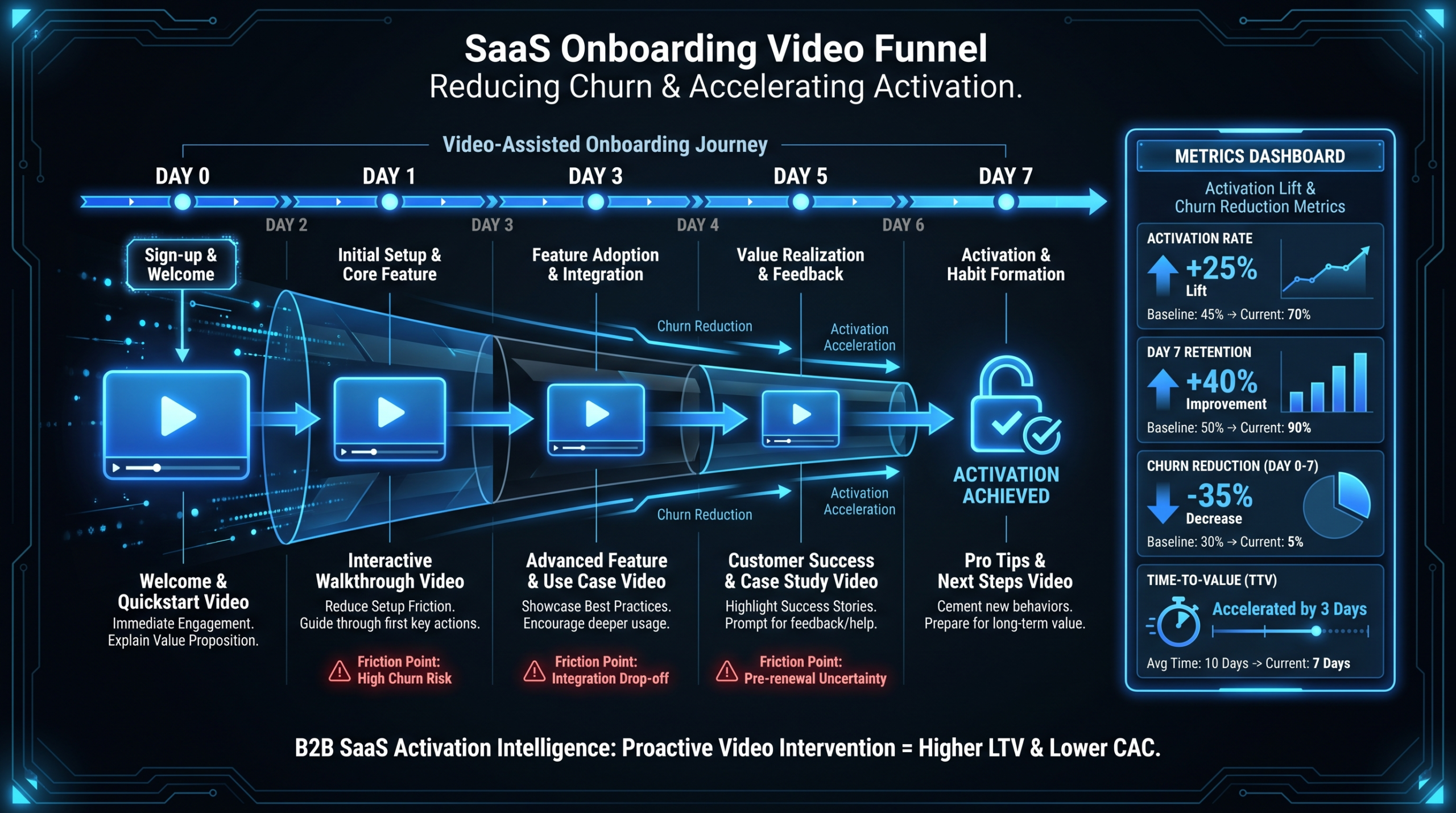
Different stages of the onboarding journey call for different video formats. Here's how the main types map to the activation funnel - this table is the starting point for planning your library:
Onboarding Video Types by User Journey Stage
| Video Type | Journey Stage | Optimal Length | Best Placement | Primary Goal |
|---|---|---|---|---|
| Welcome / Product Overview | Signup (Day 0) | 90-120s | Post-signup modal, welcome email | Set expectations, reduce blank-state anxiety |
| Setup Walkthrough | Initial Setup (Day 0-1) | 60-90s | In-app tooltip, empty state, help doc | Get users through first configuration step |
| Feature Spotlight | Exploration (Day 1-3) | 45-75s | In-app contextual trigger, drip email | Drive first meaningful feature use |
| Aha-Moment Tutorial | Activation (Day 1-5) | 90-120s | In-app overlay at friction point | Complete the activation event |
| Use-Case Demo | Value Discovery (Day 3-7) | 2-4 min | Email sequence, resource center | Show users what success looks like for their role |
| Advanced Feature Tour | Power-User Path (Day 7-30) | 3-6 min | In-app resource center, CS outreach | Expand product adoption beyond core workflow |
| Team / Collaboration Setup | Multi-Seat Expansion | 60-90s | Triggered by invite action, email | Drive team onboarding and seat expansion |
The most common mistake is investing heavily in a long product overview video - typically 3-5 minutes - and using it across all stages. A new signup doesn't have the context to make sense of a full tour. They need a narrower question answered first. Save longer-form content for users who've already activated and want to go deeper.
For SaaS teams building their first video library, start with the Setup Walkthrough and Aha-Moment Tutorial - these have the most direct impact on activation rates and target the highest-friction moments in the flow. If you're working with an external production partner, a team like VEC's product demo video specialists can develop a full library of these activation-focused assets as part of a structured content program.
In-App Placement vs. Email Sequences
Once you've created the right video content, where you place it matters as much as the content itself. The two primary channels for onboarding video delivery are in-app placement (contextual, triggered within the product) and email sequences (delivered outside the product at scheduled or behavioral intervals).
When In-App Video Wins
In-app video works best when the friction is happening in the product right now. If a user is staring at an empty state, confused by a configuration step, or hovering over a feature they don't understand - video delivered at that exact moment has maximum relevance. The user already has the context. They're looking for the answer. The video becomes the answer, not an interruption.
The mechanics: in-app video can be triggered by specific behaviors (user visits a page for the second time without completing an action, user starts but doesn't complete a setup step, user enters an empty state). This behavioral triggering means the content is contextually matched to what the user is experiencing, which tends to produce higher completion rates than undifferentiated content delivered on a schedule.
Tools like Intercom, Appcues, Pendo, and Chameleon allow you to embed video directly in onboarding flows, tooltips, and checklists. Most support embedding YouTube or Wistia URLs, so your production workflow doesn't need to change - create the video, host it, embed the URL in your in-app tool.
When Email Video Sequences Win
Email is the better channel when users need to be pulled back into the product. A user who signed up but hasn't returned after Day 1 can't be reached with in-app content - email is your only channel. A well-structured activation email sequence with video thumbnails (linking to hosted video, since most email clients don't autoplay) can re-engage users who haven't hit their activation event.
Email video sequences also work well for use-case content. Showing a user what their workflow could look like - before they've experienced it themselves - creates the pull that gets them back into the product to try it. This is aspirational rather than instructional: "here's what your team could do" rather than "here's how to do the thing you're stuck on."
The Hybrid Approach
Most high-performing onboarding flows use both channels with clear role separation. In-app video covers setup and activation moments - when the user is in the product and needs help completing a specific action. Email sequences cover re-engagement and use-case inspiration - when the user is outside the product and needs a reason to return.
In-App vs. Email: When to Use Each
| Factor | In-App Video | Email Video Sequence |
|---|---|---|
| User state | Currently active in product | Outside the product (lapsed, not returned) |
| Trigger | Behavioral (action or inaction) | Time-based or milestone-based |
| Best video type | Setup walkthrough, aha-moment tutorial | Use-case demo, welcome overview |
| Video length | 45-90 seconds | 60-180 seconds |
| Goal | Complete a specific action right now | Create intent to return to the product |
| Completion rate tendency | Higher (user is in context, intent matched) | Lower (user must click through to watch) |
| Tools used | Intercom, Appcues, Pendo, Chameleon | Customer.io, HubSpot, Klaviyo |
One practical note on email delivery: most email clients don't autoplay video. Use an animated GIF thumbnail or static image with a clear play-button overlay linking to the hosted video page. Research from Wistia's video marketing resources consistently shows that including a thumbnail meaningfully increases click-through rates versus text-only emails - the exact lift varies by audience and email type, so test with your own list before drawing conclusions.
60-90 Second Walkthroughs vs. Full Product Tours
The Case for Short Feature Walkthroughs
The instinct to show users everything is understandable but consistently counterproductive. A new user watching a 5-minute tour of your full product is in roughly the same position as someone watching a full commercial for a car before they've test-driven it - they'll retain a few highlights at best, and they won't know which feature to try first.
Short, specific walkthroughs - 60 to 90 seconds covering exactly one feature or one workflow - consistently outperform longer overview content on the activation metrics that matter: completion rate, time-to-first-action, and trial-to-paid conversion.
The reason is psychological. A 90-second video makes a single, specific ask: watch this, then try this one thing. A 5-minute tour makes no specific ask - it presents a range of information without a clear call to action. Users finish (or abandon) with a vague sense of what the product can do but no clear next step, which means they're no closer to activation than before they watched.
When Full Tours Make Sense
Full product tours have a legitimate use case: pre-purchase. A 3-5 minute demo video on your marketing site or in a sales-assisted flow helps prospects understand the full scope of the product before they decide to sign up. This is a different job than activation - it's evaluation, not onboarding.
For users who are already in the product, longer content belongs in the resource center or help library, where users who want to go deep can find it on their own terms. Don't surface it proactively during the activation window - it creates cognitive load at the moment when you need users to take action, not absorb information.
A middle-ground format that works well for complex products: a 3-4 minute "how it works" video broken into chapters. Users who want the overview can watch straight through; users who know what they're looking for can navigate directly to the relevant section. Chapter markers in YouTube or Wistia make this work. This format belongs in a resource center, not in your active onboarding flow.
Structure of an Effective 60-90 Second Walkthrough
The format that consistently works for activation-focused walkthroughs:
- 0-10 seconds: Frame the problem. "If you're trying to [achieve X], here's the fastest way to do it." Establish what the user is about to learn before showing them anything. This is the moment they decide whether to keep watching.
- 10-60 seconds: Show the action. Screen recording of the exact steps, clearly narrated. No preamble, no feature detours. Just the task, from start to finish, at a pace that's easy to follow.
- 60-75 seconds: Show the outcome. What does "done" look like? Show the result so users know what they're working toward. This gives them the mental image of success before they try it themselves.
- 75-90 seconds: Clear next action. "Now try it yourself" with a direct reference to where they need to go. Don't end on a fade-out - end on a direction.
Keep narration in first-person and direct. "Click here, then select..." rather than "Users can navigate to..." The passive voice creates distance - your goal is to feel like a colleague walking someone through something in real time.
Professional editing makes a measurable difference in completion rates even at short lengths. For SaaS video production, clean transitions, text callouts highlighting key UI elements, and polished audio keep users engaged through 90 seconds more effectively than raw screen recordings with ambient background noise.
Measuring Activation Lift From Onboarding Videos
The Metrics That Matter
The right metrics for onboarding video depend on what you're optimizing for. For activation-focused content, the primary metrics are:
- Activation rate delta: Compare the percentage of users who complete your activation event before and after adding video, or between groups who saw video vs. those who didn't. This is the headline number.
- Time to activation: How many days or sessions does it take users to hit the activation event? Video should compress this timeline - users who reach activation in 2 days rather than 5 have more runway to build habit before the trial ends.
- Support ticket deflection: Track whether tickets related to the topic covered by each video decrease after launch. A well-placed setup walkthrough should visibly reduce "how do I connect X" tickets.
- Video completion rate: This is a proxy for relevance. If users are abandoning at 30 seconds, the video isn't answering the question they have at that moment - either the placement is wrong or the framing of the first 10 seconds isn't clear enough.
- Trial-to-paid conversion: The ultimate downstream metric. Activation rate improvements should show up here within 30-60 days of rolling out video content.
A/B Testing Your Video Placement
If you're using an in-app tool like Intercom or Appcues, run A/B tests on placement before committing to a configuration. The same video can perform very differently depending on when it's triggered and how it's presented.
A video shown in a modal immediately after signup competes with the user's excitement about exploring the product; the same video shown after a user has spent 10 minutes in the product and hit the first friction point has much more relevance. Test one variable at a time: placement timing (immediate vs. delayed trigger), format (modal vs. embedded in-context tooltip), and length (90 seconds vs. 2 minutes). Aim for at least 200-300 users per variant before drawing conclusions - small sample sizes produce noisy results that will mislead your optimization.
What "Good" Looks Like (Hedged)
The honest answer is that lift varies significantly by product complexity, user sophistication, and how closely the video matches the actual friction point. That said, teams that implement well-targeted onboarding video programs commonly report patterns worth knowing:
- Activation rates typically improve when video is placed at documented friction points - the magnitude depends heavily on how significant that friction was before the video was added
- Support volume for covered topics commonly decreases after targeted video is added, though the range varies widely by product and user base
- Users who complete an onboarding video tend to reach activation faster than those who don't - though correlation and causation are difficult to separate without controlled experiments
- The highest-impact videos are almost always the ones targeting the step just before the activation event, not welcome overviews or post-activation feature tours
Be skeptical of vendor case studies claiming large, specific activation lifts - the variables are too product-specific to generalize. Run your own experiments with your own users and build your own baseline before setting targets. For methodological grounding on setting up activation measurement, Appcues' onboarding resources provide a solid framework without the inflated case study numbers.
Getting Your First Onboarding Videos Produced
Internal vs. External Production
The make-vs-buy question for onboarding video comes down to volume, quality bar, and your internal bandwidth.
Internal production using screen recording tools like Loom or Camtasia works fine for a handful of help videos, particularly if speed matters more than brand consistency. It breaks down when you need a library of 15-20 videos, consistent brand presentation across every asset, professional audio, and the ability to update content quickly as the product evolves. Managing that internally requires dedicated editorial and editing resources that most SaaS marketing teams don't have - and it pulls your team away from the strategic work they should be doing.
External production partners become cost-effective when the alternative is having your content or demand gen team spending 30-40% of their time producing and updating video assets. A dedicated video team - like those at VEC - can build a full onboarding video library covering setup walkthroughs, feature spotlights, and activation tutorials, then maintain it as your product changes, with consistent brand presentation across the full set.
For a detailed look at what different production arrangements actually cost and what to evaluate when choosing a partner, see our guide on how to outsource video editing for SaaS marketing teams.
The Minimum Viable Onboarding Video Stack
If you're starting from zero, here's the priority order for your first videos - ordered by expected impact on activation rate:
- Aha-moment tutorial: One video covering the exact steps to complete your activation event. This is the highest-leverage video you can create. Everything else builds on users reaching this moment.
- Setup walkthrough: The most common Day 0 friction point. If users are struggling to connect integrations, configure settings, or complete initial setup, a walkthrough here has immediate, measurable impact on Day 1 return rate.
- Top 3 support ticket topics: Pull your most common support tickets from the first 30 days of a user's lifecycle. Create a 60-90 second video for each. These will deflect support load and improve the experience for users who would otherwise churn quietly without ever reaching out.
- Welcome overview: After you have the above, create a 90-120 second product overview for the post-signup moment. This sets expectations and reduces the blank-state anxiety that causes some users to bail before they've even started.
- Use-case demos: Two or three 2-3 minute videos showing what successful workflows look like for your main user personas. These belong in email sequences and the resource center for users in the Day 3-7 window.
Don't try to build everything at once. The first three videos on this list cover the highest-friction moments in the onboarding journey and will produce measurable results within one cohort cycle. Build from there once you have data on what's working.
For a broader view of what a full SaaS video content library should include across the funnel - from awareness through retention - our guide on SaaS video production covers the full scope.
Frequently Asked Questions
How long should onboarding demo videos be for SaaS products?
It depends on placement and goal. For in-app activation moments - setup walkthroughs, feature tutorials placed at friction points - 60-90 seconds is the target range. This is long enough to cover one complete workflow and short enough that completion rates stay high. For use-case demos in email sequences or resource centers, 2-3 minutes is appropriate. Reserve full product tours (3-6 minutes) for pre-purchase evaluation on your marketing site, not active onboarding flows.
What's the difference between onboarding videos SaaS teams need vs. what they usually make?
Most SaaS teams make one long product overview and repurpose it everywhere. What actually reduces churn is a library of short, specific videos tied to documented friction points in the activation flow - one video per question, placed at the moment the user has that question. The difference is specificity and placement, not production quality. A perfectly produced 5-minute tour placed at the wrong moment will underperform a decent 90-second walkthrough placed at the right one.
Should onboarding videos be hosted on YouTube or a dedicated video platform like Wistia?
For in-app onboarding content, a private hosting platform like Wistia or Vidyard is typically better than YouTube. You get play data tied to individual users, you control the viewing experience (no recommended videos, no competitor ads appearing after your walkthrough ends), and you can restrict access to authenticated users. YouTube is appropriate for public-facing product demos on your marketing site. For in-app and email onboarding content, the analytics granularity from a dedicated platform is worth the cost.
How often do onboarding videos need to be updated?
Any time the feature covered by the video changes meaningfully - UI updates, workflow changes, new steps added or removed. This is chronically underestimated in planning. A library of 15-20 onboarding videos requires consistent maintenance as the product evolves. An outdated walkthrough showing the old UI actively damages trust - users follow the steps, the product doesn't match, they feel confused rather than helped. Building an update workflow into your production arrangement is as important as the initial quality.
Can onboarding demo videos replace a customer success onboarding call?
For self-serve users in lower-tier plans, well-built video content can substantially reduce dependency on 1:1 onboarding calls - particularly for the standard activation flow. They can't replace human interaction for complex implementations, enterprise accounts, or users with unusual use cases. The most efficient model is to use video to handle the standard self-serve path, freeing your CS team to focus on complex cases and high-value accounts that genuinely benefit from hands-on attention.
Ready to Build Your Onboarding Video Library?
VEC builds activation-focused onboarding video libraries for Series A-C SaaS teams - setup walkthroughs, feature tutorials, and use-case demos, maintained as your product evolves. Dedicated senior editor teams, flat monthly retainer, 90-day output guarantee.
Book a Free Strategy Call See VEC Pricing