Sales Demo vs Marketing Demo: You Need Both
TL;DR
- A marketing demo video (TOFU) attracts and qualifies prospects — it belongs on your homepage, ads, and social.
- A sales demo video (BOFU) closes deals — it goes in email sequences, deal rooms, and follow-ups.
- Most SaaS teams produce one video and use it for both. That's the root cause of weak conversion at every stage.
- Seven specific mistakes kill demo video performance. Each one has a direct, actionable fix.
- Getting both videos right typically requires dedicated post-production capacity, not just a recorded screen share.
Table of Contents
Here's the failure mode that plays out constantly at Series A-C SaaS companies: the marketing team commissions one product demo video. It's placed on the homepage, sent out in cold email sequences, attached to follow-up emails, and used as a leave-behind in the deal room. One video, everywhere.
The problem is that a prospect seeing your brand for the first time has completely different needs than a buying committee evaluating your product against two competitors. Serving both with the same asset is like giving everyone at a restaurant the same meal regardless of what they ordered.
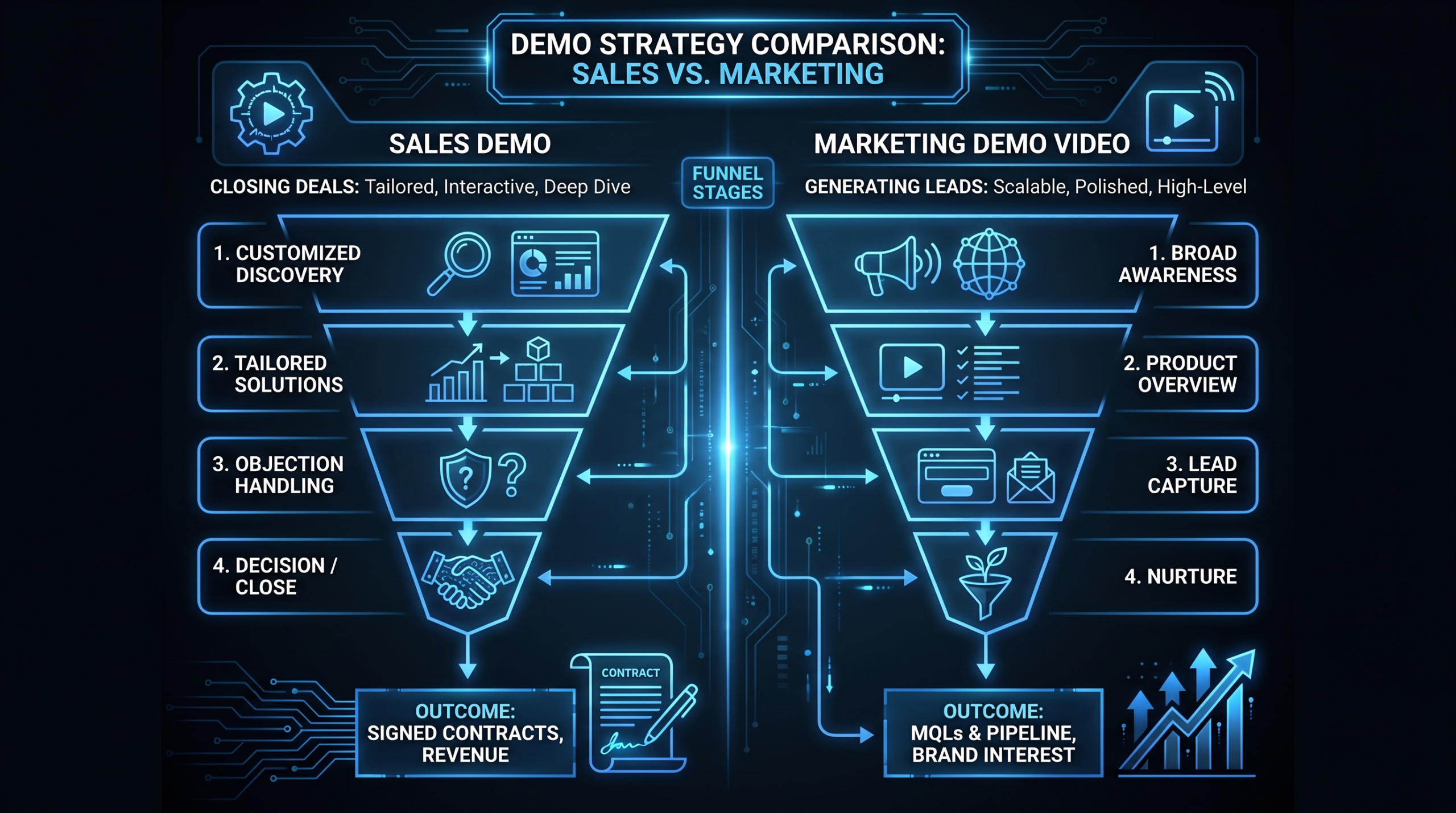
The distinction matters because demo videos operate at opposite ends of the funnel. A marketing demo video (TOFU) needs to hook a stranger in 10 seconds and make them curious enough to take a next step. A sales demo video (BOFU) needs to answer objections, address specific use cases, and move a warm prospect to a decision. The structure, length, tone, content, and call to action are fundamentally different.
This guide covers exactly what each type of demo needs to accomplish, the seven most common mistakes that kill conversion at both stages, a concrete production framework, and how to measure whether your demo videos are actually doing their job.
TOFU vs BOFU: What Each Demo Video Actually Does
Before diagnosing mistakes, you need clarity on what job each video is hired to do.
The Marketing Demo Video (TOFU)
A TOFU marketing demo video is an awareness and attraction asset. Its audience is someone who may have never heard of your product — they found you through an ad, a LinkedIn post, a search result, or a referral. They are not yet a lead. They don't have budget allocated. They're in discovery mode.
The marketing demo video's job is not to explain every feature. It's to create a strong enough signal of relevance that the viewer takes a next step — signs up for a trial, books a call, or downloads a resource. It answers one question: "Is this product worth ten more minutes of my attention?"
A well-produced TOFU demo video typically runs 60-120 seconds. It opens with the problem (not the product), shows the product solving that problem with a specific example, and closes with a frictionless CTA. It's designed for a distracted viewer who hasn't committed to learning.
The Sales Demo Video (BOFU)
A BOFU sales demo video is an evaluation and decision asset. Its audience is already aware of the problem and is actively comparing solutions. They've likely been on a discovery call, seen your pricing, and are now evaluating whether your product fits their specific context.
The sales demo video's job is to remove doubt and accelerate a decision. It should address the objections that come up most frequently in sales conversations, demonstrate the specific use cases that matter to the buying persona, and make the product feel tangible and proven. It answers: "Will this actually work for us?"
A BOFU demo video is typically 3-8 minutes — long enough to go deep, structured so viewers can navigate to the sections most relevant to them. It often includes customer proof (either quotes, metrics, or case study callouts) and ends with a specific, low-friction next step like booking a call with the account executive.
For a broader look at the SaaS video production process, see our guide on SaaS video production for B2B teams.
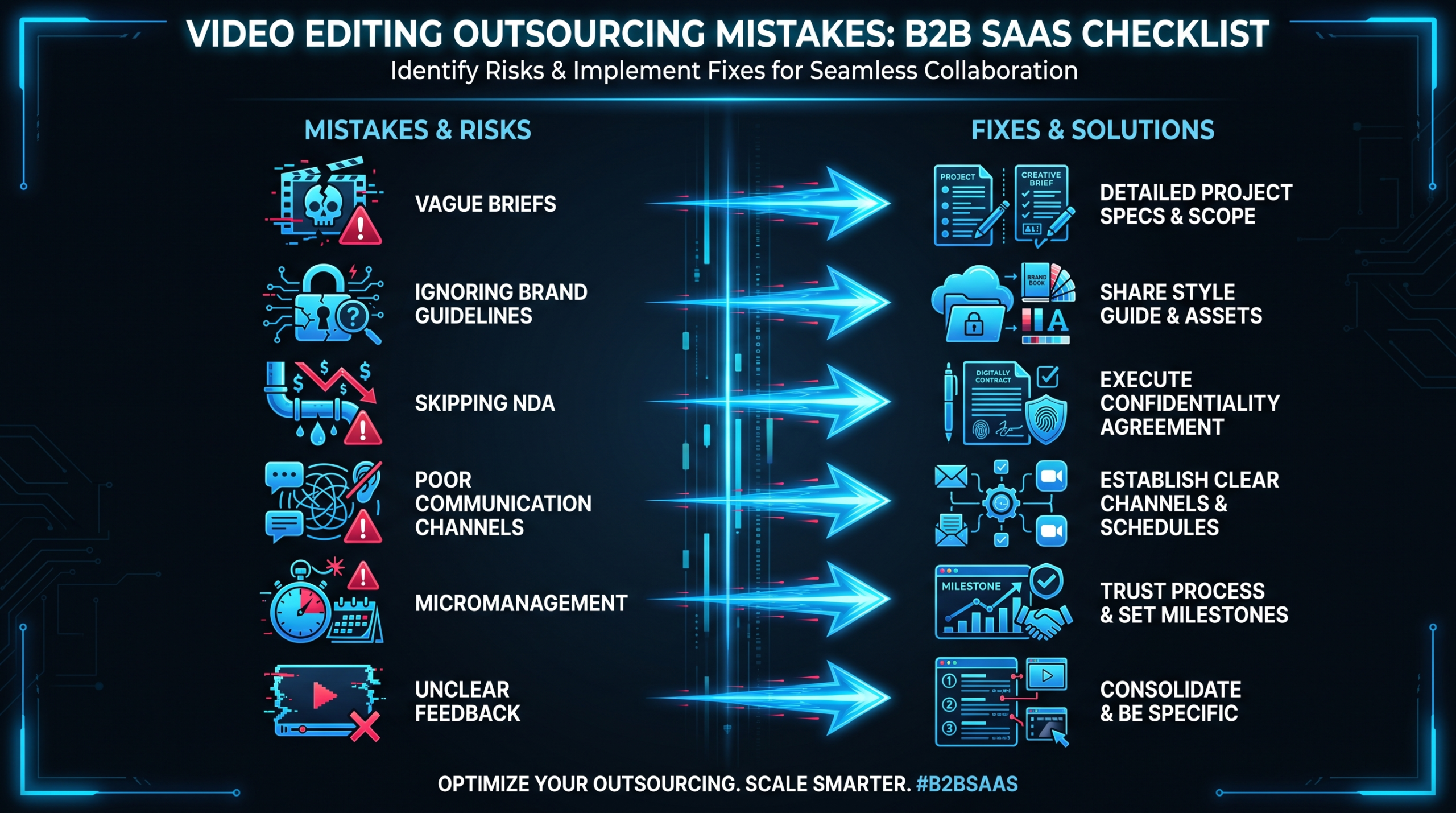
7 Mistakes That Kill Sales Demo Video Conversion
Mistake 01
Burying the Product — and the Problem
The most common TOFU mistake: opening with your company name, founding story, or a generic statement like "modern businesses need better tools." By the time you show the product, the viewer is gone. Attention at the top of funnel is borrowed, not earned.
The Fix
Open with the problem in the first 5-8 seconds. Make it specific enough that the target viewer recognizes themselves. "If your sales team is sending the same follow-up email twenty times a day…" is better than "Streamline your workflow." Show the product within the first 15 seconds — not a logo, not a tagline, the actual UI.
Mistake 02
Feature-Dump Scripts
The product team wants every feature shown. The result is a 4-minute TOFU video that walks through every menu item while a voiceover lists capabilities. No viewer who wasn't already sold cares about feature breadth before they understand value. Feature dumps also create a false equivalence problem: if your competitor has most of the same features, a feature-by-feature walkthrough makes your product look interchangeable.
The Fix
Script around outcomes, not features. "See how Acme reduced their onboarding time from 3 weeks to 4 days" is a hook. Then show the two or three features that create that outcome. In the BOFU version, feature depth is appropriate — but even there, anchor every feature section in a specific buyer pain ("for teams managing 50+ accounts, the permission system works like this…").
Mistake 03
Wrong Length at the Wrong Funnel Stage
Using a 5-minute walkthrough as your homepage hero video, or sending a 90-second teaser to a prospect who's already done a discovery call and needs to see the product in detail. Length is not a quality signal — it's a context signal. Mismatching length to context destroys engagement at both ends of the funnel.
The Fix
TOFU: 60-90 seconds for paid ads, 90-150 seconds for homepage. BOFU: 3-8 minutes, segmented by use case so viewers can navigate. If you find yourself unable to fit the TOFU version under 2 minutes, the script needs cutting — not the runtime expanded. Ruthless editing is what separates a professional demo from a product walkthrough.
Mistake 04
Weak First 10 Seconds
On social and in outbound email, your video competes with everything else in a viewer's feed or inbox. Drop-off data from platforms like Wistia consistently shows the sharpest viewer exit in the first 10-15 seconds of any video. Logos, fade-ins, branded intro animations, and "welcome" voiceovers are conversion killers in this window.
The Fix
Start with motion, a provocative question, or the problem statement — no dead air, no animation ramp-up. Design your thumbnail for immediate context. In outbound email, embed a GIF of the most visually compelling 3-second clip from your demo video with a play button overlay — it raises click-through on the actual video substantially. The first frame of a video playing auto-muted in social needs to communicate the value without sound.
Mistake 05
No CTA, or the Wrong CTA
A TOFU video that ends with "Learn more at our website" is a missed conversion opportunity. So is a BOFU video that ends with "Sign up for a free trial" when the prospect's company needs a security review and a procurement process first. Mismatched CTAs create friction even when the video itself has done its job.
The Fix
Match the CTA to the viewer's logical next step given where they are in the journey. TOFU: low-friction actions like "watch the full demo," "start a free trial," or "see pricing." BOFU: high-intent actions like "book a call with [AE name]," "see the ROI calculator," or "get a custom proposal." One CTA per video. Two CTAs (a primary and a secondary) is the maximum — more than that and viewers choose nothing.
Mistake 06
Wrong Funnel Placement
Sending a deep-dive 6-minute product tour in the first outbound email. Or putting a 90-second teaser in the deal room as the only demo asset after three qualification calls. Both represent a fundamental mismatch between the video's depth and the context it's placed in.
The Fix
Map each demo video to a specific placement and stage. Create a simple grid: TOFU video belongs on homepage, paid social, outbound sequence email 1. BOFU video belongs in email 3-5, deal room, post-discovery follow-up, procurement review packets. This sounds obvious but most teams haven't actually done it — they've put one video everywhere. Check our product demo video production guide for full placement frameworks.
Mistake 07
Ignoring Metrics Until the Video Is "Old"
Teams produce a demo video, ship it, and check performance six months later when it "feels old." By then they've burned thousands of impressions on a video that may have had a fundamental structural problem. Without early signal, there's no way to know whether a low conversion rate is a video problem, a targeting problem, or a placement problem.
The Fix
Instrument your demo videos from day one. Wistia and similar platforms give you per-video engagement graphs that show exactly where viewers drop off, rewatch, and click through. Set up measurement in the first week. If drop-off is heavy in the first 15 seconds, the open needs reworking. If viewers make it to 80% but don't click the CTA, the offer is the problem. This data makes iteration fast and decisions defensible.
The Demo Video Framework for SaaS
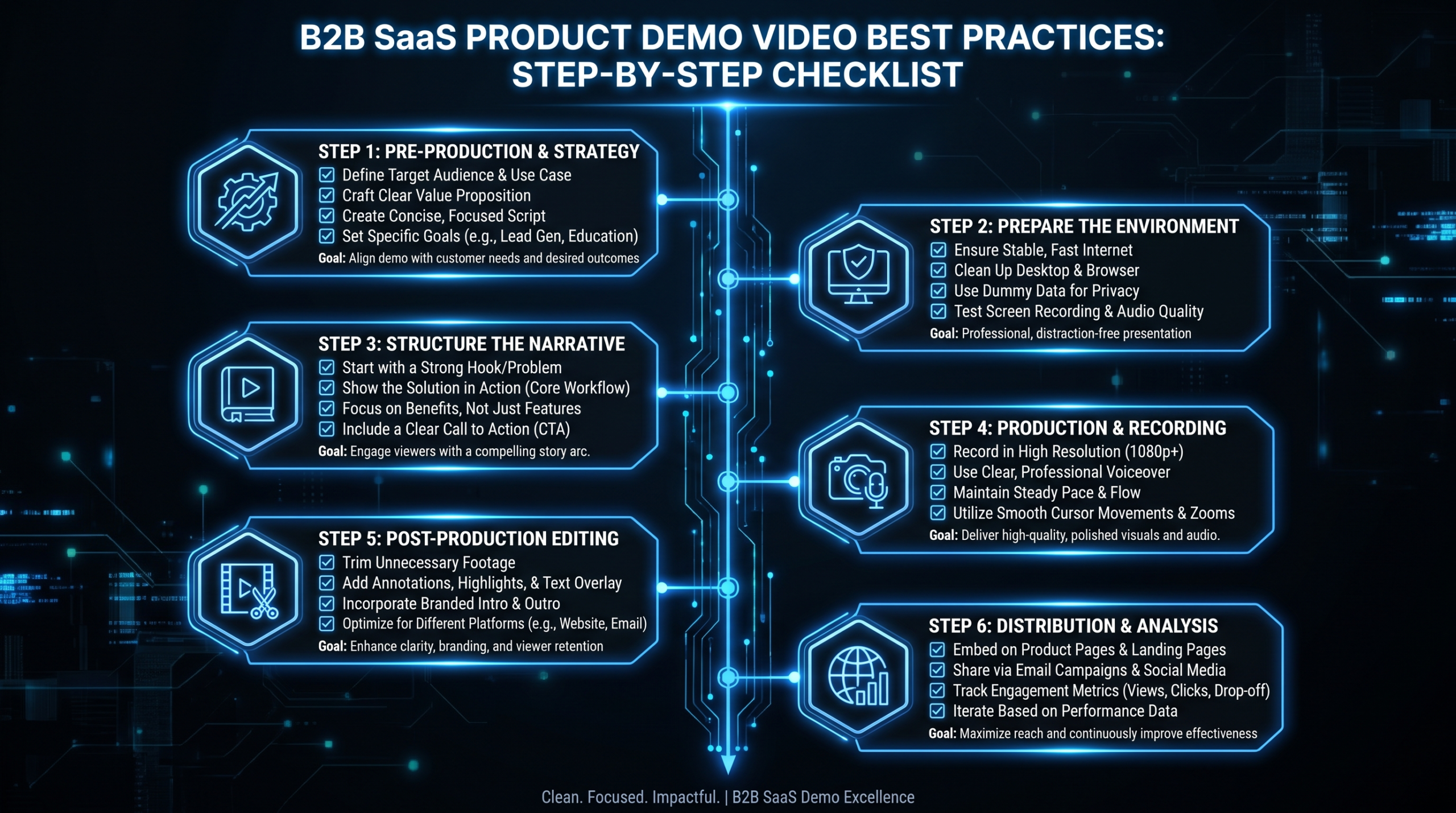
Most SaaS teams don't need a dozen demo videos. They need two core assets — a TOFU and a BOFU — produced to a high standard, placed correctly, and measured consistently. Here's the production framework:
Phase 1: Script Before Production
Every demo video failure starts upstream at the script. The most common production error is recording a walkthrough first and scripting around it later — which is why most demo videos feel like screen recordings with commentary. Script first. The script determines what footage you capture, what product states you need, and what the video will actually say.
For TOFU: the script is 150-250 words. Opening hook (5-8 sec), problem statement (10-15 sec), product reveal with a single compelling moment (30-45 sec), outcome (15-20 sec), CTA (10 sec).
For BOFU: the script is a structured outline organized by use case or buyer persona concern, not by product feature. Chapters matter here — viewers navigating a 5-minute sales demo video should be able to jump to the section relevant to their role or pain.
Phase 2: Production Quality That Matches Your Price Point
A screen recording with built-in mic audio is not a sales demo video — it's a support tutorial. At Series A and beyond, your demo video is competing with polished assets from established players who invest in post-production. This doesn't mean a Hollywood production budget. It means:
- Clean UI with real or realistic data — not empty fields or lorem ipsum
- Professional voiceover or on-camera presenter (not the PM's first take)
- Motion graphics to annotate and highlight key moments
- Sound design and music that matches the brand tone
- Captions (80%+ of B2B video is watched without sound on first view)
Teams at VEC typically approach this as a structured post-production problem: the raw screen recording and voiceover are the inputs, and the finished demo is the output after editing, motion graphics, color treatment, and sound design are applied. This process takes 15-25 hours of skilled post-production time per video — which is why screen recordings and demo videos are not the same thing.
Phase 3: Place, Measure, Iterate
Once both videos are live, establish a 30-day measurement baseline before making changes. The metrics that matter:
- TOFU: Play rate (what % of people who see the thumbnail click play), completion rate, CTA click-through rate
- BOFU: Average watch time, drop-off point, CTA click-through rate, correlation between video views and deal progression in CRM
After 30 days, you'll have enough data to prioritize the highest-leverage fix — usually either the open (if play or early drop-off is low) or the CTA (if completion is high but click-through isn't).
Side-by-Side Spec Comparison
Marketing Demo vs Sales Demo: Core Specs
| Attribute | Marketing Demo (TOFU) | Sales Demo (BOFU) |
|---|---|---|
| Primary goal | Generate curiosity, drive next step | Remove doubt, accelerate decision |
| Audience state | Problem-aware, not solution-aware | Solution-aware, evaluating options |
| Length | 60–150 seconds | 3–8 minutes |
| Feature depth | One or two key moments, outcome-led | Deep, use-case-specific walkthroughs |
| Proof required | Optional — one stat or logo wall | Essential — customer quotes, metrics |
| CTA type | Low friction (trial, pricing, full demo) | High intent (book call, get proposal) |
| Primary placement | Homepage hero, ads, outbound email 1 | Deal room, email 3-5, post-discovery |
| Navigation | Linear play | Chapters recommended |
| Production complexity | Medium — clean UI, VO, motion graphics | High — multiple segments, customer proof, branding |
Demo Video Placement by Channel
| Channel / Touchpoint | Correct Video Type | Notes |
|---|---|---|
| Homepage hero section | Marketing demo (TOFU) | Autoplay muted, 90 sec max |
| Paid social (LinkedIn, YouTube) | Marketing demo (TOFU) | Cut for 30/60 sec ad formats |
| Cold outbound email (sequence day 1) | Marketing demo (TOFU) | GIF thumbnail + link |
| Post-discovery follow-up email | Sales demo (BOFU) | Personalized intro note + video |
| Deal room / Notion / Mutual success plan | Sales demo (BOFU) | Full video + relevant chapter links |
| Pricing page | Marketing demo (TOFU) | Reinforces value at decision moment |
| Procurement / champion enablement pack | Sales demo (BOFU) | Used by champion to sell internally |
| Retargeting ads | Marketing demo (TOFU) | Remind and reinforce, 30 sec cut |
Production: What It Actually Takes to Get Both Right
The gap between a demo video that converts and one that doesn't is almost always a post-production gap, not a content gap. Most teams have the product knowledge, the use cases, and the customer stories. What they don't have is the capacity to turn raw screen recordings, talking head footage, and customer quotes into polished video assets.
What Good Post-Production Looks Like
For a TOFU marketing demo video, a skilled post-production process typically includes:
- Editing the raw footage to a tight runtime with no dead air or filler
- Adding motion graphics to highlight key UI elements (zooms, annotations, cursor emphasis)
- Voiceover sync and audio cleanup
- Intro and outro animation that reflects brand guidelines
- Captions, formatted for social viewing without sound
- Export in multiple aspect ratios (16:9 for YouTube/website, 9:16 for Reels/TikTok, 1:1 for LinkedIn feed)
For a BOFU sales demo video, add:
- Chapter markers and navigation UI
- Customer proof callouts (animated quote cards, metric highlights)
- Persona-specific segment structure (e.g., "For RevOps teams…", "For Enterprise accounts…")
- Branded lower thirds for customer names and titles
- Thumbnail design optimized for the deal room and email context
This level of production is not achievable with a freelancer pool on Upwork where a different editor handles every project. It requires a team with brand context — someone who has seen your product, knows your ICP's language, and has edited your content before. That's the model that dedicated post-production partnerships like Video Editing Company are built around: a consistent team assigned to your account, not a rotating pool of available editors.
The Build-vs-Buy Decision
At Series A-C, the typical question is: should we hire an in-house video editor, or should we use an external partner? The math usually favors an external partner if you're producing fewer than 20-25 polished videos per month.
A senior video editor in the US costs $70,000-95,000/year in salary alone, before benefits, equipment, software licenses, and management overhead. A dedicated external team at the same skill level — such as the Growth plan at VEC ($5,000/month) — provides significantly more production capacity at a lower total cost, without the hiring risk or fixed headcount. For a full breakdown of how these costs compare, see our guide to how to outsource video editing.
The exception: if video is genuinely central to your product experience (e.g., a video-first PLG product), in-house may make sense. For most SaaS marketing and sales teams, outsourcing post-production is the economically sound choice.
Checklist: Before You Produce Either Video
- Script approved by marketing and sales leadership — not just the PM
- UI populated with realistic data (real customer data with consent, or realistic dummy data)
- Voiceover talent selected and briefed on tone
- Customer proof secured (quotes, metrics, logos) for the BOFU version
- Distribution placement mapped — where does each video live?
- CTA URLs set up and tracked in analytics
- Thumbnail designed for each placement context
- Captions drafted and formatted
Metrics: How to Know If Your Demo Video Is Working
Demo videos are often treated as set-and-forget assets. A VP Marketing approves the video, it goes live, and it isn't revisited until the next annual rebrand. That's the wrong operating model.
Demo videos should be measured like landing pages: against specific conversion benchmarks, with clear ownership for iteration, on a defined review cadence. Here's how to set that up.
TOFU Video Benchmarks to Track
Play rate is the first signal. If people who land on your homepage aren't clicking play, the thumbnail and placement are the problem — not the video itself. Play rates on homepage hero videos commonly range widely depending on placement, but if fewer than 15-20% of page visitors interact with your video embed, the visibility or thumbnail needs attention.
Completion rate at 60-90 seconds is your content quality signal. If viewers are dropping off before the 50% mark, the script or pacing isn't working. If they're making it to 80% but not clicking the CTA, the offer or CTA design is the weak link.
BOFU Video Benchmarks to Track
Average watch time matters more than completion rate for longer sales demo videos. A viewer who watches 4 of 6 minutes has consumed substantial value — the metric to optimize is whether that 4-minute engagement correlates with deal progression.
Connect video engagement data to your CRM. Platforms like Vidyard and Wistia allow you to track which specific prospects watched your BOFU video and for how long. Sales teams who know a prospect watched 85% of the demo video can tailor their follow-up conversation accordingly — that's a genuine signal, not a guess.
For a deeper look at what video production investments in this category actually cost, our video editing cost per minute breakdown gives you realistic benchmarks across quality tiers.
The 30-60-90 Review Cadence
- Day 30: Baseline data. Is completion rate and CTA click-through within expected range? If play rate is low, fix placement. If drop-off is early, fix the open.
- Day 60: Optimization round. One focused change based on the 30-day data — don't change multiple variables at once.
- Day 90: Full performance review. Is the TOFU video generating qualified leads? Is the BOFU video correlating with deals progressing to proposal stage? If not, the problem may be targeting, not the video itself.
"The best demo video is the one that's been measured and improved twice — not the one that was perfect on the first take."
Frequently Asked Questions
What's the difference between a sales demo video and a marketing demo video?
A marketing demo video (TOFU) is designed for prospects who don't know your product well — it's short (60-150 seconds), outcome-focused, and built to generate curiosity and a next action. A sales demo video (BOFU) is designed for prospects actively evaluating your product — it's longer (3-8 minutes), feature-deep, structured around specific use cases, and built to remove doubt and accelerate a decision. Using the same video for both is one of the most common and most costly mistakes in SaaS video strategy.
How long should a product demo video be?
It depends entirely on where in the funnel the video will be used. For top-of-funnel (homepage, ads, outbound email): 60-150 seconds. For bottom-of-funnel (deal room, follow-up email, procurement review): 3-8 minutes, with chapters. Length is a context variable, not a quality variable. A 3-minute TOFU video will lose your audience; a 90-second BOFU video won't answer the questions evaluating buyers actually have.
What should a B2B SaaS demo video include?
For a TOFU marketing demo: a strong problem-first open (first 10 seconds), product reveal with one compelling outcome, minimal feature references (2-3 maximum), light social proof, and a single low-friction CTA. For a BOFU sales demo video: organized use-case chapters, deeper feature walkthroughs anchored to buyer pains, customer proof (quotes, metrics, logos), and a high-intent CTA matched to the buyer's likely next step. Both versions require captions, clean UI with realistic data, and professional voiceover or on-camera narration.
How do I measure whether my demo video is working?
For TOFU: track play rate (% of page visitors who click play), completion rate, and CTA click-through rate. For BOFU: track average watch time, per-chapter engagement, and whether video views in your video hosting platform (Wistia, Vidyard) correlate with deal stage progression in your CRM. Set a 30-day measurement baseline before making changes, and change only one variable at a time so you can attribute results correctly.
Can we produce a good demo video without a professional production team?
You can record a product walkthrough without a production team — but a polished demo video that converts at a professional level requires post-production: editing, motion graphics, voiceover, sound design, captions, and multi-format export. These take 15-25 hours of skilled editor time per video. At Series A and beyond, your demo video is competing with assets from companies that invest in post-production, and the quality gap is immediately visible. Most SaaS teams at this stage either hire a dedicated editor or partner with a post-production team. See our pricing page for how dedicated video production partnerships are structured.
Ready to Build Both Demo Videos the Right Way?
Video Editing Company works with Series A-C SaaS teams to produce and maintain their full demo video library — from TOFU marketing assets to BOFU sales enablement pieces. Dedicated editing teams, consistent brand standards, and a guarantee: double your video output in 90 days or month four is free.
Book a Free Strategy Call View Pricing Plans