

Most SaaS marketing teams approach video budgeting backwards. They get a number from finance — "you have $60K for video this year" — and try to make it work. By Q3, they've blown through 80% on two brand videos and a handful of product demos, leaving nothing for the webinar repurposing and social content that actually drives day-to-day pipeline.
The problem isn't the budget size. It's the allocation. A well-structured video production budget template ensures every dollar maps to a business objective, every quarter has balanced output, and you never find yourself choosing between "product launch video" and "sales enablement content" because you planned for both.
This guide gives you a complete, fill-in-the-blanks budget template designed specifically for SaaS teams — plus benchmarks, allocation frameworks, and the most common budgeting mistakes we see from companies spending $50K-$300K annually on video.
SaaS video production has unique characteristics that generic budget templates don't account for:
Every SaaS video budget should have six distinct categories. Missing any one of them leads to mid-year surprises.
Recommended allocation for SaaS teams outsourcing post-production
This is your largest line item: editing, color grading, audio mixing, subtitles, and revisions. If you're outsourcing to a dedicated editing team, this covers your retainer or per-project editing costs.
Typical post-production costs for SaaS:
| Video Type | Editing Cost | Monthly Volume | Monthly Total |
|---|---|---|---|
| YouTube (8-15 min) | $600 – $1,200 | 4 | $2,400 – $4,800 |
| Social clips (30-90s) | $100 – $300 | 8 | $800 – $2,400 |
| Product demo (3-5 min) | $1,000 – $3,000 | 2 | $2,000 – $6,000 |
| Testimonial | $800 – $2,000 | 1 | $800 – $2,000 |
| Brand video (1-3 min) | $2,000 – $5,000 | 0.5 | $1,000 – $2,500 |
Not every SaaS video requires filming. Screen recordings, animations, and stock-based content skip this cost entirely. But for testimonials, brand videos, and executive thought leadership, you'll need production days.
For most SaaS teams, 80% of video content can be produced without a film crew. Screen recordings, remote interviews, and existing footage repurposed with professional editing cover the majority of needs.
Lower thirds, intro/outro sequences, data visualizations, product UI animations, and explainer-style animations. These elements make SaaS content look polished and professional.
Video hosting (Wistia, Vidyard, Vimeo), analytics platforms, thumbnail design, subtitle services, and paid distribution. This category is often overlooked but essential for getting ROI from the content you produce.
Content strategy, creative direction, scriptwriting, and production planning. If your editing partner provides creative direction (as VEC does), this may be included in your post-production costs.
Unexpected needs: product launch moved up, competitor dropped a major campaign, CEO wants a last-minute event video. A 5% contingency buffer prevents you from robbing Q4's budget to cover Q2's surprises.
Here's a fill-in-the-blanks template for a 12-month SaaS video budget. Adjust numbers based on your company stage and video maturity.
How much should your SaaS company spend on video? Here's what we see across our client base:
| Company Stage | ARR | Annual Video Budget | % of Marketing Budget | Monthly Output |
|---|---|---|---|---|
| Seed / Pre-Series A | $0 – $2M | $12K – $36K | 5-8% | 3-6 videos |
| Series A | $2M – $10M | $36K – $96K | 6-10% | 6-12 videos |
| Series B | $10M – $50M | $96K – $240K | 8-12% | 12-20 videos |
| Series C+ | $50M – $200M | $240K – $600K | 10-15% | 20-40 videos |
| Enterprise | $200M+ | $500K – $2M+ | 8-12% | 40-80+ videos |
These numbers reflect outsourced post-production models. If you're running an in-house team, budgets are typically 30-50% higher due to salary, benefits, equipment, and software costs.
Not all videos are equal. Allocate your budget based on business impact, not creative preference.
| Funnel Stage | Video Types | Budget % | Success Metric |
|---|---|---|---|
| TOFU (Awareness) | YouTube, blog videos, thought leadership | 35% | Views, subscribers, time on site |
| MOFU (Consideration) | Demos, comparisons, webinars | 35% | Trial signups, demo requests |
| BOFU (Decision) | Testimonials, case studies, ROI proof | 20% | Pipeline influenced, close rate |
| Post-Sale | Onboarding, training, feature updates | 10% | Activation, retention, NPS |
Don't plan 12 months of video content in January and expect it to survive contact with reality. Instead, plan quarterly with an annual framework.
A quarterly cadence lets you adjust based on what's working. If YouTube is driving 3x the leads of social clips, shift Q3 budget toward more YouTube production. If a product launch moved from Q3 to Q4, reallocate production days accordingly.
For a ready-made quarterly planning tool, download our 90-Day SaaS Video Calendar Template.
Spending $30,000 on a single brand video and having nothing left for the 11 months of content that actually drives pipeline. Hero videos are important, but they shouldn't consume more than 10-15% of your annual budget.
Planning a shoot day without budgeting for editing is like buying ingredients without a chef. Post-production typically costs 1.5-2x the production budget. If your shoot day costs $5,000, budget $7,500-$10,000 for editing.
Every SaaS company has at least one "emergency" video need per quarter. Without a contingency buffer, these surprises cannibalize planned content. Always reserve 5-10% of your annual budget for unplanned needs.
One-off video projects never build momentum. The SaaS companies winning with video treat it as an ongoing program with consistent output, not a series of disconnected projects. Budget accordingly — monthly retainers, not annual project fees.
A $2,000 video with $0 distribution budget gets 200 views. The same video with $500 in LinkedIn promotion gets 20,000 views. Allocate at least 10% of your production budget to distribution.
Revision rounds cost time and money. Budget for 2-3 rounds per video. If your editing partner includes revisions in their pricing (as VEC does), you're covered. If not, add 15-20% to each video's cost for revision cycles.
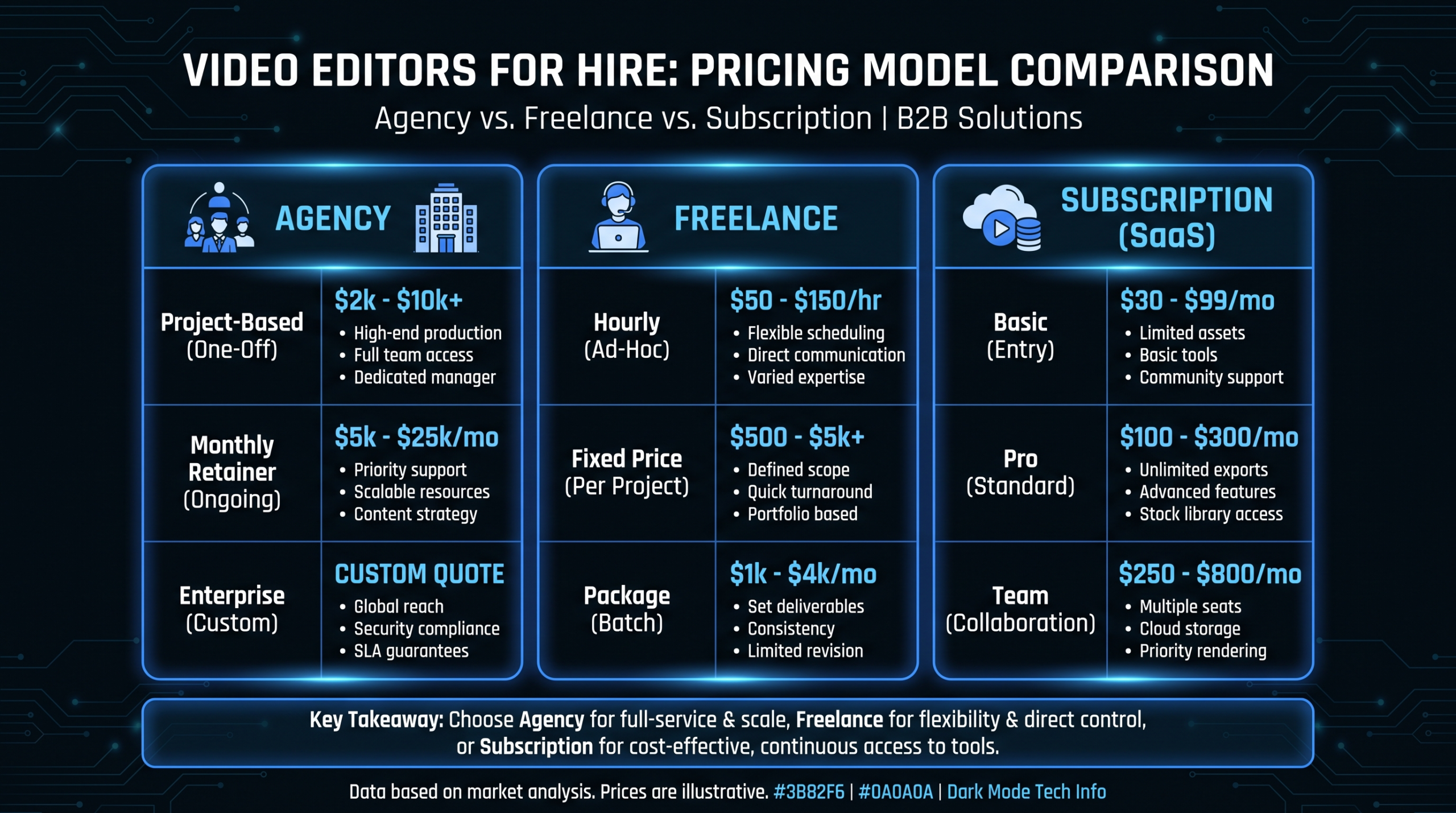
Comparing a freelancer's $500 quote against an agency's $5,000 quote without accounting for scope, quality, project management, revisions, and creative direction. Use our Budget Calculator to compare total cost of ownership across hiring models.
If your budget is locked and you need more output, these strategies stretch every dollar:
Every long-form video should generate 5-10 derivative assets. One 15-minute YouTube video becomes:
If you're paying $1,000 for a YouTube video and getting 10 assets from it, your effective cost per asset drops to $100. That's where video ROI really shines. See our Video Repurposing Matrix for the complete framework.
Film 4 testimonials in one shoot day instead of 4 separate days. Batch social clips into weekly editing sprints. Batching reduces per-unit production costs by 25-40% compared to one-off production.
Create reusable templates for recurring content: YouTube intros/outros, social clip formats, product demo frameworks. Templates reduce editing time by 30-50% for routine content, letting your editors focus on creative work.
The single highest-impact budget optimization: outsourcing editing to a dedicated team. You get more output at lower cost than in-house editing, with consistent quality and faster turnaround. Most SaaS teams save 30-50% by shifting from in-house to outsourced post-production.
Use the template in this post to build your budget, then package it with the business case framework from our guide on building a business case for video editing.
Key tips for budget approval:
Use our free Budget Calculator to model your exact video mix, compare pricing models, and build a budget your CFO will approve.
Get Your Budget Template Discuss Your Budget With Us See PricingRelated reading: